# HTTP Requests
Call external APIs from your workflow using the `HTTPRequest` action and route the process based on responses using the `CheckParameter`
condition. This pattern integrates third-party services - payment gateways, inventory systems, notification services - into your [workflow
scheme](https://docs.workflowengine.io/get-started/concepts/scheme/) without custom code. With `StoreResponse` enabled, `HTTPRequest` stores the response body only. For a
JSON object, target a scalar field through a dotted parameter path before applying a `CheckParameter` string comparison.
## Real-world scenario: purchase workflow
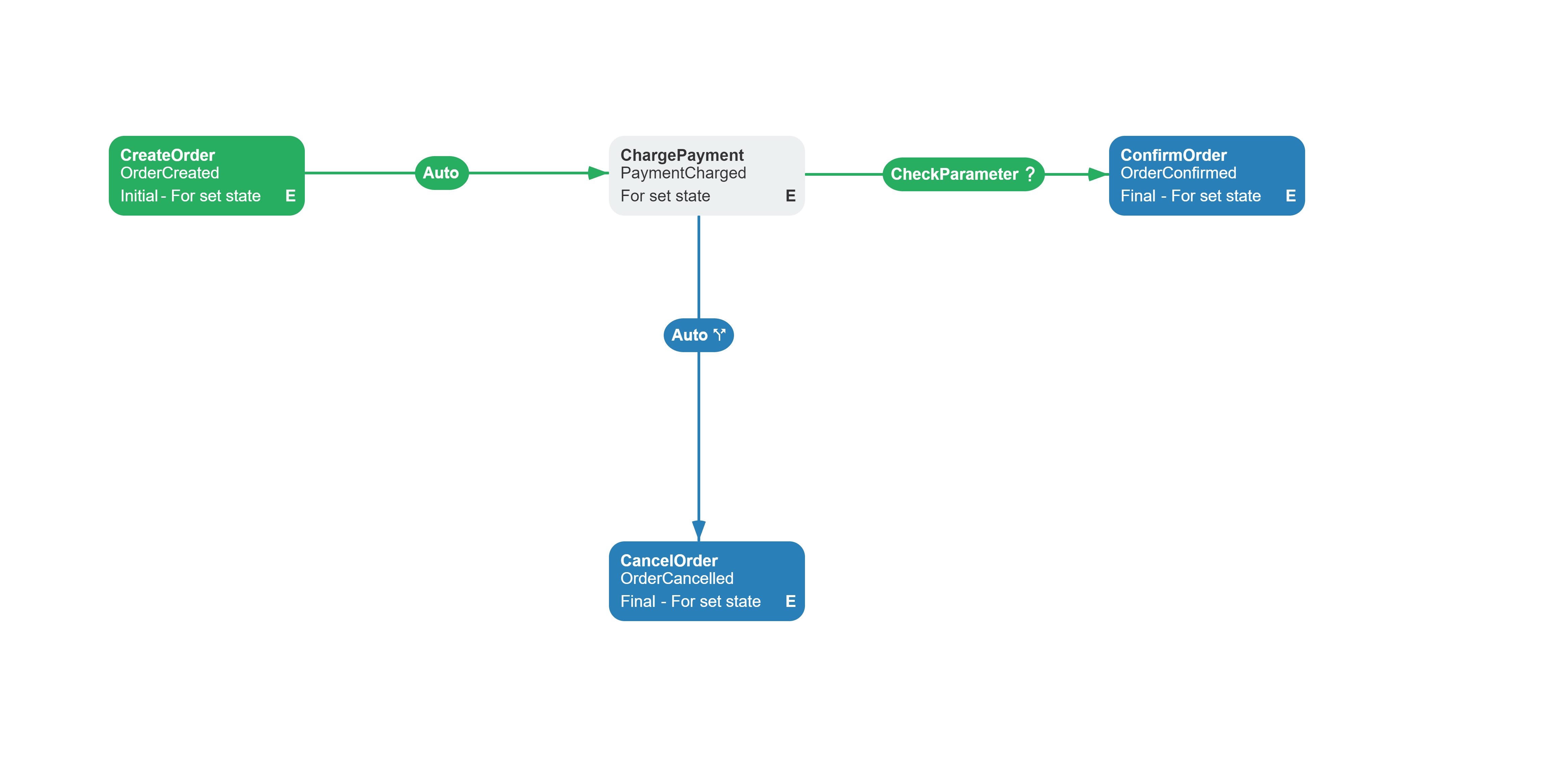
An e-commerce platform processes purchases through a series of API calls. When a customer places an order, the workflow:
1. **Creates an order** with a new GUID, amount, and product ID as persistent process parameters.
2. **Charges the payment** via the payment API. This combines reservation and capture in one call.
3. **Confirms the order** when the payment response action equals the expected value; otherwise calls the cancellation endpoint.
`ChargePayment` stores the JSON response as a `DynamicParameter`. The success transition reads the scalar
`ChargeResult.json.action` value. `ConfirmOrder` and `CancelOrder` store their response bodies in the persistent `ConfirmResult` and
`CancelResult` parameters, so the final API response remains available after the process is finalized.
## Workflow scheme
The example below uses [httpbin.org](https://httpbin.org) as a mock API. Its `/post` endpoint normally returns a JSON object with the
submitted request body under `json`. When that echo response is available, `CheckParameter` reads `ChargeResult.json.action` and the success
path runs. In production, replace the URL and comparison with fields from your API contract.
:::note
This scheme is intentionally simplified for learning. In production, configure
[ExceptionsHandlers](https://docs.workflowengine.io/get-started/concepts/activity/#exception-handling) for activities that call external APIs. Choose an appropriate
`Retry`, `SetActivity`, or `SetState` strategy, validate the API outcome defined by its contract, and keep confirmation non-final when the
workflow may still need compensation.
:::
**Related capabilities:** `HTTPRequest` action, `CheckParameter` condition, `RequestHeaders` setting.
```xml filename="purchase-workflow.xml"
```
## Configuration
Use `RequestHeaders` on the [BasicPlugin](https://docs.workflowengine.io/plugins/basic-plugin/overview/) instance only for static default headers that are valid for every
request made by the `HTTPRequest` action and the `CheckHTTPRequest` condition.
```csharp
basicPlugin.RequestHeaders.Add("X-Api-Version", "2026-01-01");
```
Do not store a request-specific Bearer token in `RequestHeaders`: the dictionary belongs to the plugin instance, not to a process, and its
values are sent with every request. Set credentials on the particular action or condition through the scheme-level `Headers` parameter.
Process parameter substitution is supported, for example:
```json
"Headers": "Authorization=Bearer @AccessToken"
```
Prefer to expose `AccessToken` as an [external parameter](https://docs.workflowengine.io/get-started/concepts/parameter/#advanced-parameter-scenarios) through an
`IWorkflowExternalParametersProvider` backed by your application's credential storage instead of persisting the token with the process.
The engine resolves `@AccessToken` immediately before the action or condition runs.
Scheme-level headers are added after the defaults. A duplicate name appends another value instead of replacing the global value, and a
header that rejects multiple values can throw a `FormatException`.
In your scheme, assign `HTTPRequest` to an [activity](https://docs.workflowengine.io/get-started/concepts/activity/) Implementation. Configure the URL, method (GET/POST),
request body, and optionally store the response body in a process [parameter](https://docs.workflowengine.io/get-started/concepts/parameter/). On an outgoing
[transition](https://docs.workflowengine.io/get-started/concepts/transition/), use the `CheckParameter` condition to inspect a scalar value and route the process.
For an undeclared response parameter, `HTTPRequest` parses valid JSON into a scalar value, `List