# Predefined Actors
Predefined actors are [BasicPlugin](https://docs.workflowengine.io/plugins/basic-plugin/overview/) actor definitions
registered in application code and injected into matching
[workflow schemes](https://docs.workflowengine.io/get-started/concepts/scheme/) by
[WorkflowRuntime](https://docs.workflowengine.io/get-started/concepts/workflow-runtime/). Register actor names with
`WithActor` or `WithActors`, resolve their identities with the plugin delegates, then select
the injected actor in an `Allow` restriction on a command transition.
**Prerequisites:**
- [Basic Plugin Overview](https://docs.workflowengine.io/plugins/basic-plugin/overview/) - BasicPlugin registration and
configuration.
- [Workflow Runtime configuration](https://docs.workflowengine.io/get-started/concepts/workflow-runtime/) - builder,
persistence provider, startup, and shutdown configuration.
## Real-world scenario
A document management system uses separate schemes for invoices, contracts, and other
document types. Each [process instance](https://docs.workflowengine.io/get-started/concepts/process-instance/) stores the
document owner's identity in a persistent `AuthorId`
[parameter](https://docs.workflowengine.io/get-started/concepts/parameter/), while the
[application identity system](https://docs.workflowengine.io/evaluate/workflow-engine-features/pluggable-security/) assigns
the `Manager` role independently of any document.
Without predefined actors, every document scheme would need separate actor definitions that
check the `Manager` role and determine the current document author. Register `Managers` and
`DocumentAuthor` for all schemes with one `WithActors` call instead. The BasicPlugin callbacks
resolve `Managers` through the role directory and resolve `DocumentAuthor` from the current
process instance.
## Workflow scheme
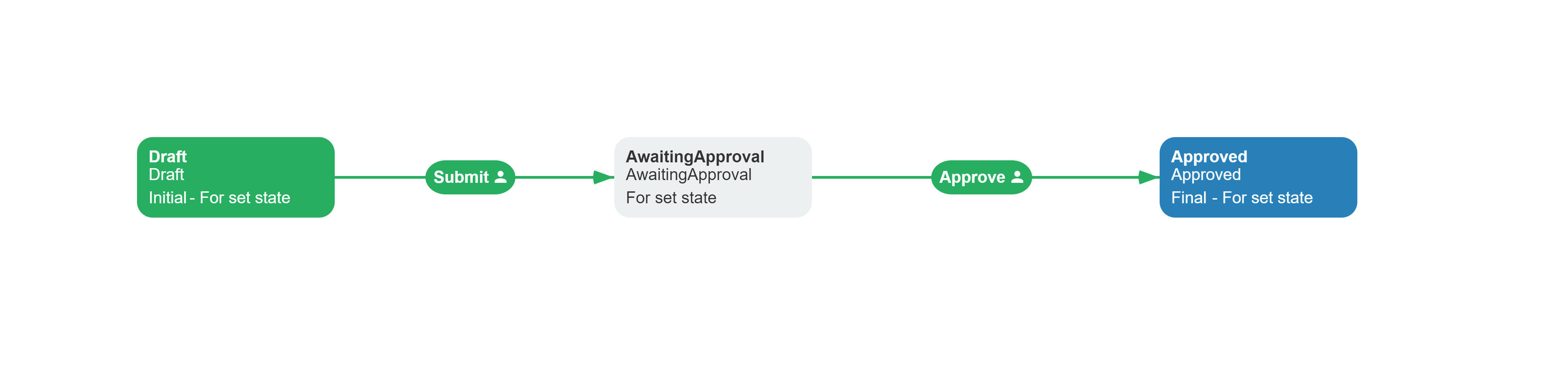
The `InvoiceApproval` scheme restricts `Submit` to the document author and restricts `Approve`
to managers. A `ContractApproval` scheme can use the same predefined actor names without
copying their rule configuration.
**Related capabilities:** `WithActor`, `WithActors`, `Predefined`
[rule](https://docs.workflowengine.io/get-started/concepts/rule/),
`CheckPredefinedActorAsync` delegate.
```xml filename="invoice-approval.xml"
```
The XML declares `AuthorId`, activities, commands, and restrictions, but it does not declare
the predefined actors. WorkflowRuntime injects `DocumentAuthor` and `Managers` before parsing
the restrictions. After BasicPlugin is registered, open the scheme in the Designer, enable
**Show predefined actors**, and select the injected actor in each restriction.
## Configure predefined actors
Configure actor names, scheme scopes, and identity delegates before passing BasicPlugin to
`WorkflowRuntime.WithPlugin`. The registration determines which actor definitions the runtime
injects into each loaded scheme.
### Register actor names
BasicPlugin stores predefined actor names separately from the scheme. `WithActor` registers
one name, while `WithActors` registers several names. Configure the names and identity
delegates before passing the plugin to `WorkflowRuntime.WithPlugin`.
```csharp filename="PredefinedActorsConfiguration.cs"
using System;
using System.Collections.Generic;
using System.Threading.Tasks;
using OptimaJet.Workflow.Plugins;
public interface IUserDirectory
{
Task IsInRoleAsync(
string identityId,
string roleName);
Task> GetUsersInRoleAsync(
string roleName);
}
public static class PredefinedActorsConfiguration
{
public static BasicPlugin CreateBasicPlugin(
IUserDirectory userDirectory)
{
var basicPlugin = new BasicPlugin();
basicPlugin.WithActors(["Managers", "DocumentAuthor"]);
basicPlugin.CheckPredefinedActorAsync =
async (processInstance, runtime, actorName, identityId) =>
{
if (actorName == "Managers")
{
return await userDirectory.IsInRoleAsync(
identityId,
"Manager");
}
if (actorName == "DocumentAuthor")
{
string authorId = await processInstance
.GetParameterAsync("AuthorId");
return string.Equals(
authorId,
identityId,
StringComparison.Ordinal);
}
return false;
};
basicPlugin.GetPredefinedIdentitiesAsync =
async (processInstance, runtime, actorName) =>
{
if (actorName == "Managers")
{
return await userDirectory
.GetUsersInRoleAsync("Manager");
}
if (actorName == "DocumentAuthor")
{
string authorId = await processInstance
.GetParameterAsync("AuthorId");
return string.IsNullOrEmpty(authorId)
? []
: [authorId];
}
return [];
};
return basicPlugin;
}
}
```
Pass the returned BasicPlugin instance to `runtime.WithPlugin(...)` within the complete
WorkflowRuntime configuration. The runtime configuration guide shows the required builder and
persistence provider setup before `StartAsync()`.
`CheckPredefinedActorAsync` checks one identity during rule authorization. BasicPlugin passes
the registered actor name in the third string position and the identity ID in the fourth
string position, which is why the example names those lambda arguments `actorName` and
`identityId`. `GetPredefinedIdentitiesAsync` returns the same manager role members or the
`AuthorId` belonging to the current document process. Configure both callbacks when the
application checks individual identities and enumerates workflow participants.
### Choose actor scope
The `schemes` argument on `WithActor` and `WithActors` controls which scheme codes receive a
predefined actor. A missing or empty list registers the actor for every scheme; a non-empty
list limits the actor to the listed scheme codes.
Table: Predefined actor scopes
| Registration | Resulting scope |
|---|---|
| `WithActor("Managers")` | `Managers` is available to every scheme |
| `WithActors(names)` | Every name is available to every scheme |
| `WithActor("DocumentAuthor", schemes)` | `DocumentAuthor` is available only to the listed scheme codes |
| `WithActors(names, schemes)` | Every name is available only to the listed scheme codes |
WorkflowRuntime combines the all-scheme names with the names registered for the current scheme
code. Do not register the same actor name in both scopes for one scheme: duplicate predefined
names cause `GetPredefinedActors` to throw `ArgumentException` while the scheme is loaded.
## Predefined actor reference
WorkflowRuntime converts matching registrations into predefined actor definitions and uses
the BasicPlugin callbacks to authorize identities. The provider API also supports applications
that need to update registered actor collections explicitly.
### Generated actor definitions
WorkflowRuntime creates an actor definition for every matching registered name before it parses
[transitions](https://docs.workflowengine.io/get-started/concepts/transition/). The generated definition uses the registered
name for both `Name` and `Value`, assigns the `Predefined` rule, and sets `IsPredefined` to
`true`. Do not add a second actor with that name to the scheme.
### Runtime authorization
For a command transition such as `Approve`, configure the restriction in the Designer as
follows:
Table: Predefined actor transition restriction
| Transition setting | Value |
|---|---|
| Trigger | `Command` |
| Command | `Approve` |
| Restriction type | `Allow` |
| Actor | `Managers` |
The `Predefined` rule is excluded from the ordinary Designer rule list, but it remains
available to runtime authorization. Select the injected `Managers` actor in the restriction
instead of creating a manual actor or choosing `CheckRole`. When a user requests the command,
the `Predefined` rule calls `CheckPredefinedActorAsync` with `Managers` and that user's identity
ID.
### Actor provider operations
`PredefinedActorProvider` exposes the thread-safe `IActorProvider` API behind the convenience
methods. Use `WithActor` and `WithActors` for initial configuration; use the provider when the
application needs explicit read, replace, merge, add, or remove operations grouped by scheme
code.
Table: PredefinedActorProvider operations
| Member | Operation |
|---|---|
| `GetAllActors` | Returns copies of all actor collections grouped by scheme code |
| `SetAllActors` | Replaces all grouped actor collections |
| `UnionAllActors` | Merges actor collections into their matching scheme groups |
| `GetActors` and `SetActors` | Reads or replaces the collection for one scheme code |
| `AddActor` and `AddActors` | Adds one or more names to one scheme group |
| `RemoveActor` and `RemoveActors` | Removes one or more names from one scheme group |
| `IsActorExist` | Checks whether one scheme group contains an actor name |
The [BasicPlugin API reference](https://api.workflowengine.io/core/OptimaJet.Workflow.Plugins/BasicPlugin/)
lists the public plugin members. Actor registration methods are intended for configuration
before BasicPlugin is initialized by WorkflowRuntime.
## Verify actor authorization
WorkflowRuntime injects a scheme-specific predefined actor only when the loaded scheme code
matches its registration. Open the matching scheme in the Designer, enable **Show predefined
actors**, and confirm that the actor appears as predefined. Then request the commands available
to a known identity. A matching identity receives the restricted command; an identity for which
`CheckPredefinedActorAsync` returns `false` does not.
Participant-enumeration APIs call `GetPredefinedIdentitiesAsync` instead of the single-identity
check. Verify that this callback returns the same identity set represented by
`CheckPredefinedActorAsync`, so command authorization and participant lists remain consistent.
## Troubleshooting common errors
Predefined actor failures usually come from actor scope, duplicate names, or an unassigned
BasicPlugin delegate. Match the observed symptom to the corresponding registration step.
| Symptom | Cause | Fix |
|---|---|---|
| A predefined actor is absent from a scheme | The scheme code is not in the actor scope, or BasicPlugin was registered after the scheme was loaded | Match the exact scheme code and register BasicPlugin during runtime configuration |
| Authorization fails when the rule runs | `CheckPredefinedActorAsync` is not configured | Assign the single-identity callback before registering BasicPlugin |
| Participant enumeration fails | `GetPredefinedIdentitiesAsync` is not configured | Assign the identity-enumeration callback before registering BasicPlugin |
| Scheme loading reports a duplicate predefined actor | The same name is registered for all schemes and for the current scheme | Keep the actor in only one applicable scope |
| `Predefined` is missing from the rule dropdown | BasicPlugin intentionally excludes the system rule from ordinary choices | Select the runtime-injected actor in the transition restriction |
## See also
- [Basic Plugin Overview](https://docs.workflowengine.io/plugins/basic-plugin/overview/): Register BasicPlugin and review
its actions, conditions, rules, and configuration API.
- [Role-Based Authorization](https://docs.workflowengine.io/plugins/basic-plugin/role-based-authorization/): Restrict
commands by resolving identities through application roles.
- [Rule](https://docs.workflowengine.io/get-started/concepts/rule/): Understand how actors connect transition
restrictions to authorization checks.
- [Pluggable Security](https://docs.workflowengine.io/evaluate/workflow-engine-features/pluggable-security/): Connect workflow
authorization to an existing identity system.
## Frequently asked questions
**Do I add predefined actors to the workflow scheme?**
No. WorkflowRuntime injects predefined actors registered by BasicPlugin while it parses the
scheme. Reference the injected actor from a transition restriction instead of declaring a
duplicate actor in the scheme.
**Can a predefined actor be limited to one workflow scheme?**
Yes. Pass the applicable scheme codes to `WithActor` or `WithActors`. Passing no scheme list,
or an empty list, makes the predefined actor available to every scheme.
**Which predefined actor delegates should I configure?**
Configure `CheckPredefinedActorAsync` for single-identity authorization and
`GetPredefinedIdentitiesAsync` for participant enumeration. Configure both when the application
uses both runtime paths.
**Why is the Predefined rule missing from the Designer rule list?**
BasicPlugin excludes `Predefined` from ordinary rule choices because WorkflowRuntime assigns it
to injected actor definitions. The rule remains registered for runtime authorization.
**How are predefined actors different from CheckRole actors?**
Predefined actors map application-defined names to identities through the two predefined actor
delegates. `CheckRole` actors pass a role value to `UsersInRoleAsync`; see
[Role-Based Authorization](https://docs.workflowengine.io/plugins/basic-plugin/role-based-authorization/) for that pattern.