# Process Control
Control workflow execution by changing the process state label, jumping to a different activity, or triggering commands on other process
instances. Unlike `WorkflowRuntime` methods which are called from application code, `SetState`, `SetActivity`, and `ExecuteCommand` work
inside a scheme - an activity can change its own process state, jump to a different activity, or trigger a command on another process as
part of its execution logic.
## Real-world scenario: multi-stage deployment
A deployment orchestrator coordinates releases across test and production environments. Three separate process schemes work together:
- **DeploymentOrchestrator** - the main coordinator that controls the release pipeline.
- **TestRelease** - a subordinate process that simulates test execution.
- **Deploy** - a subordinate process that simulates deployment.
When a release is triggered, the orchestrator:
1. **Runs tests** by executing a `RunTests` command on the `TestRelease` process.
2. **Waits for tests to pass** using `IsProcessFinish` to check if `TestRelease` finalized.
3. **Deploys to production** by executing a `DeployProd` command on the `Deploy` process.
4. **Waits for deployment** using `IsProcessFinish` to confirm completion.
Each stage only proceeds when the previous one completes, preventing deployments on failing tests.
## Workflow scheme
The `ExecuteCommand` action triggers external processes. The `IsProcessFinish` condition gates each
timer-triggered transition until the external process finalizes.

The orchestrator controls two subordinate processes that simulate external work: `TestRelease` (runs test suites) and `Deploy` (releases to
production). They wait idle in their initial activities until the orchestrator triggers their `RunTests` and `DeployProd` commands.
**Related capabilities:** `ExecuteCommand` action, `SetState` action, `SetActivity` action, `IsProcessFinish` condition.
```xml filename="deployment-orchestrator.xml"
```
### How the scheme works
Once the scheme is saved and `BasicPlugin` is registered with the `WorkflowRuntime`, the process runs as follows:
1. **Instance created** - the orchestrator starts at `Start` and executes:
- Two `SetParameter` actions that each evaluate `Guid.NewGuid().ToString()` to generate fresh IDs (`TestProcessId`, `ProdProcessId`).
- Two `CreateProcess` actions that create `TestRelease` and `Deploy` process instances using the generated IDs.
Both newly created processes wait idle in their initial activities (`Idle`).
2. **Execute the `Deploy` command** - the orchestrator moves to `DeployTest`. The activity uses `@TestProcessId` (parameter substitution
syntax) to execute `ExecuteCommand("RunTests", testProcessId)` on the `TestRelease` process. The `TestRelease` process leaves `Idle`, moves
to `RunningTests`, and after 5 seconds finalizes at `TestsCompleted`.
3. **Timer checks test completion every 5 seconds** - the `Timer` trigger fires every 5 seconds. Each time,
`IsProcessFinish(@TestProcessId)` checks if the `TestRelease` process finalized. When it does, the transition fires and the orchestrator
moves to `DeployProduction`.
4. **Deploy to production** - `DeployProduction` uses `@ProdProcessId` to execute `ExecuteCommand("DeployProd", prodProcessId)` on the
`Deploy` process. The `Deploy` process leaves `Idle`, moves to `Deploying`, and after 5 seconds finalizes at `DeploymentCompleted`.
5. **Timer checks deployment every 5 seconds** - the same pattern repeats. When the `Deploy` process finalizes, the orchestrator moves to
`Completed` and finalizes.
### External process schemes
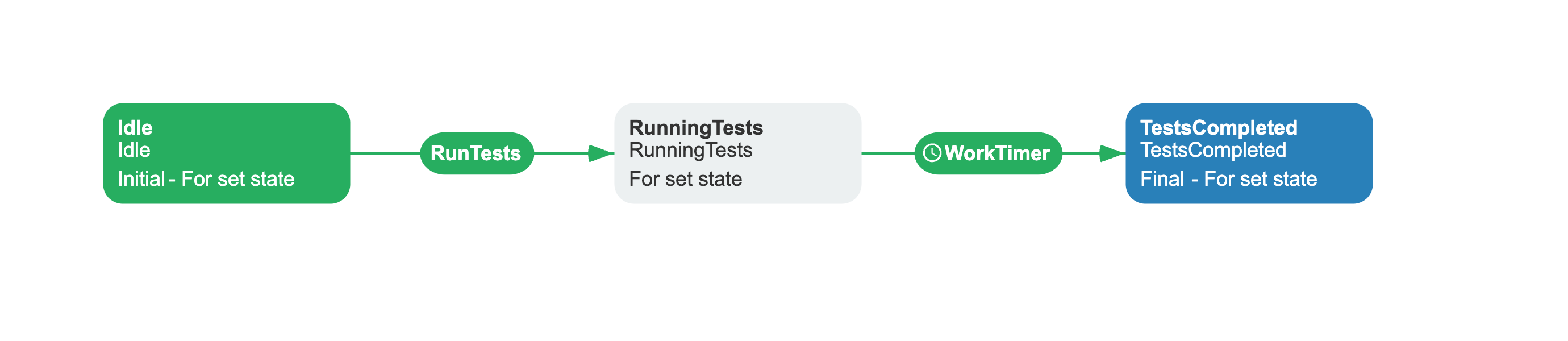
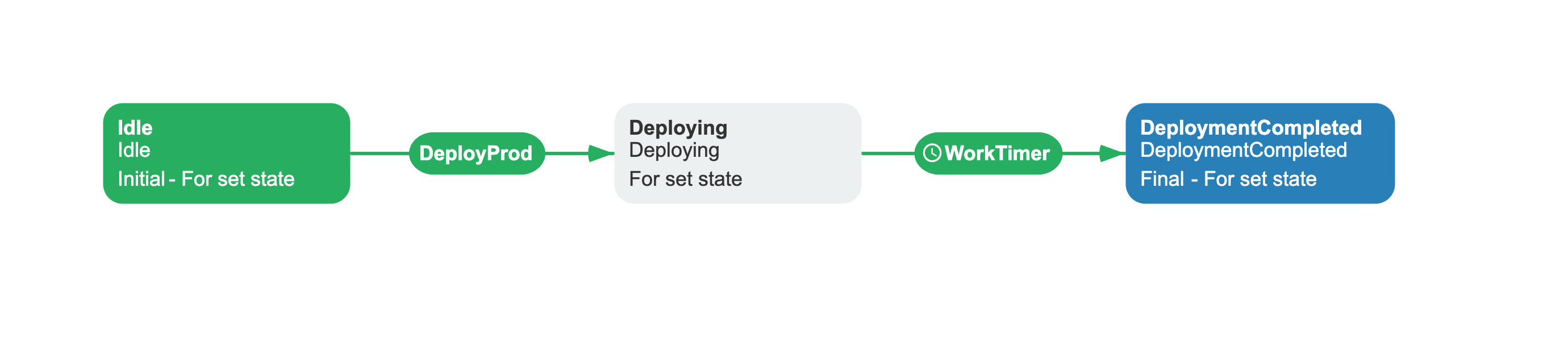
The subordinate processes that the orchestrator controls are separate schemes. Each waits for a command, simulates work with a timer, then
finalizes.
**TestRelease** accepts the `RunTests` command, transitions from `Idle` to `RunningTests`, and after a 5-second timer moves to
`TestsCompleted` (final).
```xml filename="test-release.xml"
```
**Deploy** accepts the `DeployProd` command, transitions from `Idle` to `Deploying`, and after a 5-second timer moves to
`DeploymentCompleted` (final).
```xml filename="deploy.xml"
```
## Reference
The following actions and conditions are available for process control within your workflow schemes.
### CreateProcess action
Creates an **independent** process instance from within a workflow scheme. The created process is not tracked as a subprocess -
`CheckAllSubprocessesCompleted` and `DeleteSubprocesses` do not apply to it.
| Parameter | Required | Default | Description |
|---|---|---|---|
| `Scheme` | Yes | - | Scheme code of the process to create. |
| `ProcessId` | No | Auto-generated GUID | Explicit ID for the new process. |
| `ProcessCreationParameters` | Yes | - | JSON string containing an array of initial parameters. |
**ProcessCreationParameters** format:
```json
"[{\"persist\":true,\"value\":\"\\\"value\\\"\",\"name\":\"ParamName\"}]"
```
| Field | Type | Description |
|-------|------|-------------|
| `name` | string | Parameter name. |
| `value` | string | Parameter value. Interpreted as a C# expression. For string literals, wrap in escaped C# quotes. |
| `persist` | bool | If `true`, the parameter is persisted in the database. |
### ExecuteCommand action
Triggers a command on a **different** process instance by process ID. The target process must exist and be in a state that accepts the
command.
| Parameter | Required | Default | Description |
|---|---|---|---|
| `CommandName` | Yes | - | Name of the command to execute on the target process. |
| `ProcessId` | Yes | - | GUID of the target process instance. Must differ from the current process. |
The action validates that the target process exists, the command is available, and the target is not the same process. An exception is
thrown if any check fails.
### SetState action
Moves the process to an activity by state name. Each activity has a `State` attribute - `SetState` finds the activity with `State=StateName`
and `IsForSetState="True"`, then navigates there. This is similar to `SetActivity`, but the lookup key is the state value rather than the
activity name.
When `ProcessId` is omitted or matches the current process, `SetState` schedules the change in the current execution. `SetAfter` determines
whether the change happens after the current action or after all actions in the activity. When `ProcessId` identifies a different process,
`SetState` updates that process immediately through `WorkflowRuntime.SetStateAsync`; `SetAfter` does not control this update.
| Parameter | Required | Default | Description |
|---|---|---|---|
| `StateName` | Yes | - | New state name to set on the process instance. |
| `SetAfter` | Yes | `AfterAction` | For the current process, when to apply the scheduled change. It has no effect for a different `ProcessId`. See [SetAfter](#setafter) enum. |
| `ProcessId` | No | Current process ID | Target process to update. A different process is updated immediately through `WorkflowRuntime.SetStateAsync`. |
### SetActivity action
Programmatically moves the process to a different activity. Use this for escalation paths, skipping completed steps, or routing based on
business logic.
| Parameter | Required | Default | Description |
|---|---|---|---|
| `ActivityName` | Yes | - | Name of the target activity to jump to. |
| `SetAfter` | Yes | `AfterAction` | When to apply the change. See [SetAfter](#setafter) enum. |
When `SetAfter` is `AfterAction`, the process moves to the target activity immediately after the current action completes. Subsequent
actions in the current activity do not execute. When `AfterActivity`, all actions in the current activity run before the jump.
### IsProcessFinish condition
Returns `true` when the specified process has been finalized. Use on outgoing transitions to gate progression until a process completes.
| Parameter | Required | Default | Description |
|---|---|---|---|
| `ProcessId` | No | Current process ID | Process to check. When omitted, checks the current process. |
### UpdateDocumentStateAsync delegate
A delegate on the `BasicPlugin` instance that fires when a process changes to `Idled` or `Finalized` status. Use it to synchronize external
state with the workflow state.
```csharp
// Illustrative example - not from a real application
basicPlugin.UpdateDocumentStateAsync = async (processInstance, stateName, localizedStateName) =>
{
await dbContext.Documents
.Where(d => d.Id == processInstance.ProcessId)
.ExecuteUpdateAsync(setters => setters
.SetProperty(d => d.State, stateName));
};
```
The delegate is not called for subprocesses. It only fires when the scheme code matches the optional scheme list passed during plugin
registration.
## Enums
Enum values used by the process control actions.
### SetAfter
The `SetAfter` parameter determines when `SetState` or `SetActivity` changes the current process. When `SetState` targets a different
`ProcessId`, it updates that process immediately and does not use `SetAfter`.
| Value | Behavior |
|-------|----------|
| `AfterAction` | Execute after the current action completes. Subsequent actions in the activity **will not** execute. |
| `AfterActivity` | Execute after the entire activity completes. All actions in the activity execute before the state change. |
## Troubleshooting common errors
- **ExecuteCommand on the same process** - the target `ProcessId` must belong to a different process instance. Attempting to run a command
on the same process throws an exception.
- **SetState / SetActivity with `AfterAction` skips remaining actions** - when either action changes the current process and `SetAfter` is
`AfterAction` (default), the activity switch happens immediately after the current action. Any subsequent actions in the same activity are
skipped. Set `AfterActivity` to let all actions finish before the switch.
- **SetState with no matching activity** - `SetState` requires an activity whose `State` matches `StateName` and has `IsForSetState="True"`.
If no such activity exists, an `ActivityNotFoundException` is thrown.
## See also
- [Basic Plugin Overview](https://docs.workflowengine.io/plugins/basic-plugin/overview/): Registration, configuration, and
full API reference.
- [Managing Parameters](https://docs.workflowengine.io/plugins/basic-plugin/managing-parameters/): Store, remove, and branch
on parameter values.
- [HTTP Requests](https://docs.workflowengine.io/plugins/basic-plugin/http-requests/): Send HTTP requests and branch on
responses.
## Frequently asked questions
**What is the difference between SetState and SetActivity?**
`SetState` finds the activity with `State=StateName` and moves the process there. `SetActivity` finds the activity by its `Name`. Both
switch the current activity - the difference is the lookup key. Use `SetState` when you know the target state (e.g. "Approved") but not the
activity name; use `SetActivity` when you know the exact activity name.
**How does ExecuteCommand differ from CreateProcess?**
`ExecuteCommand` triggers an existing command on an existing process instance. `CreateProcess` creates a new independent process instance.
Use `ExecuteCommand` when you already have a running process and need to advance it; use `CreateProcess` when you need to start a brand new
workflow.
**What happens to remaining actions when SetState or SetActivity changes the current process?**
With `SetAfter: AfterAction` (default), the remaining actions in the current activity do not execute. With `SetAfter: AfterActivity`, all
actions complete before the change takes effect. When `SetState` targets a different `ProcessId`, the current process continues normally;
`SetAfter` does not control the update to the other process.
**Can SetState finalize a process?**
Yes, if the target activity (the one with matching `State` and `IsForSetState="True"`) has `IsFinal="True"`. Since `SetState` moves the
process to that activity, a final target activity causes the process to finalize.