
HTTP Requests

Call external APIs from your workflow using the HTTPRequest action and route the process based on responses using the CheckParameter condition. This pattern integrates third-party services - payment gateways, inventory systems, notification services - into your workflow scheme without custom code. With StoreResponse enabled, HTTPRequest stores the response body only. For a JSON object, target a scalar field through a dotted parameter path before applying a CheckParameter string comparison.
Real-world scenario: purchase workflow
An e-commerce platform processes purchases through a series of API calls. When a customer places an order, the workflow:
- Creates an order with a new GUID, amount, and product ID as persistent process parameters.
- Charges the payment via the payment API. This combines reservation and capture in one call.
- Confirms the order when the payment response action equals the expected value; otherwise calls the cancellation endpoint.
ChargePayment stores the JSON response as a DynamicParameter. The success transition reads the scalar ChargeResult.json.action value. ConfirmOrder and CancelOrder store their response bodies in the persistent ConfirmResult and CancelResult parameters, so the final API response remains available after the process is finalized.
Workflow scheme
The example below uses httpbin.org as a mock API. Its /post endpoint normally returns a JSON object with the submitted request body under json. When that echo response is available, CheckParameter reads ChargeResult.json.action and the success path runs. In production, replace the URL and comparison with fields from your API contract.
This scheme is intentionally simplified for learning. In production, configure ExceptionsHandlers for activities that call external APIs. Choose an appropriate Retry, SetActivity, or SetState strategy, validate the API outcome defined by its contract, and keep confirmation non-final when the workflow may still need compensation.
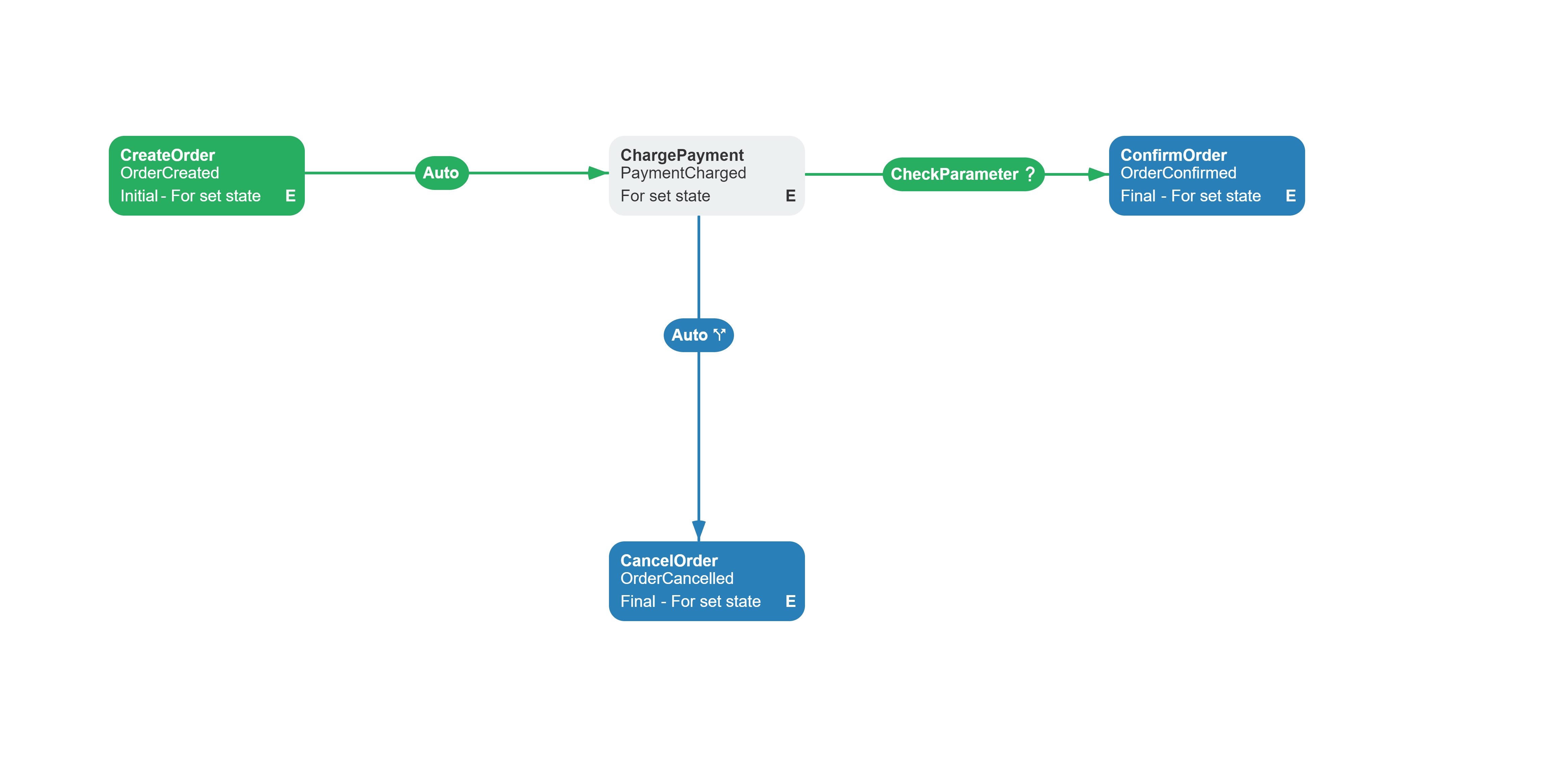
Related capabilities: HTTPRequest action, CheckParameter condition, RequestHeaders setting.
<Process Name="PurchaseWorkflow" CanBeInlined="false"> <Designer /> <Activities> <Activity Name="CreateOrder" State="OrderCreated" IsInitial="True" IsFinal="False" IsForSetState="True" IsAutoSchemeUpdate="True"> <Implementation> <ActionRef Order="1" NameRef="SetParameter"> <ActionParameter><![CDATA[ { "ParameterName": "OrderId", "Value": "Guid.NewGuid().ToString()" } ]]></ActionParameter> </ActionRef> <ActionRef Order="2" NameRef="SetParameter"> <ActionParameter><![CDATA[ { "ParameterName": "Amount", "Value": "\"100.00\"" } ]]></ActionParameter> </ActionRef> <ActionRef Order="3" NameRef="SetParameter"> <ActionParameter><![CDATA[ { "ParameterName": "ProductId", "Value": "\"PROD-001\"" } ]]></ActionParameter> </ActionRef> </Implementation> <Designer X="80" Y="100" /> </Activity> <Activity Name="ChargePayment" State="PaymentCharged" IsInitial="False" IsFinal="False" IsForSetState="True" IsAutoSchemeUpdate="True"> <Implementation> <ActionRef Order="1" NameRef="HTTPRequest"> <ActionParameter><![CDATA[ { "Url": "https://httpbin.org/post", "Post": true, "ContentType": "Json", "Parameters": "{\"action\":\"ChargePayment\",\"orderId\":\"@OrderId\",\"amount\":\"@Amount\"}", "StoreResponse": true, "ParameterName": "ChargeResult" } ]]></ActionParameter> </ActionRef> </Implementation> <Designer X="450" Y="100" /> </Activity> <Activity Name="ConfirmOrder" State="OrderConfirmed" IsInitial="False" IsFinal="True" IsForSetState="True" IsAutoSchemeUpdate="True"> <Implementation> <ActionRef Order="1" NameRef="HTTPRequest"> <ActionParameter><![CDATA[ { "Url": "https://httpbin.org/post", "Post": true, "ContentType": "Json", "Parameters": "{\"action\":\"ConfirmOrder\",\"orderId\":\"@OrderId\",\"productId\":\"@ProductId\"}", "StoreResponse": true, "ParameterName": "ConfirmResult", "ParameterPurpose": "Persistence" } ]]></ActionParameter> </ActionRef> </Implementation> <Designer X="820" Y="100" /> </Activity> <Activity Name="CancelOrder" State="OrderCancelled" IsInitial="False" IsFinal="True" IsForSetState="True" IsAutoSchemeUpdate="True"> <Implementation> <ActionRef Order="1" NameRef="HTTPRequest"> <ActionParameter><![CDATA[ { "Url": "https://httpbin.org/post", "Post": true, "ContentType": "Json", "Parameters": "{\"action\":\"CancelOrder\",\"orderId\":\"@OrderId\"}", "StoreResponse": true, "ParameterName": "CancelResult", "ParameterPurpose": "Persistence" } ]]></ActionParameter> </ActionRef> </Implementation> <Designer X="450" Y="400" /> </Activity> </Activities> <Transitions> <!-- CreateOrder -> ChargePayment --> <Transition Name="Created_ChargePayment" To="ChargePayment" From="CreateOrder" Classifier="Direct" IsFork="false" AllowConcatenationType="And" RestrictConcatenationType="And" ConditionsConcatenationType="And" MergeViaSetState="false" DisableParentStateControl="false"> <Triggers><Trigger Type="Auto" /></Triggers> <Conditions><Condition Type="Always" /></Conditions> <Designer X="327" Y="128" /> </Transition> <!-- ChargePayment -> success -> ConfirmOrder --> <Transition Name="Charged_ConfirmOrder" To="ConfirmOrder" From="ChargePayment" Classifier="Direct" IsFork="false" AllowConcatenationType="And" RestrictConcatenationType="And" ConditionsConcatenationType="And" MergeViaSetState="false" DisableParentStateControl="false"> <Triggers><Trigger Type="Auto" /></Triggers> <Conditions> <Condition Type="Action" NameRef="CheckParameter" ConditionInversion="false"> <ActionParameter><![CDATA[ { "ParameterName": "ChargeResult.json.action", "Value": "ChargePayment", "CompareType": "Equal" } ]]></ActionParameter> </Condition> </Conditions> <Designer X="713" Y="129" /> </Transition> <!-- ChargePayment -> failure -> CancelOrder --> <Transition Name="ChargeFailed_Cancel" To="CancelOrder" From="ChargePayment" Classifier="Reverse" IsFork="false" AllowConcatenationType="And" RestrictConcatenationType="And" ConditionsConcatenationType="And" MergeViaSetState="false" DisableParentStateControl="false"> <Triggers><Trigger Type="Auto" /></Triggers> <Conditions><Condition Type="Otherwise" /></Conditions> <Designer X="517" Y="248" /> </Transition> </Transitions></Process>Configuration
Use RequestHeaders on the BasicPlugin instance only for static default headers that are valid for every request made by the HTTPRequest action and the CheckHTTPRequest condition.
basicPlugin.RequestHeaders.Add("X-Api-Version", "2026-01-01");Do not store a request-specific Bearer token in RequestHeaders: the dictionary belongs to the plugin instance, not to a process, and its values are sent with every request. Set credentials on the particular action or condition through the scheme-level Headers parameter. Process parameter substitution is supported, for example:
"Headers": "Authorization=Bearer @AccessToken"Prefer to expose AccessToken as an external parameter through an IWorkflowExternalParametersProvider backed by your application's credential storage instead of persisting the token with the process. The engine resolves @AccessToken immediately before the action or condition runs.
Scheme-level headers are added after the defaults. A duplicate name appends another value instead of replacing the global value, and a header that rejects multiple values can throw a FormatException.
In your scheme, assign HTTPRequest to an activity Implementation. Configure the URL, method (GET/POST), request body, and optionally store the response body in a process parameter. On an outgoing transition, use the CheckParameter condition to inspect a scalar value and route the process.
For an undeclared response parameter, HTTPRequest parses valid JSON into a scalar value, List<object>, or DynamicParameter. Non-JSON text remains a string. If the target parameter has a declared type, HTTPRequest deserializes the body to that type. JSON object fields are available through dotted paths, so the example compares ChargeResult.json.action with ChargePayment by using Equal.
StoreResponse does not store the HTTP status code or response headers. The parameter contains only the parsed response body.
Enums
The following enums control how HTTP requests are formatted and how responses are validated.
ContentType
The ContentType parameter in HTTPRequest specifies the request body format for POST requests.
| Value | Format |
|---|---|
Urlencoded | application/x-www-form-urlencoded - form data encoded as name/value pairs (e.g. Name=Value;). |
Json | application/json - request body encoded as JSON. |
CompareType
The CompareType parameter in CheckHTTPRequest and CheckParameter determines how the selected response value is evaluated.
| Value | Example |
|---|---|
Equal | n == v |
NotEqual | n != v |
Contains | "yummy" contains "umm" |
NotContains | "yummy" does not contain "yy" |
StartWith | "yummy" starts with "yu" |
EndWith | "yummy" ends with "my" |
NotStartWith | not "yummy" starts with "yy" |
NotEndWith | not "yummy" ends with "um" |
StartAndEndWith | "yummy" starts and ends with "y" |
NotStartAndEndWith | "yummy" does not start or end with "mm" |
Greater | n > v |
Less | n < v |
GreaterOrEqual | n >= v |
LessOrEqual | n <= v |
In | 5 in (1, 2, 3, 4, 5) |
NotIn | 6 not in (1, 2, 3, 4, 5) |
See also
Basic Plugin Overview
Registration, actions, conditions, rules, and common configuration.
Sending Emails
Send email notifications at workflow stages.
Managing Parameters
Store, remove, and branch on parameter values.
Frequently asked questions
How do I add authentication headers to HTTP requests?
Set the scheme-level Headers parameter on the particular HTTPRequest action or CheckHTTPRequest condition. It can reference a process parameter, for example Authorization=Bearer @AccessToken; prefer to supply the token through an IWorkflowExternalParametersProvider. Do not put a request-specific Bearer token in the plugin-wide RequestHeaders dictionary because its value is shared by every request. Also avoid duplicating a global header name: the local value is appended rather than replacing it and may be rejected when the header does not support multiple values.
How do I check the response from a previous API call?
Use the CheckParameter condition on the transition leaving the activity. Set ParameterName to the name you used in ParameterName on the HTTPRequest action, or use a dotted path such as ChargeResult.json.action for a JSON object. Choose a CompareType and provide the scalar Value to match. An undeclared response parameter stores parsed JSON data, while non-JSON text remains a string.
What happens if the HTTP request fails?
The HTTPRequest action throws when HttpClient reports a transport failure, timeout, or cancellation. It does not convert a non-2xx status into an exception, but StoreResponse saves only the response body. The stored parameter does not expose the status code or response headers; use a custom action or an outcome field in the response body when routing requires that metadata.
Why use CheckParameter instead of CheckHTTPRequest?
CheckHTTPRequest makes an additional HTTP request to evaluate the condition - it does not reuse the response stored by the HTTPRequest action. For idempotent GET requests this is fine, but for POST requests (which change server state) you must use CheckParameter to check the previously stored response. This avoids sending the same state-changing request twice.