
Rule

Rules are permission checks that decide which users can execute a command on a transition. Actors link restrictions in the scheme to rule implementations in code. Rules can be defined inside the scheme via CodeActions or externally through IWorkflowRuleProvider. Impersonation allows one user to act on behalf of another while preserving the audit trail.
A rule is a named check that WorkflowRuntime evaluates to decide whether a specific user is allowed to execute a command at the current activity. Rules control who can move a process forward - only users who pass the rule check can proceed to the next step.
What a rule is
A rule is a permission check used by a transition restriction. The restriction references an actor, and the actor stores the rule name and an optional value. The rule's Check or CheckAsync method receives an identity and returns true (allowed) or false (blocked).
Rule implementations can also provide GetIdentities or GetIdentitiesAsync to return the identities that match the rule.
How a rule works
Actors are declared in the scheme's <Actors> section. Each actor references a rule by name. Restrictions on transitions reference these actors, and the runtime resolves the rule through the registered provider or the scheme's CodeActions. The scheme below defines two actors (IsApprover and IsOwner) and restricts the Approve transition to the IsApprover actor:
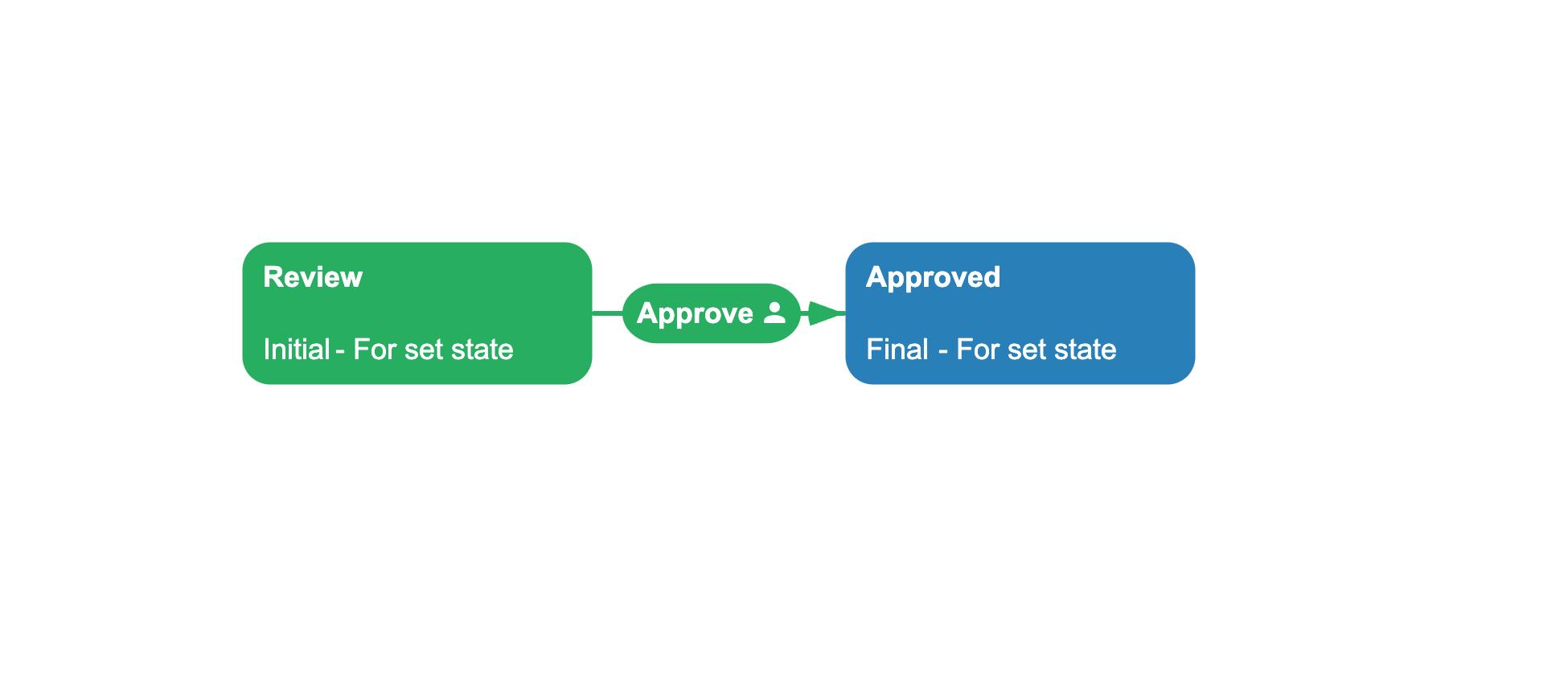
<?xml version="1.0" encoding="utf-8"?><Process> <Actors> <Actor Name="IsApprover" Rule="IsApprover" Value=""/> <Actor Name="IsOwner" Rule="IsOwner" Value=""/> </Actors> <Commands> <Command Name="Approve"/> </Commands> <Activities> <Activity Name="Review" IsInitial="True" IsFinal="False" IsForSetState="True" IsAutoSchemeUpdate="True"> <Designer X="200" Y="200"/> </Activity> <Activity Name="Approved" IsInitial="False" IsFinal="True" IsForSetState="True" IsAutoSchemeUpdate="True"> <Designer X="450" Y="200"/> </Activity> </Activities> <Transitions> <Transition Name="ApproveReview" From="Review" To="Approved" Classifier="Direct"> <Triggers> <Trigger Type="Command" NameRef="Approve"/> </Triggers> <Conditions> <Condition Type="Always"/> </Conditions> <Restrictions> <Restriction Type="Allow" NameRef="IsApprover"/> </Restrictions> <Designer/> </Transition> </Transitions></Process>When GetAvailableCommandsAsync is called for "user-42", WorkflowRuntime loads the scheme, finds the Approve transition, reads its restrictions, resolves the IsApprover actor, and calls the IsApprover rule method with "user-42" as the identity. If the rule returns false, the Approve command is excluded from the result.
Rule and actor
An Actor is the link between a scheme restriction and a rule implementation. Each actor in the scheme has three parts:
- Name: a unique identifier used in
<Restriction NameRef="..." /> - Rule: the rule name passed to
CheckAsyncandGetIdentitiesAsyncas theruleNameparameter - Value: an optional string parameter passed to both methods as the
parameterargument
Multiple transitions can reference the same actor. Multiple actors can reference the same rule with different value parameters.
Restrictions and their combination
A transition can have multiple restrictions. Each restriction has a type (Allow or Restrict) and references an actor. The AllowConcatenationType and RestrictConcatenationType attributes on the transition control how restrictions of the same type are combined.
The runtime combines the Allow results, combines the Restrict results, and requires both parts to pass. The table describes the result for one identity checked through Check or CheckAsync:
| Allow combination | Restrict combination | Effect |
|---|---|---|
| - | - | The identity is allowed. |
And (default) | - | The identity must match all Allow restrictions. |
Or | - | The identity must match at least one Allow restriction. |
| - | And (default) | The identity must not match all Restrict restrictions. |
| - | Or | The identity must match none of the Restrict restrictions. |
And | And | The identity must match all Allow restrictions and not all Restrict restrictions. |
And | Or | The identity must match all Allow restrictions and no Restrict restrictions. |
Or | And | The identity must match at least one Allow restriction and not all Restrict restrictions. |
Or | Or | The identity must match at least one Allow restriction and no Restrict restrictions. |
Actor-list APIs start with the identities returned for Allow restrictions. Consequently, a transition with only Restrict restrictions can validate an identity supplied to GetAvailableCommandsAsync, but GetAllActorsForCommandTransitionsAsync returns no identities for it because the API derives its candidates only from Allow restrictions.
Defining rules
Rules can be defined in two places. Defining them inside the scheme via CodeActions keeps the logic local to that process. Defining them through IWorkflowRuleProvider shares the logic across multiple schemes.
Defining rules in the scheme with CodeActions
Rules can be defined directly in the scheme's <CodeActions> section. Use Type="RuleGet" for a method that returns the list of permitted identity IDs, or Type="RuleCheck" for a method that checks a single identity:
<CodeActions> <CodeAction Name="DepartmentRule" Type="RuleGet" IsAsync="false"> <ActionCode><![CDATA[ var department = processInstance.GetParameter<string>("Department"); if (department == "Engineering") return new[] { "alice", "bob" }; return new[] { "charlie" }; ]]></ActionCode> </CodeAction></CodeActions>If you define only RuleGet, the runtime generates a RuleCheck that compares the supplied identityId with the returned list. If you define only RuleCheck, the generated RuleGet returns an empty list. If you define both, the runtime uses each implementation for its corresponding operation.
Implementing rules through IWorkflowRuleProvider
For rules shared across schemes or backed by external services, implement IWorkflowRuleProvider and register it with WithRuleProvider. Its Check methods validate a supplied identity, while its GetIdentities methods return identities for actor-list APIs. GetRules reports the supported rule names, and the IsCheckAsync and IsGetIdentitiesAsync flags select the synchronous or asynchronous implementations.
using System.Collections.Generic;using System.Threading;using System.Threading.Tasks;using OptimaJet.Workflow.Core.Model;using OptimaJet.Workflow.Core.Runtime;public sealed class OwnerRuleProvider : IWorkflowRuleProvider{ public List<string> GetRules( string schemeCode, NamesSearchType namesSearchType) => ["IsOwner"]; public bool Check( ProcessInstance processInstance, WorkflowRuntime runtime, string identityId, string ruleName, string parameter) => processInstance.GetParameter<string>("OwnerId") == identityId; public Task<bool> CheckAsync( ProcessInstance processInstance, WorkflowRuntime runtime, string identityId, string ruleName, string parameter, CancellationToken token) => Task.FromResult(false); public IEnumerable<string> GetIdentities( ProcessInstance processInstance, WorkflowRuntime runtime, string ruleName, string parameter) => [processInstance.GetParameter<string>("OwnerId")]; public Task<IEnumerable<string>> GetIdentitiesAsync( ProcessInstance processInstance, WorkflowRuntime runtime, string ruleName, string parameter, CancellationToken token) => Task.FromResult<IEnumerable<string>>([]); public bool IsCheckAsync(string ruleName, string schemeCode) => false; public bool IsGetIdentitiesAsync(string ruleName, string schemeCode) => false;}Register the provider with runtime.WithRuleProvider(new OwnerRuleProvider()).
If several providers or plugins are registered, WorkflowRuntime combines them through AggregatingRuleProvider and selects the provider that reports the requested rule name for the current scheme. For an implementation example, see Get available actors.
Impersonation and delegated execution
Impersonation allows one identity to execute a command on behalf of another. GetAvailableCommandsAsync can check several supplied identities and records the matching ones in WorkflowCommand.Identities. During ExecuteCommandAsync, restrictions are checked against the impersonated identity. Transition history stores the real identity as ExecutorIdentityId and the impersonated identity as ActorIdentityId. See Execute commands for the call pattern and identity parameters.
using System;using System.Linq;using System.Threading.Tasks;using OptimaJet.Workflow.Core.Runtime;public static class DelegatedExecution{ public static async Task ExecuteAsync( WorkflowRuntime runtime, Guid processId, string commandName, string identityId, string impersonatedIdentityId) { var commands = await runtime.GetAvailableCommandsAsync( processId, [identityId, impersonatedIdentityId]); var command = commands.First( item => item.CommandName == commandName && item.Identities.Contains(impersonatedIdentityId)); await runtime.ExecuteCommandAsync( command, identityId, impersonatedIdentityId); }}Accessing identity information inside actions
During command execution, ProcessInstance.IdentityId identifies the user who called ExecuteCommandAsync. ProcessInstance.ImpersonatedIdentityId identifies the user on whose behalf the command runs. Actions can read both system parameters:
using System.Threading;using System.Threading.Tasks;using OptimaJet.Workflow.Core.Model;using OptimaJet.Workflow.Core.Runtime;public static class IdentityActions{ public static Task ExecuteActionAsync( string name, ProcessInstance processInstance, WorkflowRuntime runtime, string parameter, CancellationToken token) { var actualUser = processInstance.IdentityId; var onBehalfOf = processInstance.ImpersonatedIdentityId; return Task.CompletedTask; }}Search priority for rules
When the same rule name exists in several places, WorkflowRuntime needs to decide which one to use. It looks for rules in three places:
- Local Code Actions - rules defined inside the current scheme
- Global Code Actions - rules marked as
IsGlobal="true", shared across all schemes - Registered provider - your
IWorkflowRuleProviderclass external to the scheme
By default, the runtime checks these sources in that order: the scheme's own rules first, then global rules, then the provider. If a rule named IsApprover exists in both the scheme and the provider, the scheme's version wins by default.
This order is configurable with SetExecutionSearchOrder, which accepts the six orders defined by ExecutionSearchOrder. This matches the same priority system used for actions.
See also
Command
Commands are filtered by rules in GetAvailableCommandsAsync.
Transition
Transitions reference rules through restrictions in the scheme.
Condition
Conditions and rules both guard transitions but serve different purposes.
Process Instance
Process instances carry the parameters that rules read during evaluation.
Frequently asked questions
What is a rule in Workflow Engine?
A rule is a named check that WorkflowRuntime evaluates to decide whether a specific identity is permitted to execute a command at the current activity. Rules are defined as Code Actions or implemented in an IWorkflowRuleProvider, and actors reference them in the scheme.
How do I restrict a command to certain users?
Define an actor with the rule name and add a Restriction to the transition that references the actor. Implement the rule as a Code Action or in Check or CheckAsync of an IWorkflowRuleProvider. The runtime then filters the command list.
What is the difference between a rule and a condition?
A rule checks who can execute a command (permission). A condition checks whether the process state allows the transition to fire (business logic). GetAvailableCommandsAsync checks rules, while conditions are checked during execution. Use GetAvailableCommandsWithConditionCheckAsync when command discovery must also check conditions.
How do I get a list of all users who can execute the next command?
Call runtime.GetAllActorsForCommandTransitionsAsync(processId) to build the result from identity lists returned for Allow restrictions on outgoing command transitions. This is useful for building notification lists or inbox views. Filter by classifier to limit results to only direct or only reverse transitions. See Get available actors for the API examples.