
Timer

A timer fires a transition automatically when its persisted execution time becomes due. Developers use timers to model deadlines, timeouts, reminders, and scheduled tasks in their workflow processes. This page covers timer types, registration, execution, and calendar integration.
What a timer is
A timer is a named schedule defined in the scheme. Unlike a command, which requires a user or system to call ExecuteCommandAsync, a timer is processed by Workflow Runtime. The runtime calculates and stores its execution time, and the timer manager polls for due records.
A transition can have at most one timer. Multiple transitions can reference the same timer.
Each timer has a name and three configuration fields:
| Field | Description |
|---|---|
| Name | Unique identifier used by transitions to reference this timer via NameRef |
| Type | Determines how the runtime interprets the schedule value |
| Value | The schedule itself: a duration, time of day, date, or expression |
| NotOverrideIfExists | Keeps the execution time when a timer with the same name is already registered for the process |
The five timer types are:
| Timer type | What it means |
|---|---|
Interval | Fire after a delay, such as "2d 5h 24m" or 3600000 milliseconds |
Time | Fire at a time of day (HH:mm:ss); registration selects today or tomorrow |
Date | Fire at midnight on a specific calendar date |
DateAndTime | Fire at an exact date and time |
Expression | Evaluate a C# expression that returns a date, time span, or interval |
How timers work in a scheme
Timers are declared in the <Timers> section of a scheme XML. Each <Timer> element defines one named schedule. Transitions reference timers through their trigger element.
The following scheme models a service desk ticket. Two timers enforce different kinds of deadlines: an Interval timer fires four hours after the ticket enters the InProgress activity (SLA breach), and an Expression timer fires at midnight on January 1st of the following year, computed dynamically.
<Process Name="ServiceDeskTicket"> <Timers> <Timer Name="SLA" Type="Interval" Value="4h" NotOverrideIfExists="false"/> <Timer Name="HardDeadline" Type="Expression" Value="new DateTime(DateTime.Now.Year + 1, 1, 1)"/> </Timers> <Commands> <Command Name="Assign"/> <Command Name="Resolve"/> </Commands> <Activities> <Activity Name="Open" IsInitial="True"> <Designer X="200" Y="50"/> </Activity> <Activity Name="InProgress"> <Designer X="50" Y="250"/> </Activity> <Activity Name="Resolved" IsFinal="True"> <Designer X="200" Y="450"/> </Activity> <Activity Name="Breached" IsFinal="True"> <Designer X="350" Y="250"/> </Activity> </Activities> <Transitions> <Transition Name="AssignTicket" From="Open" To="InProgress" Classifier="Direct"> <Triggers> <Trigger Type="Command" NameRef="Assign"/> </Triggers> <Conditions> <Condition Type="Always"/> </Conditions> </Transition> <Transition Name="ResolveTicket" From="InProgress" To="Resolved" Classifier="Direct"> <Triggers> <Trigger Type="Command" NameRef="Resolve"/> </Triggers> <Conditions> <Condition Type="Always"/> </Conditions> </Transition> <Transition Name="SLABreach" From="InProgress" To="Breached" Classifier="Direct"> <Triggers> <Trigger Type="Timer" NameRef="SLA"/> </Triggers> <Conditions> <Condition Type="Always"/> </Conditions> </Transition> <Transition Name="DeadlineBreach" From="Open" To="Breached" Classifier="Direct"> <Triggers> <Trigger Type="Timer" NameRef="HardDeadline"/> </Triggers> <Conditions> <Condition Type="Always"/> </Conditions> </Transition> </Transitions></Process>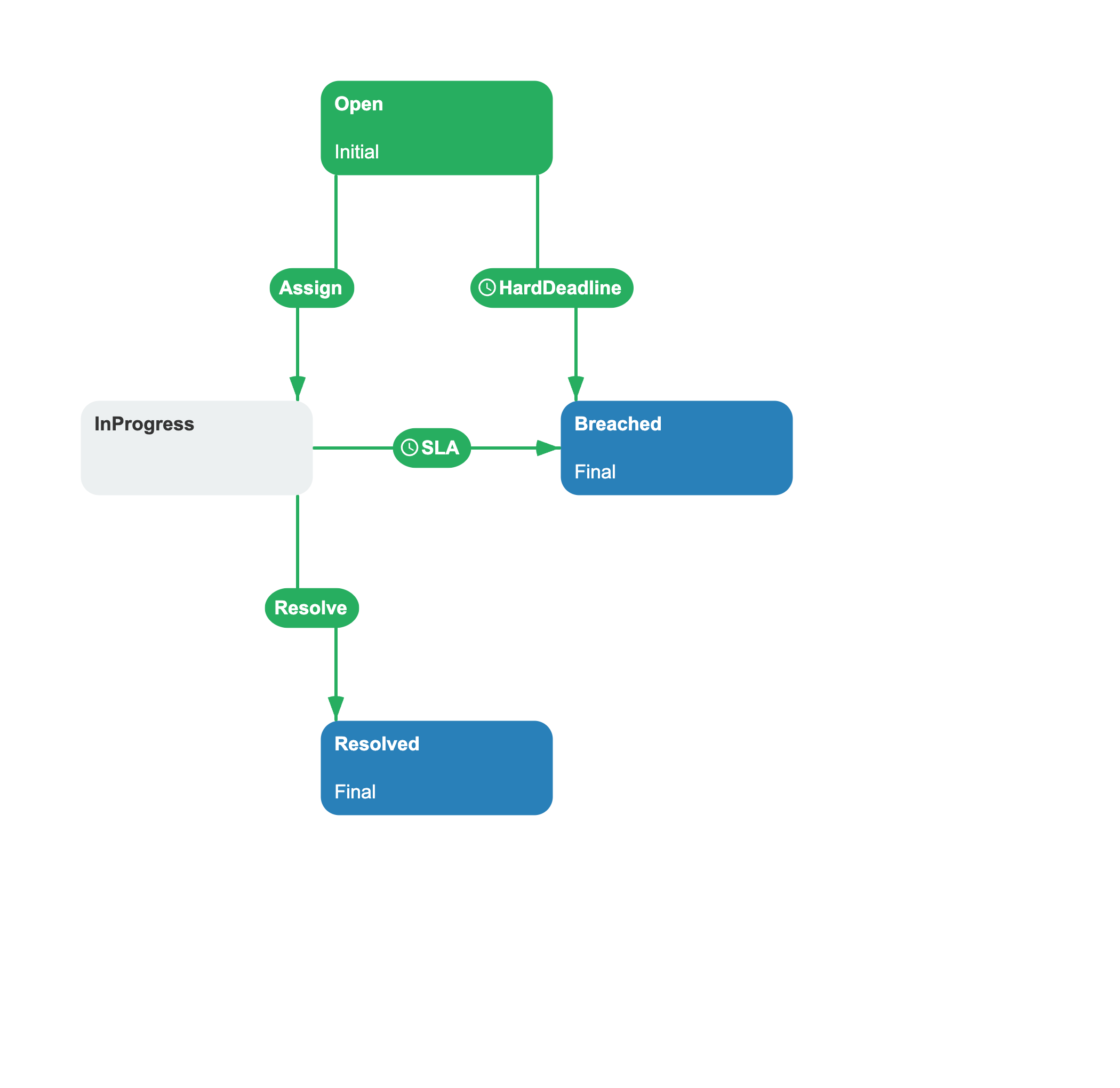
Two transitions are timer-triggered:
- The
DeadlineBreachtransition fromOpentoBreachedis triggered byHardDeadline. The runtime registers this timer as soon as the process instance enters theOpenactivity. If the ticket is still inOpenwhen the deadline passes, the timer fires and the process moves toBreached. - The
SLABreachtransition fromInProgresstoBreachedis triggered bySLA. The runtime registers this timer when the ticket is assigned and entersInProgress. If no one resolves the ticket within four hours, the timer fires and the process moves toBreached.
The HardDeadline timer is registered when the process first enters Open (the initial activity). If the ticket is assigned before the deadline, the Assign command moves it to InProgress. The process then clears the Open-activity timers and registers the InProgress -activity timers (SLA).
A scheme can declare any number of timers. Each timer is defined once and can be referenced by multiple transitions.
How timers connect to the runtime
A timer relates a transition to the process instance's timeline.
Timer registration
When a process instance enters an activity, WorkflowRuntime registers timers associated with outgoing timer-triggered transitions. The sequence is:
- Find every timer-triggered transition from the current activity.
- Clear previous timers, except same-name timers preserved by
NotOverrideIfExists. - Calculate the execution time from the timer type and process context.
- Register the timer in the persistence store. An overridable same-name timer is updated.
Timer execution
The runtime's TimerManager periodically queries the persistence store for due timers. For each timer, it loads the process instance and evaluates conditions on transitions from the current activity that reference the timer name:
- If a condition passes, the transition fires and the process moves to the target activity. The new activity triggers a fresh registration cycle.
- If no condition passes, the normal clear-and-register cycle runs for the current activity. With the default
NotOverrideIfExists="false", this replaces the fired timer and calculates its execution time again.
Recovery after downtime
Timer records remain in persistence while the runtime is stopped. After WorkflowRuntime.StartAsync() starts the timer manager, a poll selects records whose execution time has passed. Single-server mode polls immediately on startup; multi-server mode begins after its configured timer interval.
Custom expression values
Workflow Runtime compiles an Expression timer against the process instance. A DateTime result is used directly. A TimeSpan, integer number of milliseconds, or interval string is added to the runtime's current time. If the result cannot be converted, the optional GetCustomTimerValueAsync delegate can supply an execution time.
An expression reads a process parameter with the @ prefix. For a DateTime parameter named Deadline, the expression (@Deadline).AddHours(1) schedules the timer one hour after that parameter value.
Register a custom resolver when an expression value uses an application-specific format:
using System;using System.Threading.Tasks;using OptimaJet.Workflow.Core.Runtime;public static class TimerConfiguration{ public static void Configure(WorkflowRuntime runtime) { runtime.GetCustomTimerValueAsync = (value, timerName) => { if (timerName == "EndOfBusinessDay") { return Task.FromResult<DateTime?>( DateTime.Today.AddHours(18)); } return Task.FromResult<DateTime?>(null); }; }}Hosting environment considerations
Call WorkflowRuntime.StartAsync() after configuration to start the timer manager. See Configure Timers for hosting guidance and Runtime Settings for single-server and multi-server setup.
Calendar-aware timers
An Interval timer can use the work calendar resolved for the process instance. A value such as "8 whours" is converted to elapsed time according to that calendar's workdays and working hours.
When timers matter
- SLA enforcement: escalate a ticket if nobody reviews it within 24 hours
- Deadline: reject an approval if not decided by end of day
- Reminder: trigger a notification path after a delay
- Scheduled transition: move a waiting process at a configured time
See also
Work Calendar
Timers can use work calendars.
Command
Commands provide a user-triggered alternative to timers.
Transition
Transitions carry timer triggers and conditions that determine when the process moves to the next activity.
Frequently asked questions
What timer types does Workflow Engine support?
Five types: Interval (delay), Time (time of day), Date (calendar date at midnight), DateAndTime (exact moment), and Expression (a C# expression that resolves an execution time).
Can a timer coexist with a command on the same transition?
No. A transition can have exactly one trigger: either a command or a timer. If you need both user-triggered and time-triggered paths from the same activity, create two transitions.
What happens when a timer fires but conditions on the transition fail?
With the default NotOverrideIfExists="false", the runtime clears and registers the current activity's timers again. Interval starts a new delay from the current time, Time selects today or tomorrow again, Expression is reevaluated, and Date or DateAndTime resolves to the same configured moment. With NotOverrideIfExists="true", the fired same-name timer is not replaced and is deleted after the execution attempt.
What is the NotOverrideIfExists property for?
When NotOverrideIfExists is true, the runtime keeps an existing timer with the same name when that timer still applies after an activity change. This prevents an active countdown from restarting when the process loops back or moves to another activity that uses the same timer.
What happens to timers after the hosting environment restarts?
Persisted timers that became due while Workflow Runtime was stopped are selected after the timer manager starts polling. Single-server mode performs its first poll immediately; multi-server mode waits for its configured timer interval.