
Command

A command is a named trigger that moves a process instance from its current activity to the next one by firing a matching transition. Commands represent user actions or system events, such as "Submit", "Approve", or "Reject".
Commands are declared in a scheme separately from transitions. A transition references a command through its trigger. Executing a command makes the runtime evaluate matching transitions from the current activity.
A command is available to an identity when the restrictions on at least one matching transition allow that identity. Restrictions belong to transitions, not to the command itself.
A command can also carry input parameters, additional data the caller provides when executing it, such as a comment or a selected value.
Command properties
Each command in the scheme has a set of properties that define its identity and input parameters.
Core properties
| Property | Type | Description |
|---|---|---|
| Name | string | Case-sensitive name used to reference the command in transitions and when executing it |
| InputParameters | list of ParameterDefinitionReference | Parameters the command accepts. Each parameter has a name, a linked scheme parameter, and optional default value |
| Comment | string | Optional description |
Input parameter properties
Each input parameter in InputParameters has the following properties:
| Property | Type | Description |
|---|---|---|
| Name | string | Name used to access and localize the parameter |
| Parameter | ParameterDefinition | Links to a scheme-level parameter definition that determines the type |
| IsRequired | bool | Whether a value must be provided before executing |
| DefaultValue | string | JSON-serialized value applied by the parameter default methods |
| Comment | string | Optional description |
How commands connect to transitions in a scheme
Commands are declared in the <Commands> section of a scheme. Each <Command> element defines one named trigger. Transitions reference commands through their trigger element.
<Process Name="DocumentReview"> <Commands> <Command Name="Submit"/> <Command Name="Approve"> <InputParameters> <ParameterRef Name="Comment" NameRef="CommentParam" IsRequired="true"/> </InputParameters> </Command> </Commands> <Parameters> <Parameter Name="CommentParam" Type="String"/> </Parameters> <Activities> <Activity Name="Draft" IsInitial="true"> <Designer X="100" Y="200"/> </Activity> <Activity Name="Review"> <Designer X="400" Y="200"/> </Activity> <Activity Name="Approved" IsFinal="true"> <Designer X="700" Y="200"/> </Activity> </Activities> <Transitions> <Transition Name="Submit_Draft_Review" From="Draft" To="Review" Classifier="Direct"> <Triggers> <Trigger Type="Command" NameRef="Submit"/> </Triggers> <Conditions> <Condition Type="Always"/> </Conditions> <Designer/> </Transition> <Transition Name="Approve_Review_Approved" From="Review" To="Approved" Classifier="Direct"> <Triggers> <Trigger Type="Command" NameRef="Approve"/> </Triggers> <Conditions> <Condition Type="Always"/> </Conditions> <Designer/> </Transition> </Transitions></Process>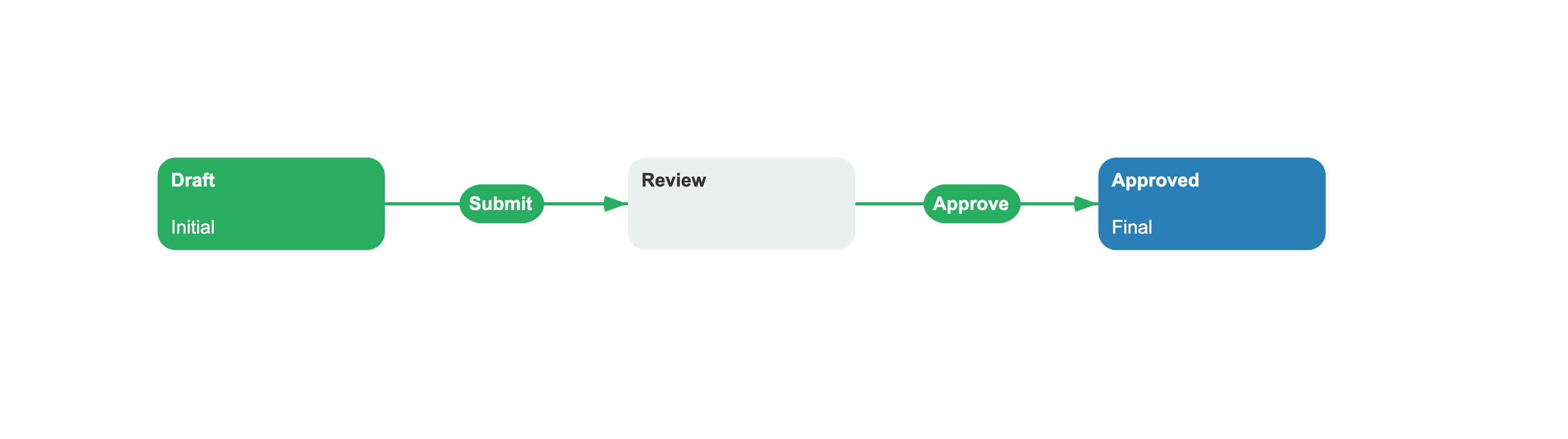
A command is referenced by a transition's trigger through the NameRef attribute. Multiple transitions can reference the same command. When someone executes that command, the runtime finds matching transitions from the current activity and evaluates their conditions to select which transition or transitions to execute.
Working with commands
When you call GetAvailableCommandsAsync, the runtime returns a list of WorkflowCommand objects. It filters command transitions from the current activities of the process and its child subprocesses by their restrictions for the supplied identity. Use GetAvailableCommandsWithConditionCheckAsync when failed transition conditions must also exclude commands from the list.
Each WorkflowCommand contains the command's resolved parameters, localization, and allowed identities.
var commands = await runtime.GetAvailableCommandsAsync(processId, identityId);foreach (var command in commands){ // System and localized names string name = command.CommandName; string localizedName = command.LocalizedName; // The activity and state this command is valid from string fromActivity = command.ValidForActivityName; string fromState = command.ValidForStateName; bool isForSubprocess = command.IsForSubprocess; TransitionClassifier classifier = command.Classifier; // Users who can execute this command IEnumerable<string> identities = command.Identities;}Command parameters
Each WorkflowCommand carries a list of CommandParameter objects. Every parameter exposes its metadata and current value:
| Property | Description |
|---|---|
ParameterName | System name of the parameter |
LocalizedName | Localized name of the parameter |
Type | CLR type of the parameter value |
IsRequired | Whether a value must be provided |
DefaultValue | Default value from the scheme |
Value | The current value, set before execution |
IsPersistent | If true, the value is saved to the database |
Set parameter values on the command object before executing it:
var command = commands.First();// Set a temporary parametercommand.SetParameter("Comment", "Approved");// Set a persistent parameter (saved to database)command.SetParameter("ApprovedAmount", 1500.00m, persist: true);// Validate required fields and typesif (command.Validate(out string errorMessage)){ await runtime.ExecuteCommandAsync(command, identityId, impersonatedIdentityId: null);}Implicit parameters
A command does not need to declare every parameter in its <InputParameters> section. SetParameter updates a declared command parameter when the name matches. Otherwise, it adds a new parameter with the value's runtime type. The persist argument determines whether the value is persistent or temporary; the runtime does not infer this from a same-named scheme parameter.
During execution, a declared command parameter name is mapped to its referenced scheme parameter name. An undeclared parameter keeps the name passed to SetParameter:
// TrackingNote is temporary because persist defaults to false.command.SetParameter("TrackingNote", "Routed to manager");WorkflowRuntime also adds the system parameters CurrentCommand, IdentityId, and ImpersonatedIdentityId during command execution. These parameters do not need to be declared in <InputParameters>.
See also
Transition
Transitions reference a command through triggers and fire when that command executes.
Rule
Rules filter which commands are available to a specific user.
Activity
Activities are the stable states where a process instance waits for commands.
Scheme
A scheme declares commands alongside activities, transitions, and parameters.
Frequently asked questions
What is a command in Workflow Engine?
A command is a named trigger defined in the scheme that moves a process instance from one activity to another by firing a matching transition. Commands represent user actions or system events, like "Submit", "Approve", or "Reject".
How does a transition reference a command?
A transition references a command through its nested <Triggers><Trigger Type="Command" NameRef="CommandName" /></Triggers> element. Multiple transitions can reference the same command. When that command is executed, the runtime evaluates matching transitions from the current activity.
What happens if a user tries to execute a command they are not allowed to use?
GetAvailableCommandsAsync filters command transitions by their restrictions. ExecuteCommandAsync does not repeat that check by default, so the application should present only returned commands or use ExecuteCommandWithRestrictionCheckAsync when restrictions must be checked again during execution.
How do I set parameter values on a command before executing it?
Use SetParameter(name, value) or SetParameter(name, value, persist: true) on the WorkflowCommand object returned by GetAvailableCommandsAsync. Call SetAllParametersToDefault() to reset all parameters, then run Validate() to check that required fields have values and types match.