
Parallel Approval

Use FillApproversUsers and FillApproversRoles to set up multi-user approval workflows. The Approver rule restricts commands to authorized users, and IsApproveComplete checks when all required approvals are collected. An Auto transition on the completion check fires on each activity re-entry. Handle rejection with a separate Reject command and transition. Use ClearApprovers to reset approval status between stages.
Implement parallel approval workflows where multiple users must approve before the process continues. The FillApproversUsers action populates the approvers list, the Approver rule restricts command execution to pending users, and the IsApproveComplete condition checks if all required approvals have been received.
Real-world scenario
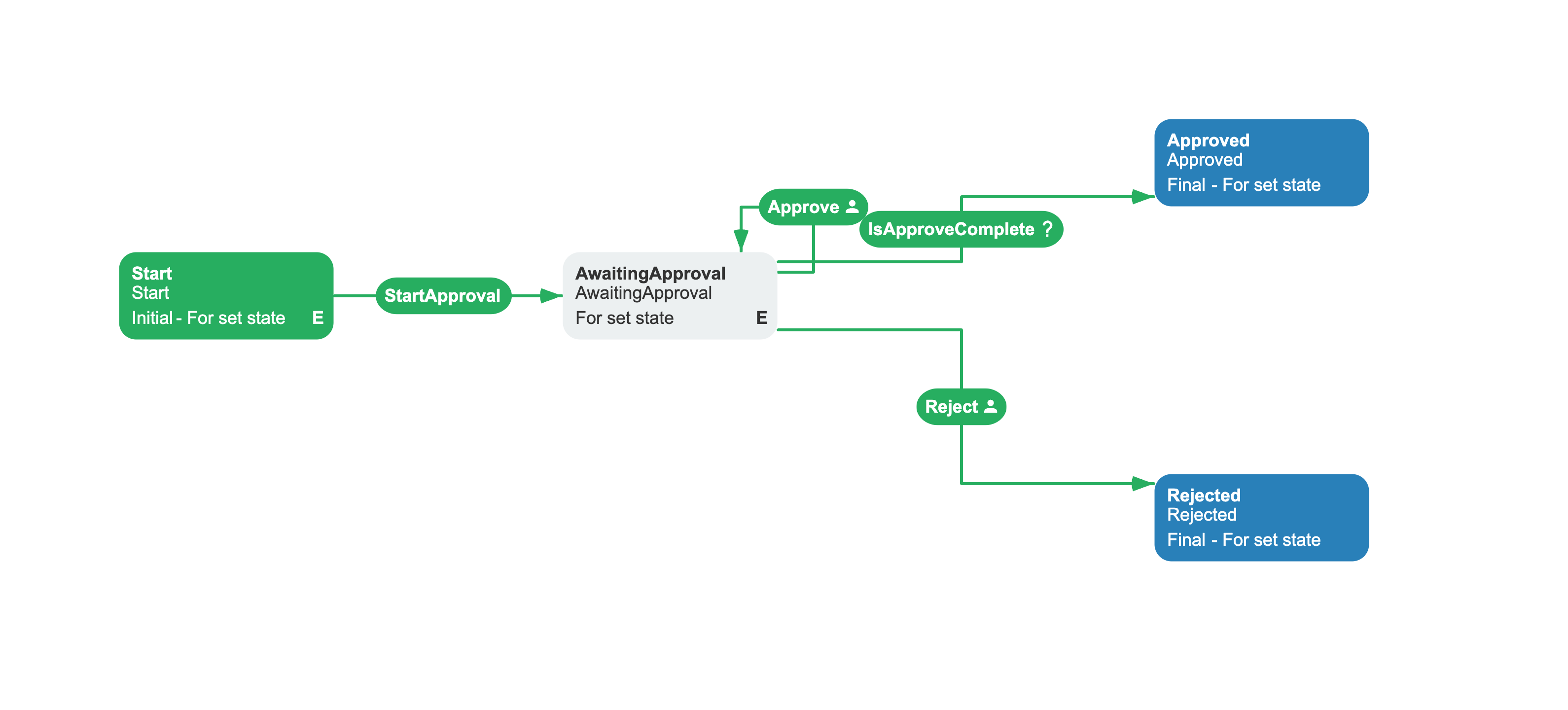
A purchase request workflow requires approval from three stakeholders: the department manager, the finance director, and the procurement officer. All three must approve the request before it proceeds. The FillApproversUsers action registers the approvers when the process enters the approval stage. Each pending approver can choose either the Approve or Reject command. After an identity approves, its flag becomes true, so the Approver rule no longer authorizes that identity to reject. An Auto trigger on the completion transition checks IsApproveComplete whenever the process re-enters the approval activity. A rejection by any approver who has not already voted moves the process to Rejected, regardless of approvals already submitted by other identities.
Workflow scheme
Related capabilities: FillApproversUsers action, FillApproversRoles action, ClearApprovers action, IsApproveComplete condition, IsApprovedByUsers condition, IsApprovedByRoles condition, CheckApproversExist condition, Approver rule, ApproversInStageAsync delegate.
<Process Name="PurchaseRequestApproval" CanBeInlined="false"> <Designer /> <Commands> <Command Name="Approve" /> <Command Name="Reject" /> <Command Name="StartApproval" /> </Commands> <Actors> <Actor Name="Approver" Rule="Approver" Value="" /> </Actors> <Activities> <Activity Name="Start" State="Start" IsInitial="True" IsFinal="False" IsForSetState="True" IsAutoSchemeUpdate="True"> <Implementation> <ActionRef Order="1" NameRef="ClearApprovers" /> </Implementation> <Designer X="100" Y="210" /> </Activity> <Activity Name="AwaitingApproval" State="AwaitingApproval" IsInitial="False" IsFinal="False" IsForSetState="True" IsAutoSchemeUpdate="True"> <Implementation> <ActionRef Order="1" NameRef="FillApproversUsers"> <ActionParameter><![CDATA[ { "Users": "manager, finance_director, procurement_officer", "Separator": ",", "RequiredApprovalsNumber": 0 } ]]></ActionParameter> </ActionRef> </Implementation> <Designer X="400" Y="210" /> </Activity> <Activity Name="Approved" State="Approved" IsInitial="False" IsFinal="True" IsForSetState="True" IsAutoSchemeUpdate="True"> <Designer X="800" Y="120" /> </Activity> <Activity Name="Rejected" State="Rejected" IsInitial="False" IsFinal="True" IsForSetState="True" IsAutoSchemeUpdate="True"> <Designer X="800" Y="360" /> </Activity> </Activities> <Transitions> <Transition Name="Start_AwaitingApproval" To="AwaitingApproval" From="Start" Classifier="Direct" IsFork="false" MergeViaSetState="false" DisableParentStateControl="false"> <Triggers> <Trigger Type="Command" NameRef="StartApproval" /> </Triggers> <Conditions> <Condition Type="Always" /> </Conditions> <Designer /> </Transition> <Transition Name="AwaitingApproval_RecordApproval" To="AwaitingApproval" From="AwaitingApproval" Classifier="Direct" IsFork="false" MergeViaSetState="false" DisableParentStateControl="false"> <Triggers> <Trigger Type="Command" NameRef="Approve" /> </Triggers> <Restrictions> <Restriction Type="Allow" NameRef="Approver" /> </Restrictions> <Conditions> <Condition Type="Always" /> </Conditions> <Designer /> </Transition> <Transition Name="AwaitingApproval_Approved" To="Approved" From="AwaitingApproval" Classifier="Direct" IsFork="false" MergeViaSetState="false" DisableParentStateControl="false"> <Triggers> <Trigger Type="Auto" /> </Triggers> <Conditions> <Condition Type="Action" NameRef="IsApproveComplete" ConditionInversion="false" /> </Conditions> <Designer /> </Transition> <Transition Name="AwaitingApproval_Rejected" To="Rejected" From="AwaitingApproval" Classifier="Direct" IsFork="false" MergeViaSetState="false" DisableParentStateControl="false"> <Triggers> <Trigger Type="Command" NameRef="Reject" /> </Triggers> <Restrictions> <Restriction Type="Allow" NameRef="Approver" /> </Restrictions> <Conditions> <Condition Type="Always" /> </Conditions> <Designer /> </Transition> </Transitions></Process>How the scheme works
- Instance created - the process starts at
Startand executesClearApprovers, which resets any previous approval state. The process then idles, waiting for theStartApprovalcommand. This ensures the approvers list is clean if the process is restarted. - Enter approval stage - executing
StartApprovalmoves the process toAwaitingApproval. The activity's implementation callsFillApproversUsers, which creates anApproverslist with three users (manager,finance_director,procurement_officer) and stores it as a process parameter. All three are required to approve (RequiredApprovalsNumber: 0means "all"). - Each user makes one decision - while an approver's flag is
false, theApproverrestriction authorizes that identity to call either theApproveorRejectcommand. The approval self-loop re-entersAwaitingApprovaland re-executesFillApproversUsers, which records the current user's approval by setting the flag totrue. TheApproverrule then filters out that identity, preventing another approval or a later rejection. - Auto checks completion on re-entry - the
Autotrigger fires each time the process entersAwaitingApproval(including after each self-loop).IsApproveCompletechecks whether all required approvals have been collected (Approvers.IsApproved). When all three have approved, the transition fires and the process moves toApproved(final). - A pending approver can reject - before voting, any approver returned by the
Approverrule can call theRejectcommand. The direct transition moves the process toRejected(final), so one rejection ends the process regardless of approvals already submitted by other identities. An identity that has already approved cannot execute this restricted transition.
Reference
The following actions, conditions, and rules are available for parallel approval workflows.
FillApproversUsers action
Populates the Approvers process parameter with a list of users who must approve. On first execution in an activity it creates the list; on subsequent executions in the same activity it records the current user's approval.
To retrieve approvers dynamically at runtime instead of hardcoding them in the scheme, set the ApproversInStageAsync delegate and use GetUsersFrom: FromApproversInStage:
basicPlugin.ApproversInStageAsync = async (stage, processInstance) =>{ // Fetch approvers for the given stage from your data store var approvers = await approvalService.GetStageApproversAsync( processInstance.ProcessId, stage); return approvers.Select(a => a.IdentityId);};When ApproversInStageAsync is not set, the approver list must come from the Users action parameter.
To map user identifiers from the Users parameter to identity IDs that the runtime recognizes, set the GetApproverIdentityId delegate:
basicPlugin.GetApproverIdentityId = async (processInstance, runtime, user) =>{ // Map a display name or email to a runtime identity ID var identityId = await userService.GetUserIdAsync(user); return identityId ?? user;};When GetApproverIdentityId is not set (default), user identifiers are used as-is.
| Parameter | Required | Default | Description |
|---|---|---|---|
Users | Yes | - | Comma-separated list of user IDs (when GetUsersFrom=FromParameters). |
Separator | Yes | , | Separator for splitting the Users string. |
RequiredApprovalsNumber | No | 0 | Number of approvals required. 0 means all. |
GetUsersFrom | No | FromParameters | Source of the approver list. See GetUsersFrom enum. |
StageName | No | - | Stage name passed to ApproversInStageAsync delegate when GetUsersFrom=FromApproversInStage. |
FillApproversRoles action
Populates the Approvers parameter with all users who belong to specified roles. BasicPlugin registers FillApproversRoles only while its UsersInRoleAsync delegate is set. Assigning the delegate adds the action; setting the delegate to null removes it.
| Parameter | Required | Default | Description |
|---|---|---|---|
Roles | Yes | - | Comma-separated list of role names. |
Separator | Yes | , | Separator for splitting the Roles string. |
RequiredApprovalsNumber | No | 0 | Number of approvals required. 0 means all. |
ClearApprovers action
Resets all approval statuses in the Approvers list to false. Use between approval stages so the same set of approvers must approve again. Takes no parameters.
IsApproveComplete condition
Returns true when the required number of approvals have been collected. Reads the Approvers process parameter and checks Approvers.IsApproved:
- If
RequiredApprovalsNumber > 0:truewhen that many users have approved. - If
RequiredApprovalsNumber == 0(default):truewhen ALL listed users have approved.
Takes no parameters.
IsApprovedByUsers condition
Returns true only when the process history contains a non-Reverse entry for every user in the Users parameter. A user matches when the user ID is the executor or actor of an entry. The condition does not verify that the entry was created by a particular approval command.
| Parameter | Required | Default | Description |
|---|---|---|---|
Users | Yes | - | Comma-separated list of user IDs. |
Separator | Yes | , | Separator for splitting the Users string. |
IsApprovedByRoles condition
Resolves every role through UsersInRoleAsync and combines the returned users. The condition returns true only when at least one user is resolved and every resolved user is the executor or actor of a non-Reverse process history entry. It does not verify that an entry was created by a particular approval command. BasicPlugin registers this condition only while UsersInRoleAsync is set.
| Parameter | Required | Default | Description |
|---|---|---|---|
Roles | Yes | - | Comma-separated list of role names. |
Separator | Yes | , | Separator for splitting the Roles string. |
CheckApproversExist condition
Returns true when the actor search resolves at least one identity from Allow restrictions on command transitions in the selected process-tree, activity, and classifier scope. Defining an actor is not sufficient: its rule must resolve an identity, and Restrict restrictions can remove identities from the result. Transition conditions are not evaluated. Use this condition to skip an approval stage when no eligible command actor can be resolved.
| Parameter | Required | Default | Description |
|---|---|---|---|
TransitionClassifier | Yes | Direct, NotSpecified | Which transition directions (Direct, Reverse, NotSpecified) to scan for actors. |
BeginningWithRoot | No | false | When true, start scanning from the root process. When false, start from the current process. |
ActivityName | No | Current activity | Activity to start scanning from. |
Approver rule
A built-in rule that checks whether the current identity is in the Approvers list. Use as a restriction on command transitions to limit approval commands to authorized users. The rule returns true only for users who have not yet approved, preventing duplicate approvals.
Enums
Enum values used by the parallel approval actions.
GetUsersFrom
Controls where FillApproversUsers retrieves the approver list from.
| Value | Behavior |
|---|---|
FromParameters | Retrieve approver list from the Users action parameter. |
FromApproversInStage | Retrieve approver list from the ApproversInStageAsync delegate using the StageName parameter. |
Troubleshooting common errors
Approvecommand is not available to any user - check thatFillApproversUsersexecuted before theApprovecommand is attempted. TheApproverrule reads theApproversparameter, which only exists afterFillApproversUsershas run.- Process never transitions to
Approved- verify that the completion transition has an Auto trigger. The Auto trigger evaluatesIsApproveCompleteimmediately after the final approval, without waiting for another command. A separately configured Command transition without restrictions can be authorized, but it requires an explicit command invocation. Adding anApproverrestriction would exclude identities that have already approved. FillApproversRolesis unavailable - setUsersInRoleAsyncbefore using role-based approval. While the delegate isnull,BasicPlugindoes not registerFillApproversRolesorIsApprovedByRoles; setting it back tonullremoves both. A workflow scheme therefore cannot resolve the action or condition through the plugin when the delegate is absent.- Approvals reset unexpectedly - if
FillApproversUsersis called in a different activity (e.g., in Start), theActivityWithApproverscheck causes it to create a new approvers list instead of recording the approval. PlaceFillApproversUsersin the activity where approval happens.
See also
Related documentation for approval and authorization workflows.
Basic Plugin Overview
Registration, configuration, and full API reference.
Role-Based Authorization
Restrict commands to users in specific roles.
Managing Subprocesses
Check whether child subprocesses created by fork transitions have completed, or delete all child subprocesses during cleanup.
Frequently asked questions
What is the difference between FillApproversUsers and FillApproversRoles?
FillApproversUsers populates the approvers list with specific user IDs passed in the Users parameter. FillApproversRoles resolves users by role membership via the UsersInRoleAsync delegate. Use FillApproversUsers when you know the exact approvers; use FillApproversRoles when approvers are determined by their role.
Can I require only a subset of approvers to approve?
Yes. Set RequiredApprovalsNumber to the number of approvals needed. For example, with 5 approvers and RequiredApprovalsNumber: 3, the process advances after any 3 approve.
What happens if an approver rejects?
A pending approver whose stored flag is false can use the Reject command to move the process to the Rejected activity (final). One rejection ends the approval process regardless of approvals already submitted by other identities. After an approver's flag becomes true, the Approver rule no longer authorizes that identity to execute the restricted Reject transition.
How do I retrieve approvers dynamically from my database?
Set the ApproversInStageAsync delegate on the BasicPlugin instance. The delegate receives (string stageName, ProcessInstance processInstance) and returns a list of approver IDs. Use the processInstance to access process parameters or external data sources. Then use FillApproversUsers with GetUsersFrom: FromApproversInStage and optionally set a StageName.