
Process Control

Use SetState, SetActivity, and ExecuteCommand actions in your workflow scheme to change process state, jump to activities, or trigger commands on other process instances without writing custom action providers. Combine with the IsProcessFinish condition and Timers to easily build multi-stage orchestration patterns across multiple separate process schemes.
Control workflow execution by changing the process state label, jumping to a different activity, or triggering commands on other process instances. Unlike WorkflowRuntime methods which are called from application code, SetState, SetActivity, and ExecuteCommand work inside a scheme - an activity can change its own process state, jump to a different activity, or trigger a command on another process as part of its execution logic.
Real-world scenario: multi-stage deployment
A deployment orchestrator coordinates releases across test and production environments. Three separate process schemes work together:
- DeploymentOrchestrator - the main coordinator that controls the release pipeline.
- TestRelease - a subordinate process that simulates test execution.
- Deploy - a subordinate process that simulates deployment.
When a release is triggered, the orchestrator:
- Runs tests by executing a
RunTestscommand on theTestReleaseprocess. - Waits for tests to pass using
IsProcessFinishto check ifTestReleasefinalized. - Deploys to production by executing a
DeployProdcommand on theDeployprocess. - Waits for deployment using
IsProcessFinishto confirm completion.
Each stage only proceeds when the previous one completes, preventing deployments on failing tests.
Workflow scheme
The ExecuteCommand action triggers external processes. The IsProcessFinish condition gates each timer-triggered transition until the external process finalizes.

The orchestrator controls two subordinate processes that simulate external work: TestRelease (runs test suites) and Deploy (releases to production). They wait idle in their initial activities until the orchestrator triggers their RunTests and DeployProd commands.
Related capabilities: ExecuteCommand action, SetState action, SetActivity action, IsProcessFinish condition.
<Process Name="DeploymentOrchestrator" CanBeInlined="false"> <Designer /> <Commands> <Command Name="Deploy" /> </Commands> <Timers> <Timer Name="CheckTestTimer" Type="Interval" Value="5s" NotOverrideIfExists="false" /> <Timer Name="CheckProdTimer" Type="Interval" Value="5s" NotOverrideIfExists="false" /> </Timers> <Activities> <Activity Name="Start" State="Start" IsInitial="True" IsFinal="False" IsForSetState="True" IsAutoSchemeUpdate="True"> <Implementation> <ActionRef Order="1" NameRef="SetParameter"> <ActionParameter><![CDATA[ { "ParameterName": "TestProcessId", "Value": "Guid.NewGuid().ToString()" } ]]></ActionParameter> </ActionRef> <ActionRef Order="2" NameRef="SetParameter"> <ActionParameter><![CDATA[ { "ParameterName": "ProdProcessId", "Value": "Guid.NewGuid().ToString()" } ]]></ActionParameter> </ActionRef> <ActionRef Order="3" NameRef="CreateProcess"> <ActionParameter><![CDATA[ { "Scheme": "TestRelease", "ProcessId": "@TestProcessId", "ProcessCreationParameters": "[]" } ]]></ActionParameter> </ActionRef> <ActionRef Order="4" NameRef="CreateProcess"> <ActionParameter><![CDATA[ { "Scheme": "Deploy", "ProcessId": "@ProdProcessId", "ProcessCreationParameters": "[]" } ]]></ActionParameter> </ActionRef> </Implementation> <Designer X="100" Y="210" /> </Activity> <Activity Name="DeployTest" State="DeployTest" IsInitial="False" IsFinal="False" IsForSetState="True" IsAutoSchemeUpdate="True"> <Implementation> <ActionRef Order="1" NameRef="ExecuteCommand"> <ActionParameter><![CDATA[ { "CommandName": "RunTests", "ProcessId": "@TestProcessId" } ]]></ActionParameter> </ActionRef> </Implementation> <Designer X="400" Y="210" /> </Activity> <Activity Name="DeployProduction" State="DeployProduction" IsInitial="False" IsFinal="False" IsForSetState="True" IsAutoSchemeUpdate="True"> <Implementation> <ActionRef Order="1" NameRef="ExecuteCommand"> <ActionParameter><![CDATA[ { "CommandName": "DeployProd", "ProcessId": "@ProdProcessId" } ]]></ActionParameter> </ActionRef> </Implementation> <Designer X="700" Y="210" /> </Activity> <Activity Name="Completed" State="Completed" IsInitial="False" IsFinal="True" IsForSetState="True" IsAutoSchemeUpdate="True"> <Designer X="1000" Y="210" /> </Activity> </Activities> <Transitions> <Transition Name="Start_DeployTest" To="DeployTest" From="Start" Classifier="Direct" IsFork="false" MergeViaSetState="false" DisableParentStateControl="false"> <Triggers> <Trigger Type="Command" NameRef="Deploy" /> </Triggers> <Conditions> <Condition Type="Always" /> </Conditions> <Designer /> </Transition> <Transition Name="DeployTest_DeployProduction" To="DeployProduction" From="DeployTest" Classifier="Direct" IsFork="false" MergeViaSetState="false" DisableParentStateControl="false"> <Triggers> <Trigger Type="Timer" NameRef="CheckTestTimer" /> </Triggers> <Conditions> <Condition Type="Action" NameRef="IsProcessFinish" ConditionInversion="false"> <ActionParameter><![CDATA[ { "ProcessId": "@TestProcessId" } ]]></ActionParameter> </Condition> </Conditions> <Designer /> </Transition> <Transition Name="DeployProduction_Completed" To="Completed" From="DeployProduction" Classifier="Direct" IsFork="false" MergeViaSetState="false" DisableParentStateControl="false"> <Triggers> <Trigger Type="Timer" NameRef="CheckProdTimer" /> </Triggers> <Conditions> <Condition Type="Action" NameRef="IsProcessFinish" ConditionInversion="false"> <ActionParameter><![CDATA[ { "ProcessId": "@ProdProcessId" } ]]></ActionParameter> </Condition> </Conditions> <Designer /> </Transition> </Transitions></Process>How the scheme works
Once the scheme is saved and BasicPlugin is registered with the WorkflowRuntime, the process runs as follows:
- Instance created - the orchestrator starts at
Startand executes:- Two
SetParameteractions that each evaluateGuid.NewGuid().ToString()to generate fresh IDs (TestProcessId,ProdProcessId). - Two
CreateProcessactions that createTestReleaseandDeployprocess instances using the generated IDs. Both newly created processes wait idle in their initial activities (Idle).
- Two
- Execute the
Deploycommand - the orchestrator moves toDeployTest. The activity uses@TestProcessId(parameter substitution syntax) to executeExecuteCommand("RunTests", testProcessId)on theTestReleaseprocess. TheTestReleaseprocess leavesIdle, moves toRunningTests, and after 5 seconds finalizes atTestsCompleted. - Timer checks test completion every 5 seconds - the
Timertrigger fires every 5 seconds. Each time,IsProcessFinish(@TestProcessId)checks if theTestReleaseprocess finalized. When it does, the transition fires and the orchestrator moves toDeployProduction. - Deploy to production -
DeployProductionuses@ProdProcessIdto executeExecuteCommand("DeployProd", prodProcessId)on theDeployprocess. TheDeployprocess leavesIdle, moves toDeploying, and after 5 seconds finalizes atDeploymentCompleted. - Timer checks deployment every 5 seconds - the same pattern repeats. When the
Deployprocess finalizes, the orchestrator moves toCompletedand finalizes.
External process schemes
The subordinate processes that the orchestrator controls are separate schemes. Each waits for a command, simulates work with a timer, then finalizes.
TestRelease accepts the RunTests command, transitions from Idle to RunningTests, and after a 5-second timer moves to TestsCompleted (final).
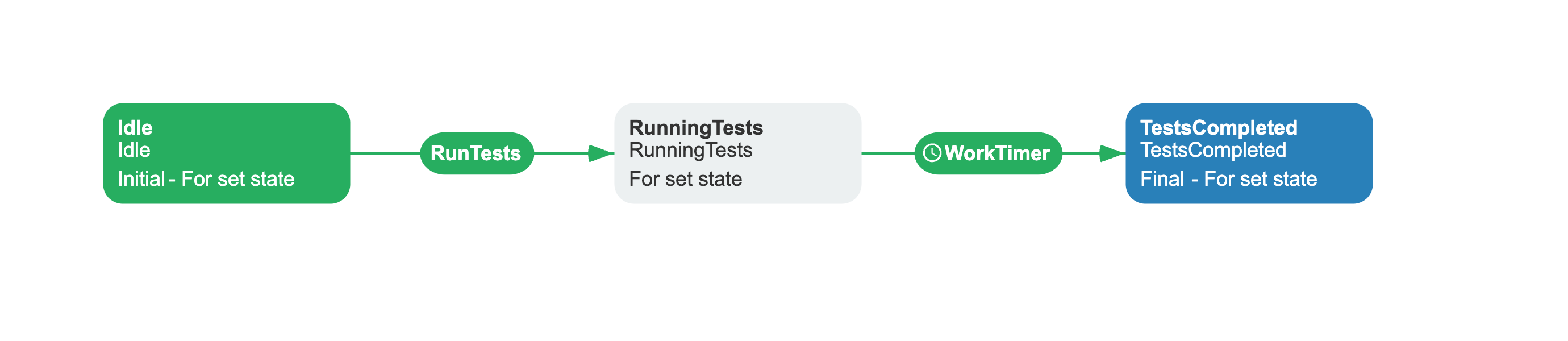
<Process Name="TestRelease" CanBeInlined="false"> <Designer /> <Commands> <Command Name="RunTests" /> </Commands> <Timers> <Timer Name="WorkTimer" Type="Interval" Value="5s" NotOverrideIfExists="false" /> </Timers> <Activities> <Activity Name="Idle" State="Idle" IsInitial="True" IsFinal="False" IsForSetState="True" IsAutoSchemeUpdate="True"> <Designer X="100" Y="210" /> </Activity> <Activity Name="RunningTests" State="RunningTests" IsInitial="False" IsFinal="False" IsForSetState="True" IsAutoSchemeUpdate="True"> <Designer X="400" Y="210" /> </Activity> <Activity Name="TestsCompleted" State="TestsCompleted" IsInitial="False" IsFinal="True" IsForSetState="True" IsAutoSchemeUpdate="True"> <Designer X="700" Y="210" /> </Activity> </Activities> <Transitions> <Transition Name="Idle_RunningTests" To="RunningTests" From="Idle" Classifier="Direct" IsFork="false" MergeViaSetState="false" DisableParentStateControl="false"> <Triggers> <Trigger Type="Command" NameRef="RunTests" /> </Triggers> <Conditions> <Condition Type="Always" /> </Conditions> <Designer /> </Transition> <Transition Name="RunningTests_TestsCompleted" To="TestsCompleted" From="RunningTests" Classifier="Direct" IsFork="false" MergeViaSetState="false" DisableParentStateControl="false"> <Triggers> <Trigger Type="Timer" NameRef="WorkTimer" /> </Triggers> <Conditions> <Condition Type="Always" /> </Conditions> <Designer /> </Transition> </Transitions></Process>Deploy accepts the DeployProd command, transitions from Idle to Deploying, and after a 5-second timer moves to DeploymentCompleted (final).
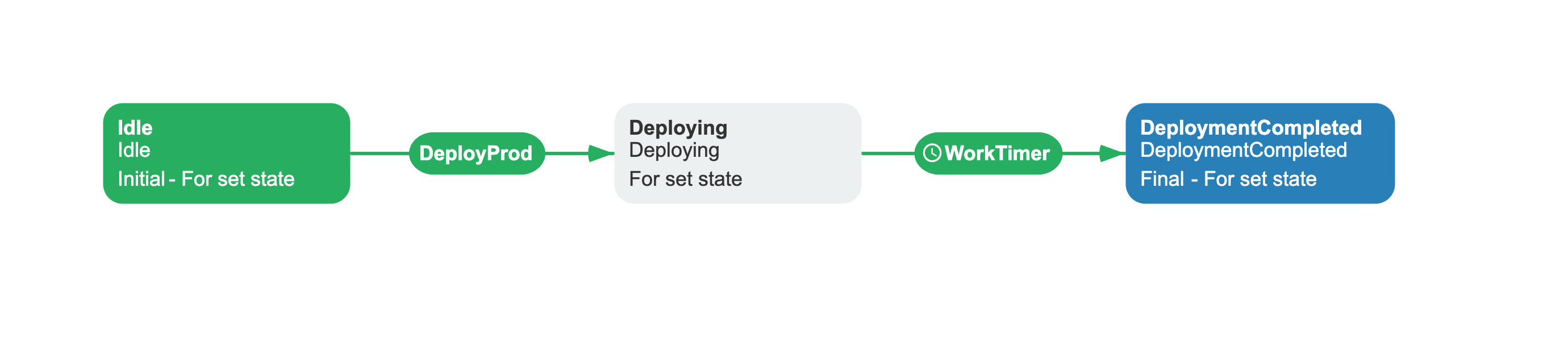
<Process Name="Deploy" CanBeInlined="false"> <Designer /> <Commands> <Command Name="DeployProd" /> </Commands> <Timers> <Timer Name="WorkTimer" Type="Interval" Value="5s" NotOverrideIfExists="false" /> </Timers> <Activities> <Activity Name="Idle" State="Idle" IsInitial="True" IsFinal="False" IsForSetState="True" IsAutoSchemeUpdate="True"> <Designer X="100" Y="210" /> </Activity> <Activity Name="Deploying" State="Deploying" IsInitial="False" IsFinal="False" IsForSetState="True" IsAutoSchemeUpdate="True"> <Designer X="400" Y="210" /> </Activity> <Activity Name="DeploymentCompleted" State="DeploymentCompleted" IsInitial="False" IsFinal="True" IsForSetState="True" IsAutoSchemeUpdate="True"> <Designer X="700" Y="210" /> </Activity> </Activities> <Transitions> <Transition Name="Idle_Deploying" To="Deploying" From="Idle" Classifier="Direct" IsFork="false" MergeViaSetState="false" DisableParentStateControl="false"> <Triggers> <Trigger Type="Command" NameRef="DeployProd" /> </Triggers> <Conditions> <Condition Type="Always" /> </Conditions> <Designer /> </Transition> <Transition Name="Deploying_DeploymentCompleted" To="DeploymentCompleted" From="Deploying" Classifier="Direct" IsFork="false" MergeViaSetState="false" DisableParentStateControl="false"> <Triggers> <Trigger Type="Timer" NameRef="WorkTimer" /> </Triggers> <Conditions> <Condition Type="Always" /> </Conditions> <Designer /> </Transition> </Transitions></Process>Reference
The following actions and conditions are available for process control within your workflow schemes.
CreateProcess action
Creates an independent process instance from within a workflow scheme. The created process is not tracked as a subprocess - CheckAllSubprocessesCompleted and DeleteSubprocesses do not apply to it.
| Parameter | Required | Default | Description |
|---|---|---|---|
Scheme | Yes | - | Scheme code of the process to create. |
ProcessId | No | Auto-generated GUID | Explicit ID for the new process. |
ProcessCreationParameters | Yes | - | JSON string containing an array of initial parameters. |
ProcessCreationParameters format:
"[{\"persist\":true,\"value\":\"\\\"value\\\"\",\"name\":\"ParamName\"}]"| Field | Type | Description |
|---|---|---|
name | string | Parameter name. |
value | string | Parameter value. Interpreted as a C# expression. For string literals, wrap in escaped C# quotes. |
persist | bool | If true, the parameter is persisted in the database. |
ExecuteCommand action
Triggers a command on a different process instance by process ID. The target process must exist and be in a state that accepts the command.
| Parameter | Required | Default | Description |
|---|---|---|---|
CommandName | Yes | - | Name of the command to execute on the target process. |
ProcessId | Yes | - | GUID of the target process instance. Must differ from the current process. |
The action validates that the target process exists, the command is available, and the target is not the same process. An exception is thrown if any check fails.
SetState action
Moves the process to an activity by state name. Each activity has a State attribute - SetState finds the activity with State=StateName and IsForSetState="True", then navigates there. This is similar to SetActivity, but the lookup key is the state value rather than the activity name.
When ProcessId is omitted or matches the current process, SetState schedules the change in the current execution. SetAfter determines whether the change happens after the current action or after all actions in the activity. When ProcessId identifies a different process, SetState updates that process immediately through WorkflowRuntime.SetStateAsync; SetAfter does not control this update.
| Parameter | Required | Default | Description |
|---|---|---|---|
StateName | Yes | - | New state name to set on the process instance. |
SetAfter | Yes | AfterAction | For the current process, when to apply the scheduled change. It has no effect for a different ProcessId. See SetAfter enum. |
ProcessId | No | Current process ID | Target process to update. A different process is updated immediately through WorkflowRuntime.SetStateAsync. |
SetActivity action
Programmatically moves the process to a different activity. Use this for escalation paths, skipping completed steps, or routing based on business logic.
| Parameter | Required | Default | Description |
|---|---|---|---|
ActivityName | Yes | - | Name of the target activity to jump to. |
SetAfter | Yes | AfterAction | When to apply the change. See SetAfter enum. |
When SetAfter is AfterAction, the process moves to the target activity immediately after the current action completes. Subsequent actions in the current activity do not execute. When AfterActivity, all actions in the current activity run before the jump.
IsProcessFinish condition
Returns true when the specified process has been finalized. Use on outgoing transitions to gate progression until a process completes.
| Parameter | Required | Default | Description |
|---|---|---|---|
ProcessId | No | Current process ID | Process to check. When omitted, checks the current process. |
UpdateDocumentStateAsync delegate
A delegate on the BasicPlugin instance that fires when a process changes to Idled or Finalized status. Use it to synchronize external state with the workflow state.
// Illustrative example - not from a real applicationbasicPlugin.UpdateDocumentStateAsync = async (processInstance, stateName, localizedStateName) =>{ await dbContext.Documents .Where(d => d.Id == processInstance.ProcessId) .ExecuteUpdateAsync(setters => setters .SetProperty(d => d.State, stateName));};The delegate is not called for subprocesses. It only fires when the scheme code matches the optional scheme list passed during plugin registration.
Enums
Enum values used by the process control actions.
SetAfter
The SetAfter parameter determines when SetState or SetActivity changes the current process. When SetState targets a different ProcessId, it updates that process immediately and does not use SetAfter.
| Value | Behavior |
|---|---|
AfterAction | Execute after the current action completes. Subsequent actions in the activity will not execute. |
AfterActivity | Execute after the entire activity completes. All actions in the activity execute before the state change. |
Troubleshooting common errors
- ExecuteCommand on the same process - the target
ProcessIdmust belong to a different process instance. Attempting to run a command on the same process throws an exception. - SetState / SetActivity with
AfterActionskips remaining actions - when either action changes the current process andSetAfterisAfterAction(default), the activity switch happens immediately after the current action. Any subsequent actions in the same activity are skipped. SetAfterActivityto let all actions finish before the switch. - SetState with no matching activity -
SetStaterequires an activity whoseStatematchesStateNameand hasIsForSetState="True". If no such activity exists, anActivityNotFoundExceptionis thrown.
See also
Basic Plugin Overview
Registration, configuration, and full API reference.
Managing Parameters
Store, remove, and branch on parameter values.
HTTP Requests
Send HTTP requests and branch on responses.
Frequently asked questions
What is the difference between SetState and SetActivity?
SetState finds the activity with State=StateName and moves the process there. SetActivity finds the activity by its Name. Both switch the current activity - the difference is the lookup key. Use SetState when you know the target state (e.g. "Approved") but not the activity name; use SetActivity when you know the exact activity name.
How does ExecuteCommand differ from CreateProcess?
ExecuteCommand triggers an existing command on an existing process instance. CreateProcess creates a new independent process instance. Use ExecuteCommand when you already have a running process and need to advance it; use CreateProcess when you need to start a brand new workflow.
What happens to remaining actions when SetState or SetActivity changes the current process?
With SetAfter: AfterAction (default), the remaining actions in the current activity do not execute. With SetAfter: AfterActivity, all actions complete before the change takes effect. When SetState targets a different ProcessId, the current process continues normally; SetAfter does not control the update to the other process.
Can SetState finalize a process?
Yes, if the target activity (the one with matching State and IsForSetState="True") has IsFinal="True". Since SetState moves the process to that activity, a final target activity causes the process to finalize.