
Localization

Localization in Workflow Engine maps internal names for commands, states, command parameters, actions, conditions, schemes, and comments to culture-specific text. Applications can display these translated values while Workflow Engine continues to use the internal names.
WorkflowRuntime, ProcessInstance, and ProcessDefinition expose a Localizer, but each one starts with different translation sources. A lookup uses the requested culture, CultureInfo.CurrentCulture when no culture is supplied, a default translation when available, and finally the original internal name.
What Localization is
Localization in Workflow Engine is a set of translation entries stored alongside a scheme or provided through an external source. Each entry maps an object name - for example, a command called Approve - to a translated string for a specific culture, such as Approuver for French or Genehmigen for German.
Every translation entry has these properties:
| Property | Description |
|---|---|
| ObjectName | The internal name of the scheme object being translated |
| Type | The type of the object: Command, State, Parameter, Action, Condition, Scheme, or Comment |
| Culture | The CultureInfo name used for the translation, for example en-US, fr-FR, or de-DE |
| IsDefault | When true, this translation is used when no translation is found for the requested culture |
| Value | The translated string for the specified culture |
The built-in Localization.Get method selects an exact culture match before a default entry. When a Localizer has several sources, it returns the first non-default candidate in source order. If no such candidate exists, it returns the first default supplied by those sources. If neither is available, the Localizer returns the original internal name.
How Localization works
Localization entries are stored in the scheme. They can be accessed through the Localizer property on WorkflowRuntime, ProcessInstance, or ProcessDefinition (the scheme object). Each source has a different search scope:
WorkflowRuntime.Localizer- searches only external localization providers registered at runtime.ProcessInstance.Localizer- binds the scheme as the first source and the runtime's external provider as the second.ProcessDefinition.Localizer- searches only the scheme's own localization.
Localization entries are embedded directly in the scheme XML inside a <Localization> section. The following scheme declares French translations for the Review state and the Approve command:
<Process Name="DocumentReview"> <Commands> <Command Name="Submit"/> <Command Name="Approve"/> </Commands> <Activities> <Activity Name="Draft" State="Draft" IsInitial="true"> <Designer X="100" Y="200"/> </Activity> <Activity Name="Review" State="Review"> <Designer X="400" Y="200"/> </Activity> <Activity Name="Approved" State="Approved" IsFinal="true"> <Designer X="700" Y="200"/> </Activity> </Activities> <Transitions> <Transition Name="Submit_Draft_Review" From="Draft" To="Review" Classifier="Direct"> <Triggers> <Trigger Type="Command" NameRef="Submit"/> </Triggers> <Conditions> <Condition Type="Always"/> </Conditions> <Designer/> </Transition> <Transition Name="Approve_Review_Approved" From="Review" To="Approved" Classifier="Direct"> <Triggers> <Trigger Type="Command" NameRef="Approve"/> </Triggers> <Conditions> <Condition Type="Always"/> </Conditions> <Designer/> </Transition> </Transitions> <Localization> <Localize Type="State" IsDefault="false" Culture="fr-FR" ObjectName="Review" Value="Revision"/> <Localize Type="Command" IsDefault="false" Culture="fr-FR" ObjectName="Approve" Value="Approuver"/> </Localization></Process>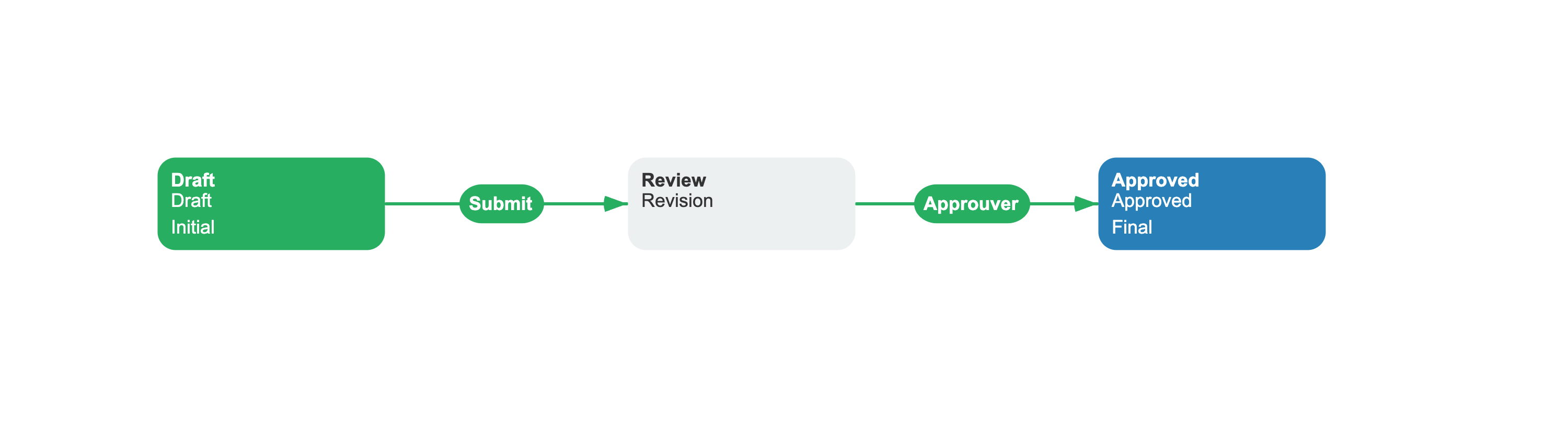
Access a scheme translation through the process instance's Localizer:
using System.Globalization;using OptimaJet.Workflow.Core.Model;static string GetFrenchStateName(ProcessInstance processInstance){ return processInstance.Localizer[ "Review", LocalizeType.State, CultureInfo.GetCultureInfo("fr-FR")];}Adding translations with an external provider
For shared translations, register an ILocalizationProvider with WorkflowRuntime. The built-in Localization collection already implements this interface:
using OptimaJet.Workflow.Core.Model;using OptimaJet.Workflow.Core.Runtime;static WorkflowRuntime AddSharedTranslations(WorkflowRuntime runtime){ return runtime.WithLocalizationProvider(new Localization { new Translation( "Approve", "Approuver", LocalizeType.Command, "fr-FR") });}For database, resource-file, or service-backed translations, implement ILocalizationProvider.Get for lookups and GetAll for predefined translations shown in the Designer. See Localization configuration for the provider and programmatic scheme configuration APIs.
Localizing commands in GetAvailableCommands
When you retrieve available commands for a user, pass the culture to populate WorkflowCommand.LocalizedName and each command parameter's LocalizedName:
using System;using System.Globalization;using System.Threading.Tasks;using OptimaJet.Workflow.Core.Runtime;static async Task ShowCommandsAsync( WorkflowRuntime runtime, Guid processId, string identityId){ var culture = CultureInfo.GetCultureInfo("fr-FR"); var commands = await runtime.GetAvailableCommandsAsync( processId, identityId, culture); foreach (var command in commands) { Console.WriteLine(command.LocalizedName); }}If no culture is specified, CultureInfo.CurrentCulture is used. The available-command path creates each WorkflowCommand from its ProcessDefinition, so it uses the translations embedded in the scheme and does not query the runtime's external provider.
Localization and Scheme
A scheme stores its localization entries in ProcessDefinition.Localization. ProcessDefinition.Localizer uses only those entries, while ProcessInstance.Localizer binds the scheme source first and the runtime's external provider second. A culture-specific external entry can therefore replace a default scheme entry, but not a culture-specific scheme entry.
Use scheme-local translations for workflow-specific names and for names returned by available-command APIs. Use an external ILocalizationProvider for shared translations resolved through WorkflowRuntime.Localizer or a localizer bound to a process or scheme.
See also
Command
Commands display localized names when culture is specified in GetAvailableCommands.
Scheme
Schemes store their own localization entries for scheme-specific translations.
Frequently asked questions
What is localization in Workflow Engine?
Localization maps commands, states, command parameters, actions, conditions, scheme names, and comments to culture-specific text. A Localizer returns the original internal name when neither a culture-specific nor a default translation is available.
How do I add translations to a scheme?
Translations can be added directly to the scheme's localization section. Each entry specifies the object name, LocalizeType, culture name, value, and whether it is a default for lookups without a culture-specific match.
How do I add external translations without modifying the scheme?
Implement ILocalizationProvider and register it through runtime.WithLocalizationProvider(provider). WorkflowRuntime.Localizer uses that external source, while ProcessInstance.Localizer binds its scheme before the provider.
How do I get localized command names for a user?
Call GetAvailableCommandsAsync(processId, identityId, culture) and read command.LocalizedName. Available commands use scheme-local command and parameter translations; when culture is omitted, they use CultureInfo.CurrentCulture.