
Sending Emails

Send email notifications at specific workflow stages using the SendEmail action in BasicPlugin. This pattern notifies users about process events - order confirmations, approval requests, completion notifications - via SMTP.
Real-world scenario
A customer support workflow sends an email notification when a ticket is resolved. A manager triggers the SendEmail command from the workflow UI. The workflow sends an HTML-formatted email to the customer with the resolution details and a satisfaction survey link.
Workflow scheme
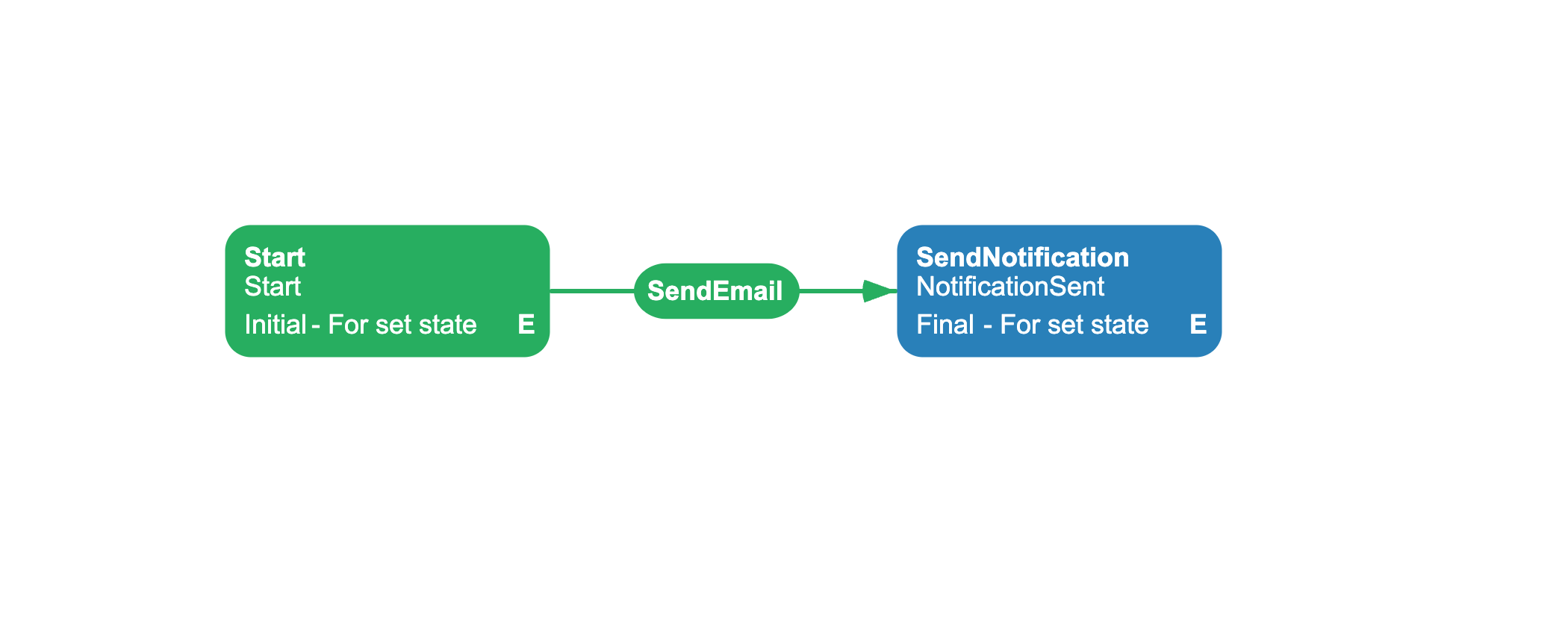
The scheme starts in the Start activity, which initializes process parameters (customer email, name, ticket details) via SetParameter actions. A SendEmail command triggers the transition to the SendNotification activity, which sends the email with parameter-substituted content via the SendEmail action.
Related capabilities: SendEmail action, Setting_Mailserver* configuration properties.
<Process Name="EmailNotification" CanBeInlined="false"> <Designer /> <Commands> <Command Name="SendEmail" /> </Commands> <Activities> <Activity Name="Start" State="Start" IsInitial="True" IsFinal="False" IsForSetState="True" IsAutoSchemeUpdate="True"> <Implementation> <ActionRef Order="1" NameRef="SetParameter"> <ActionParameter><![CDATA[ { "ParameterName": "CustomerEmail", "Value": "\"alice@example.com\"" } ]]></ActionParameter> </ActionRef> <ActionRef Order="2" NameRef="SetParameter"> <ActionParameter><![CDATA[ { "ParameterName": "CustomerName", "Value": "\"Alice Johnson\"" } ]]></ActionParameter> </ActionRef> <ActionRef Order="3" NameRef="SetParameter"> <ActionParameter><![CDATA[ { "ParameterName": "TicketId", "Value": "\"TKT-2026-0842\"" } ]]></ActionParameter> </ActionRef> <ActionRef Order="4" NameRef="SetParameter"> <ActionParameter><![CDATA[ { "ParameterName": "AgentName", "Value": "\"Bob Smith\"" } ]]></ActionParameter> </ActionRef> <ActionRef Order="5" NameRef="SetParameter"> <ActionParameter><![CDATA[ { "ParameterName": "Resolution", "Value": "\"The issue was resolved by restarting the server\"" } ]]></ActionParameter> </ActionRef> <ActionRef Order="6" NameRef="SetParameter"> <ActionParameter><![CDATA[ { "ParameterName": "SurveyLink", "Value": "\"https://survey.example.com/ticket-0842\"" } ]]></ActionParameter> </ActionRef> </Implementation> <Designer X="100" Y="200" /> </Activity> <Activity Name="SendNotification" State="NotificationSent" IsInitial="False" IsFinal="True" IsForSetState="True" IsAutoSchemeUpdate="True"> <Implementation> <ActionRef Order="1" NameRef="SendEmail"> <ActionParameter><![CDATA[ { "To": "@CustomerEmail", "Subject": "Your support ticket #@TicketId has been resolved", "Body": "<h2>Your ticket has been resolved</h2><p>Dear @CustomerName,</p><p>Your support ticket <strong>#@TicketId</strong> has been resolved by @AgentName.</p><p><strong>Resolution:</strong> @Resolution</p><p>Please take a moment to fill out our <a href='@SurveyLink'>satisfaction survey</a>.</p><p>Thank you,<br/>Support Team</p>", "IsHTML": true } ]]></ActionParameter> </ActionRef> </Implementation> <Designer X="400" Y="200" /> </Activity> </Activities> <Transitions> <Transition Name="Start_SendNotification" To="SendNotification" From="Start" Classifier="Direct" IsFork="false" AllowConcatenationType="And" RestrictConcatenationType="And" ConditionsConcatenationType="And" MergeViaSetState="false" DisableParentStateControl="false"> <Triggers> <Trigger Type="Command" NameRef="SendEmail" /> </Triggers> <Conditions> <Condition Type="Always" /> </Conditions> <Designer /> </Transition> </Transitions></Process>Configuration
Configure SMTP settings on the BasicPlugin instance before registration:
basicPlugin.Setting_Mailserver = "smtp.gmail.com";basicPlugin.Setting_MailserverPort = 587;basicPlugin.Setting_MailserverFrom = "workflow@company.com";basicPlugin.Setting_MailserverLogin = "workflow@company.com";basicPlugin.Setting_MailserverPassword = "app-password";basicPlugin.Setting_MailserverSsl = true;Register the plugin with WorkflowRuntime:
runtime.WithPlugin(basicPlugin);In your scheme, assign SendEmail to an activity Implementation. The action parameters override the global SMTP settings per-action if specified.
SendEmail parameters
The SendEmail action accepts these parameters in JSON format:
| Parameter | Type | Required | Description |
|---|---|---|---|
To | string | yes | Recipient email address. Supports comma-separated addresses for multiple recipients. |
Subject | string | no | Email subject line. |
Body | string | no | Email body content. |
IsHTML | bool | no | Set to true to render body as HTML. Default: false. |
CcList | JSON array | no | List of CC recipients. Example: ["manager@company.com", "hr@company.com"]. |
BccList | JSON array | no | List of BCC recipients. |
ReplyToList | JSON array | no | List of Reply-To addresses. |
MailServer | string | no | SMTP server (overrides global setting). |
MailServerPort | int | no | SMTP port (overrides global setting). |
MailServerFrom | string | no | From address (overrides global setting). |
MailServerLogin | string | no | SMTP login (overrides global setting). |
MailServerPass | string | no | SMTP password (overrides global setting). |
MailServerSsl | bool | no | Enable SSL (overrides global setting). |
Using process parameters in email content
You can inject workflow parameter values into email content using the @ParameterName syntax. The WorkflowRuntime substitutes these references before sending the email.
Example with parameter substitution:
{ "To": "@CustomerEmail", "Subject": "Ticket #@TicketId resolved", "Body": "<p>Dear @CustomerName,</p><p>Your ticket has been resolved.</p>", "IsHTML": true}The workflow engine replaces @CustomerEmail, @TicketId, and @CustomerName with actual process parameter values at runtime. To reference nested parameters use @(Parameter.SubName) syntax. For formatted values use @(Parameter:format) (for example, @(StartDate:yyyy-MM-dd)). For JSON serialization use @(Parameter:json).
Error handling
The SendEmail action throws an exception if the email fails (SMTP error, network issue, authentication failure). Unlike HTTPRequest, SendEmail does not return a failure status it either succeeds or throws.
Activities support built-in exception handlers that catch action exceptions and determine the next step. Add an ExceptionsHandlers block to the activity. For a SetState handler, NameForSet is a state name, not an activity name. First, add a fallback activity to the Activities block of the page's scheme:
<Activity Name="EmailError" State="Error" IsInitial="False" IsFinal="True" IsForSetState="True" IsAutoSchemeUpdate="True"> <Designer X="400" Y="400" /></Activity>The SetState handler can select EmailError because its non-empty State equals NameForSet="Error" and IsForSetState is True. Without a matching activity, the handler throws ActivityNotFoundException while handling the original email error. Then add the handler to SendNotification:
<Activity Name="SendNotification" State="NotificationSent" IsInitial="False" IsFinal="True" IsForSetState="True" IsAutoSchemeUpdate="True"> <ExceptionsHandlers> <ExceptionsHandler Exceptions="*" Type="SetState" NameForSet="Error" Order="1" /> </ExceptionsHandlers> <Implementation> <ActionRef Order="1" NameRef="SendEmail"> ... </ActionRef> </Implementation> <Designer X="400" Y="200" /></Activity>Available handler types:
| Type | Behavior |
|---|---|
SetActivity | Move to a specified activity |
SetState | Move to a specified state |
Retry | Retry the action (set RetryCount) |
Ignore | Suppress the exception and continue |
Use Exceptions="*" to catch all exceptions, or specify a full exception type name (for example, System.Net.Mail.SmtpException). Handlers are evaluated in Order sequence.
See also
Basic Plugin Overview
Registration, configuration, and full API reference.
HTTP Requests
Call external APIs from your workflow.
Managing Parameters
Store and use process parameter values.
Frequently asked questions
Can I send HTML emails?
Yes. Set IsHTML to true in the SendEmail action parameters. The email body renders as HTML, supporting tags like <h2>, <p>, <table>, and <a>.
How do I send to multiple recipients?
Use comma-separated email addresses in the To parameter. For CC and BCC recipients, use the CcList and BccList parameters as JSON arrays: ["user1@company.com", "user2@company.com"].
Can I override SMTP settings per email?
Yes. The SendEmail action parameters override the global SMTP configuration. Specify MailServer, MailServerPort, MailServerFrom, MailServerLogin, MailServerPass, and MailServerSsl in the action parameters to use different SMTP servers for different emails.
How do I use workflow parameters in email content?
Use the @ParameterName syntax in the Subject and Body fields. The WorkflowRuntime substitutes these references with actual parameter values before sending the email. Use @(Parameter:format) for formatted values (for example, @(StartDate:yyyy-MM-dd)) and @(Parameter:json) for JSON serialization.
What happens if the email fails to send?
The SendEmail action throws an exception (SMTP error, network issue, etc.). Add an exception handler to the activity to catch the error and move to a fallback activity or retry.