
Role-Based Authorization

Restrict command execution to users in specific roles using the CheckRole rule. This pattern enforces role-based access control in workflows, ensuring that only authorized users can perform sensitive actions like approvals, escalations, or administrative tasks.
Real-world scenario
A loan approval workflow requires that only users in the "Managers" role can approve loan applications. When a loan application reaches the approval activity, the workflow checks if the current user belongs to the "Managers" role before allowing them to execute the approval command. Users without this role see the activity but cannot execute the approval command. This ensures compliance with regulatory requirements and internal policies.
Workflow scheme
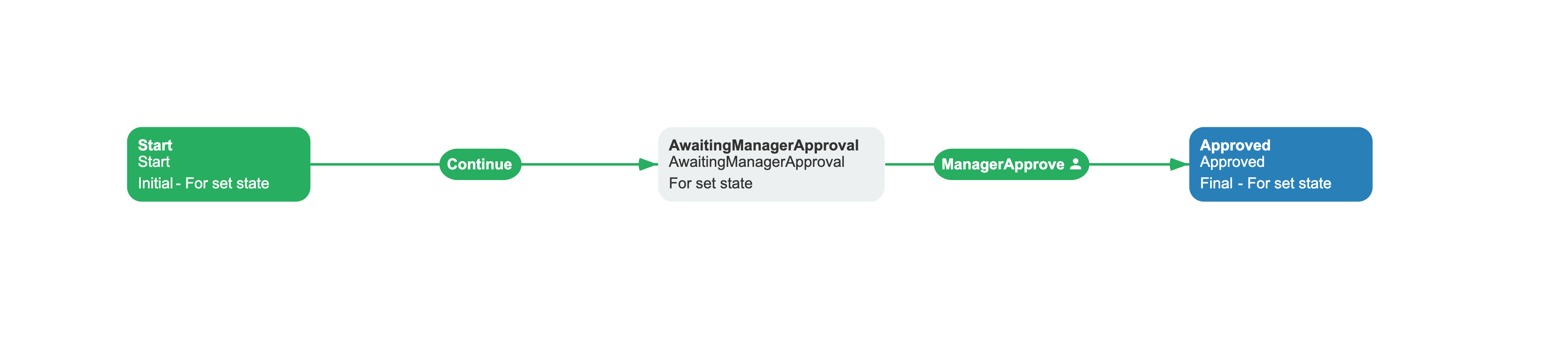
Related capabilities: CheckRole rule, UsersInRoleAsync delegate.
<Process Name="RoleBasedAuthExample" CanBeInlined="false"> <Designer /> <Commands> <Command Name="ManagerApprove" /> <Command Name="Continue" /> </Commands> <Actors> <Actor Name="Managers" Rule="CheckRole" Value="Managers" /> </Actors> <Activities> <Activity Name="Start" State="Start" IsInitial="True" IsFinal="False" IsForSetState="True" IsAutoSchemeUpdate="True"> <Designer X="100" Y="210" /> </Activity> <Activity Name="AwaitingManagerApproval" State="AwaitingManagerApproval" IsInitial="False" IsFinal="False" IsForSetState="True" IsAutoSchemeUpdate="True"> <Designer X="520" Y="210" /> </Activity> <Activity Name="Approved" State="Approved" IsInitial="False" IsFinal="True" IsForSetState="True" IsAutoSchemeUpdate="True"> <Designer X="940" Y="210" /> </Activity> </Activities> <Transitions> <Transition Name="Start_AwaitingManagerApproval" To="AwaitingManagerApproval" From="Start" Classifier="Direct" IsFork="false" MergeViaSetState="false" DisableParentStateControl="false"> <Triggers> <Trigger Type="Command" NameRef="Continue" /> </Triggers> <Conditions> <Condition Type="Always" /> </Conditions> <Designer /> </Transition> <Transition Name="AwaitingManagerApproval_Approved" To="Approved" From="AwaitingManagerApproval" Classifier="Direct" IsFork="false" MergeViaSetState="false" DisableParentStateControl="false"> <Triggers> <Trigger Type="Command" NameRef="ManagerApprove" /> </Triggers> <Restrictions> <Restriction Type="Allow" NameRef="Managers" /> </Restrictions> <Conditions> <Condition Type="Always" /> </Conditions> <Designer /> </Transition> </Transitions></Process>Configuration
Configure the UsersInRoleAsync delegate to resolve role membership from your data store:
basicPlugin.UsersInRoleAsync = async (role, processInstance) =>{ var users = await userRepository.GetUsersInRoleAsync(role); return users.Select(u => u.Id.ToString());};Then create an actor in your scheme with Rule: CheckRole and Value: Managers. Add a restriction to a command transition with that actor and Type: Allow. Only users in the "Managers" role can execute the command.
When UsersInRoleAsync is not set, BasicPlugin removes CheckRole from its rule provider. This does not invalidate the XML scheme during parsing or build because those stages do not verify provider rule availability. If no other provider or code action implements CheckRole, authorization throws NotImplementedException with Rule with name CheckRole is not implemented when it evaluates the restriction.
Reference
The following rule is available for role-based authorization.
CheckRole rule
Checks whether the current identity belongs to a specified role by calling the UsersInRoleAsync delegate. Use as a restriction on command transitions to limit execution to users in specific roles.
Within BasicPlugin, the rule passes the actor Value it receives directly to UsersInRoleAsync(roleName, processInstance). It does not normalize the value or compare role names. The application-provided delegate and its data store define role matching, including case sensitivity. If the delegate returns the user's identity ID, the user is allowed to execute the command.
Troubleshooting common errors
- Actor
Valuedoes not resolve the expected role -BasicPluginpasses the value directly toUsersInRoleAsyncwithout comparing or normalizing it. Whether"managers"matches"Managers"depends on the delegate and its data store. Apply any required normalization or comparison rules in the application-provided delegate. - Restriction references a non-existent actor - if a restriction has
NameRef="Manager"but no actor withName="Manager"is defined in the scheme, parsing fails withSchemeNotValidException(Actor Manager not found). The invalid scheme does not reach command authorization. - Multiple restrictions behave as AND, not OR - when you add several Allow restrictions to a transition, all must pass by default (
AllowConcatenationType="And"). To require only one matching role, setAllowConcatenationType="Or"on the transition element.
See also
Basic Plugin Overview
Registration, configuration, and full API reference.
Parallel Approval
Set up multi-user approval without explicit branches.
Frequently asked questions
How does the CheckRole rule work?
The CheckRole rule checks if the current user belongs to a specified role by calling the UsersInRoleAsync delegate. If the delegate returns the user's ID, the user is allowed to execute the command. If the user is not in the role, the command is blocked.
Can I use multiple roles for a single command?
Yes. Create multiple actors with different role values, then add multiple restrictions to the command transition. By default, restrictions use AND logic - the user must belong to all listed roles. To require only one role, set AllowConcatenationType="Or" on the transition element.
What happens if UsersInRoleAsync is not configured?
If UsersInRoleAsync is not set, the CheckRole rule is not registered with the workflow runtime. Any workflow scheme that references this rule can still parse and build. If no other implementation supplies CheckRole, the failure occurs later when authorization evaluates the restriction, with Rule with name CheckRole is not implemented. Configure the delegate before executing role-restricted commands.
Can I check role membership dynamically at runtime?
Yes. The UsersInRoleAsync delegate receives the process instance as a parameter, so you can access process parameters or other context to determine role membership dynamically. For example, you could check a "Department" parameter to determine which department managers have approval authority.