
Managing Parameters

Control workflow execution by storing, modifying, and branching on process parameter values. Without SetParameter, RemoveParameter, and CheckParameter, every scheme that needs to remember a decision, store intermediate data, or route based on dynamic conditions would require custom actions or conditions defined in the scheme. These built-in actions and conditions handle the full lifecycle of process parameters.
Real-world scenario: product delivery routing
An e-commerce order workflow assigns each order a product type - "Digital" (software, e-books) or "Physical" (hardware, shipped goods). The product type is set in the first activity using a C# expression that randomly picks one of the two values. A Decide activity then routes the order to the correct delivery branch:
- If the product type is
"Digital", the order goes to DigitalDelivery. - For any other value (fallback handled by the
Otherwisecondition), the order goes to PhysicalDelivery.
This demonstrates how parameters control process routing. In production, the product type would come from an external system or user input rather than a random expression.
Workflow scheme
The three SetParameter calls in the Start activity generate order data. The process then passes through Decide, which auto-evaluates the conditions on its outgoing transitions.
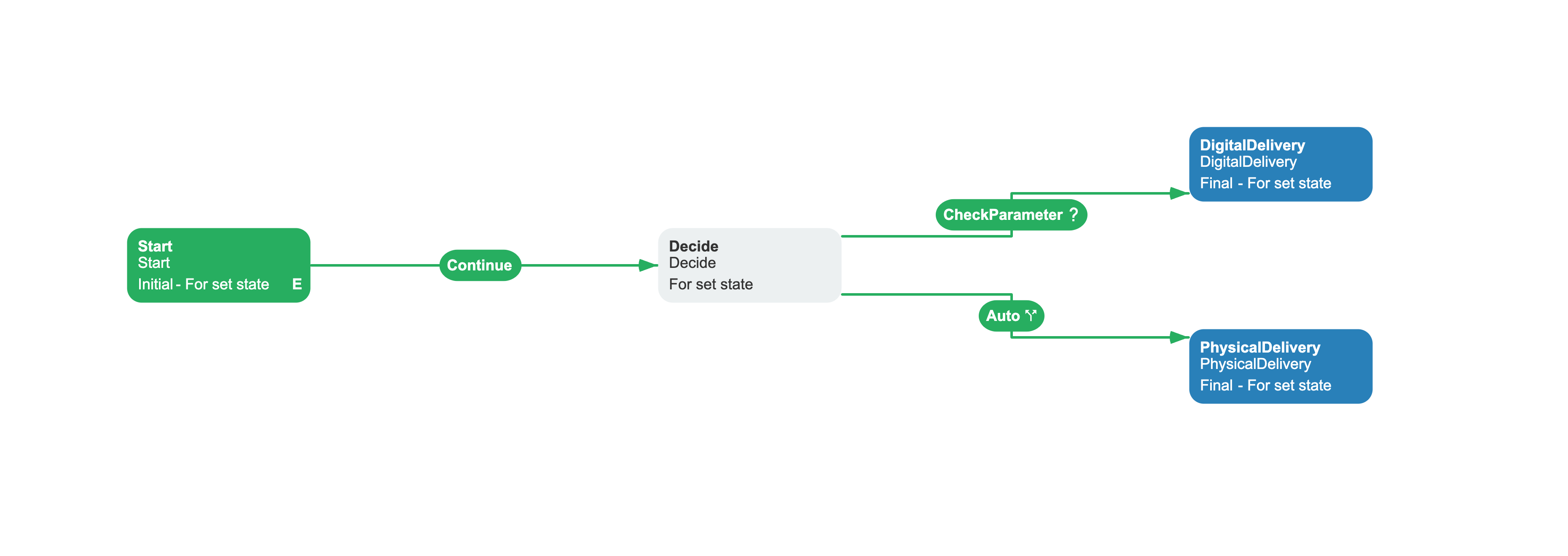
Related capabilities: SetParameter action, RemoveParameter action, CheckParameter condition, Otherwise condition type.
<Process Name="ManageParametersExample" CanBeInlined="false"> <Designer /> <Commands> <Command Name="Continue" /> </Commands> <Activities> <Activity Name="Start" State="Start" IsInitial="True" IsFinal="False" IsForSetState="True" IsAutoSchemeUpdate="True"> <Implementation> <ActionRef Order="1" NameRef="SetParameter"> <ActionParameter><![CDATA[ { "ParameterName": "OrderId", "Value": "Guid.NewGuid().ToString()" } ]]></ActionParameter> </ActionRef> <ActionRef Order="2" NameRef="SetParameter"> <ActionParameter><![CDATA[ { "ParameterName": "Amount", "Value": "100.00" } ]]></ActionParameter> </ActionRef> <ActionRef Order="3" NameRef="SetParameter"> <ActionParameter><![CDATA[ { "ParameterName": "ProductType", "Value": "Guid.NewGuid().ToByteArray()[0] < 128 ? \"Digital\" : \"Physical\"" } ]]></ActionParameter> </ActionRef> </Implementation> <Designer X="100" Y="210" /> </Activity> <Activity Name="Decide" State="Decide" IsInitial="False" IsFinal="False" IsForSetState="True" IsAutoSchemeUpdate="True"> <Designer X="520" Y="210" /> </Activity> <Activity Name="DigitalDelivery" State="DigitalDelivery" IsInitial="False" IsFinal="True" IsForSetState="True" IsAutoSchemeUpdate="True"> <Designer X="940" Y="130" /> </Activity> <Activity Name="PhysicalDelivery" State="PhysicalDelivery" IsInitial="False" IsFinal="True" IsForSetState="True" IsAutoSchemeUpdate="True"> <Designer X="940" Y="290" /> </Activity> </Activities> <Transitions> <Transition Name="Start_Decide" To="Decide" From="Start" Classifier="Direct" IsFork="false" MergeViaSetState="false" DisableParentStateControl="false"> <Triggers> <Trigger Type="Command" NameRef="Continue" /> </Triggers> <Conditions> <Condition Type="Always" /> </Conditions> <Designer /> </Transition> <Transition Name="Decide_DigitalDelivery" To="DigitalDelivery" From="Decide" Classifier="Direct" IsFork="false" MergeViaSetState="false" DisableParentStateControl="false"> <Triggers> <Trigger Type="Auto" /> </Triggers> <Conditions> <Condition Type="Action" NameRef="CheckParameter" ConditionInversion="false"> <ActionParameter><![CDATA[ { "ParameterName": "ProductType", "CompareType": "Contains", "Value": "Digital" } ]]></ActionParameter> </Condition> </Conditions> <Designer /> </Transition> <Transition Name="Decide_PhysicalDelivery" To="PhysicalDelivery" From="Decide" Classifier="Direct" IsFork="false" MergeViaSetState="false" DisableParentStateControl="false"> <Triggers> <Trigger Type="Auto" /> </Triggers> <Conditions> <Condition Type="Otherwise" /> </Conditions> <Designer /> </Transition> </Transitions></Process>How the scheme works
Once the scheme is saved and the BasicPlugin is registered with the WorkflowRuntime, the process runs as follows:
// 1. Create an instance from the schemevar processId = Guid.NewGuid();var createParams = new CreateInstanceParams("ManageParametersExample", processId);await runtime.CreateInstanceAsync(createParams);// -> Start executes SetParameter x 3:// OrderId = "b1a2c3d4-..." (GUID)// Amount = 100.00// ProductType = "Digital" or "Physical" (selected from a random GUID byte)// 2. Execute the Continue commandvar commands = await runtime.GetAvailableCommandsAsync(processId, identityId: null);var command = commands.First(c => c.CommandName == "Continue");await runtime.ExecuteCommandAsync(command, identityId: null, impersonatedIdentityId: null);// -> Process moves from Start to Decide// 3. Decide auto-evaluates its outgoing transitions// If ProductType contains "Digital" -> DigitalDelivery (Finalized)// Otherwise -> PhysicalDelivery (Finalized)// 4. Check the final statusvar status = await runtime.GetProcessStatusAsync(processId);// -> ProcessStatus.FinalizedThe Auto trigger on both transitions from Decide means the process evaluates CheckParameter immediately upon entering Decide. The condition uses Contains to check whether ProductType contains "Digital". If it does, the process takes that branch. Otherwise, the Otherwise condition catches the fallback. No additional command is needed.
Reference
BasicPlugin provides the following actions and conditions for managing process parameters.
SetParameter action
Stores a value in a process parameter. The value is interpreted as a C# expression by default.
| Parameter | Required | Default | Description |
|---|---|---|---|
ParameterName | Yes | - | Name of the parameter to set. |
Value | Yes | - | Value to store. With expression compilation enabled (the default), provide a non-empty C# expression. For string literals, escape quotes: \"value\". To store an empty string, use the explicit C# string literal \"\" in the action JSON. For expressions, use code such as Guid.NewGuid().ToString(). |
ForRootProcess | Yes | false | When true, operates on the root process parameter in a subprocess hierarchy. |
RemoveParameter action
Deletes a process parameter by name.
| Parameter | Required | Default | Description |
|---|---|---|---|
ParameterName | Yes | - | Name of the parameter to remove. |
ForRootProcess | Yes | false | When true, operates on the root process parameter in a subprocess hierarchy. |
CheckParameter condition
Compares a parameter value against a reference value. Returns true when the comparison matches.
| Parameter | Required | Default | Description |
|---|---|---|---|
ParameterName | Yes | - | Name of the parameter to check. |
CompareType | Yes | Equal | Comparison operator. See CompareType enum. |
Value | No | Empty string | Value to compare against. For In/NotIn, use a delimited list. |
Separator | Yes | , | Delimiter for In/NotIn comparison. |
ForRootProcess | Yes | false | When true, reads the parameter from the root process. |
Enums
BasicPlugin uses the following enums in action parameters.
CompareType
The CompareType parameter in CheckParameter determines how the parameter value is compared.
| Value | Example |
|---|---|
Equal | n == v |
NotEqual | n != v |
Contains | "yummy" contains "umm" |
StartWith | "yummy" starts with "yu" |
EndWith | "yummy" ends with "my" |
NotContains | "yummy" does not contain "yy" |
StartAndEndWith | "yummy" starts and ends with "y" |
NotStartWith | "yummy" does not start with "my" |
NotEndWith | "yummy" does not end with "yu" |
NotStartAndEndWith | "yummy" does not start or end with "mm" |
Greater | n > v |
Less | n < v |
GreaterOrEqual | n >= v |
LessOrEqual | n <= v |
In | 5 in (1, 2, 3, 4, 5) |
NotIn | 6 not in (1, 2, 3, 4, 5) |
Troubleshooting common errors
Common mistakes when working with parameter actions and conditions.
Common mistakes
- String values without expression escaping: When using
SetParameter.Valuewith a static string, wrap it in escaped C# quotes:"value". Without them, the expression compiler treats the value as a variable name and throws(1,28): error CS0103: The name 'X' does not exist in the current context. Fix: escape as\"X\". - Using
Nameinstead ofNameRef: ConditionType="Action"requiresNameRef, notName. UsingNamecauses the Designer to show an empty action field.
See also
Basic Plugin Overview
Registration, configuration, and full API reference.
HTTP Requests
Send HTTP requests and branch on responses.
Process Control
Jump between activities and control process state.
Frequently asked questions
How do I pass a plain string to SetParameter without the expression compiler breaking it?
Wrap the value in escaped C# quotes inside the JSON: "Value":"\"hello\"". The JSON parser unescapes this to the C# string literal "hello", which the expression compiler compiles as a plain string. Without the quotes, the compiler tries to find a variable named hello and throws CS0103.
How do I pass a GUID or other dynamic value to SetParameter?
Use any C# expression as the value: "Value":"Guid.NewGuid().ToString()" generates a new GUID. A ternary expression based on a random GUID byte, "Value":"Guid.NewGuid().ToByteArray()[0] < 128 ? \"Digital\" : \"Physical\"", selects one of two string values. The expression compiler evaluates the value as C# code.
How do I delete a parameter?
Add the RemoveParameter action to an activity with ParameterName set to the parameter name. Set ForRootProcess to true to delete from the root process in a subprocess hierarchy. In a multilevel hierarchy, the root process can differ from the subprocess's immediate parent.
Can I check if a parameter exists?
CheckParameter can be used when existence is checked together with an expected value. It returns false when the parameter does not exist, regardless of CompareType, and otherwise evaluates the configured comparison. For a direct existence check, prefer ProcessInstance.IsParameterExisting in a custom condition or use an expression condition.