
Scheme

A scheme is a workflow blueprint written in XML that Workflow Engine parses and builds into the ProcessDefinition used to create and execute process instances. It declares each activity, transition, command, and user-defined parameter, together with other workflow configuration. You define a scheme once; Workflow Engine creates as many process instances from its stored versions as needed, with each instance tracking its own state independently.
What a scheme is
A scheme is an XML document whose top-level sections describe the building blocks of a workflow. The most common sections are commands, activities, and transitions, but a scheme can also include parameters, timers, code actions, and other elements depending on the process requirements.
<Process Name="DocumentApproval"> <Commands> <Command Name="Submit"/> <Command Name="Approve"/> <Command Name="Reject"/> </Commands> <Activities> <Activity Name="Draft" IsInitial="true"> <Designer X="100" Y="200"/> </Activity> <Activity Name="Review"> <Designer X="400" Y="200"/> </Activity> <Activity Name="Approved" IsFinal="true"> <Designer X="700" Y="70"/> </Activity> <Activity Name="Rejected" IsFinal="true"> <Designer X="700" Y="330"/> </Activity> </Activities> <Transitions> <Transition Name="Submit_Draft_Review" From="Draft" To="Review" Classifier="Direct"> <Triggers> <Trigger Type="Command" NameRef="Submit"/> </Triggers> <Conditions> <Condition Type="Always"/> </Conditions> <Designer/> </Transition> <Transition Name="Approve_Review_Approved" From="Review" To="Approved" Classifier="Direct"> <Triggers> <Trigger Type="Command" NameRef="Approve"/> </Triggers> <Conditions> <Condition Type="Always"/> </Conditions> <Designer/> </Transition> <Transition Name="Reject_Review_Rejected" From="Review" To="Rejected" Classifier="Direct"> <Triggers> <Trigger Type="Command" NameRef="Reject"/> </Triggers> <Conditions> <Condition Type="Always"/> </Conditions> <Designer/> </Transition> </Transitions></Process>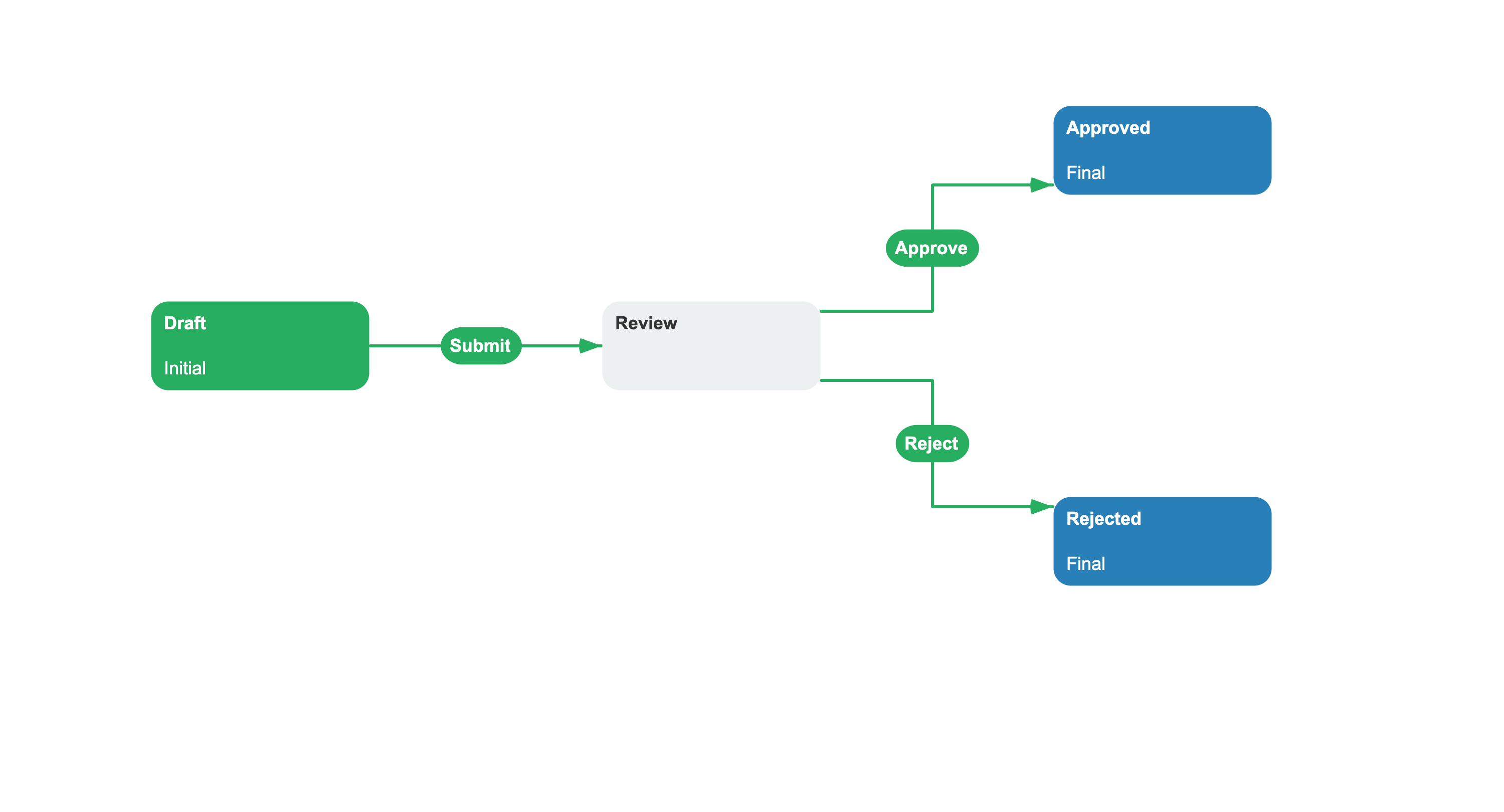
Commands lists the named command triggers in the process. Activities lists the workflow steps, marking which is initial and which are final. Transitions connects activities and defines their triggers, conditions, and restrictions.
In addition to these core sections, a scheme can declare parameters, timers, actors, code actions, localization, and subprocess configuration. A minimal executable scheme can contain a single initial activity; transitions are needed only when the process must move to another activity.
How a scheme works
SchemeDefinition carries an unparsed scheme together with its code and stored version metadata. WorkflowBuilder looks up an active, non-obsolete version by scheme code. If no such version exists, the configured generator supplies the scheme, the parser creates a ProcessDefinition, build steps transform it, and the persistence provider saves the built version under a unique scheme ID.
When a process instance is created, it receives the scheme ID and ProcessDefinition for that stored version. Execution starts from the definition's initial activity. Multiple process instances can use the same scheme version while keeping their current activities and parameters independent.
Scheme and process instance
A scheme is a workflow blueprint; a process instance is one execution of a stored version of that blueprint. Many process instances can use the same scheme version at the same time, each tracking its own current activity and parameters independently.
A process instance does not store a private snapshot of the scheme XML. It stores a SchemeId that identifies its built scheme version, and WorkflowBuilder loads the corresponding ProcessDefinition when the instance is loaded.
After stored versions are marked obsolete, new instances use an active non-obsolete version or cause a new version to be generated and built. Existing instances remain linked to their old version until they are updated. Automatic updates require the runtime setting and IsAutoSchemeUpdate on the current activity; an explicit update overload can ignore the activity flag.
See also
Activity
Activities define the stable states within a scheme.
Transition
Transitions connect activities within a scheme.
Process Instance
A process instance is created and executed from a scheme definition.
Parameter
Parameters carry business data through the process.
Frequently asked questions
What is a scheme in Workflow Engine?
A scheme is an XML document that serves as the workflow blueprint. WorkflowBuilder parses the scheme into a ProcessDefinition, applies configured build steps, and stores the built version for process instances. A configured parsed-process cache can reuse that ProcessDefinition in memory.
How does Workflow Engine handle scheme updates without breaking running processes?
A process instance keeps the SchemeId of the built scheme version it started with. Marking that version obsolete makes new instances use an active version, while running instances can keep the old version or be updated. Automatic updates require IsAutoSchemeUpdate on the current activity, but an explicit update can ignore that flag.
Do I have to write XML to create a scheme in Workflow Engine?
No. The Workflow Designer creates scheme XML, and application code can create a ProcessDefinition with ProcessDefinitionBuilder. A configured generator can also supply the unparsed scheme to WorkflowBuilder.