
Annotation

An annotation is a named string value attached to an activity or transition in a scheme. It is custom metadata that application code can read from the scheme model. Use annotations for configuration that belongs to a scheme element rather than data that changes for each process instance.
Annotations are part of the scheme definition. Changing an annotation means changing the scheme. A running process instance continues to use its assigned scheme version until it is updated to another version.
What an Annotation is
An annotation is a name-value record on an activity or a transition. Both fields are strings in the scheme model. The value can contain plain text or JSON that application code deserializes when reading it.
Activities and transitions can carry multiple annotations. In the Designer, annotations are available in Expert mode in the activity or transition properties. Annotation names are required and must be unique within that scheme element.
Workflow Engine does not interpret a regular annotation as activity execution or transition routing logic. Application code reads annotations through the ProcessDefinition, ActivityDefinition, or TransitionDefinition object and decides how to use the values.
How Annotations work
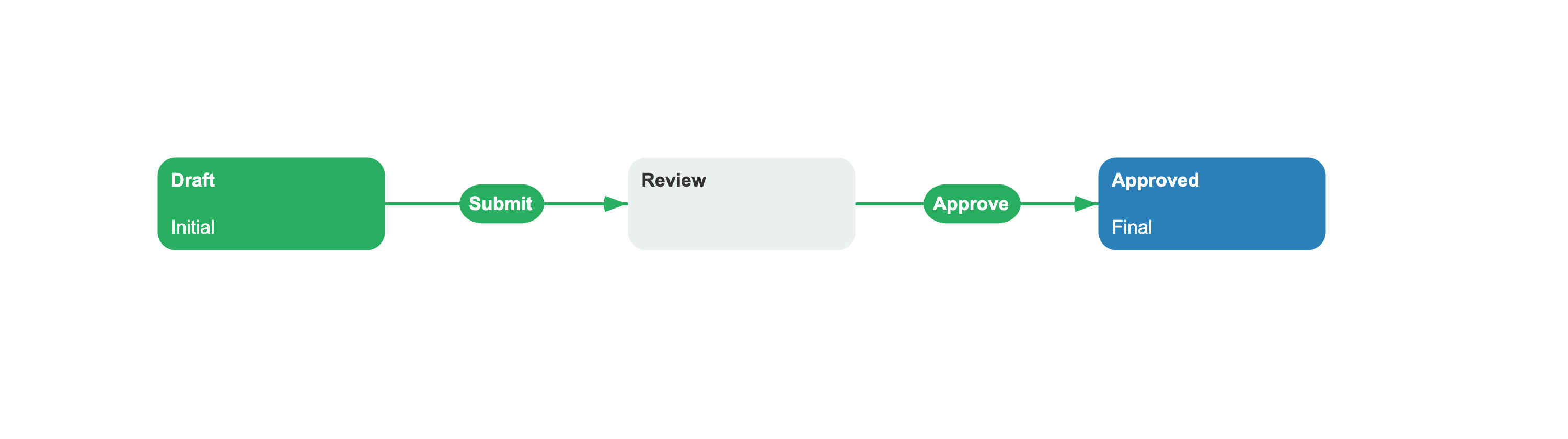
Annotations are stored in the scheme alongside activities and transitions in nested <Annotations> elements. Each <Annotation> element has a Name attribute and a string value inside a <![CDATA[...]]> section. The following scheme defines two annotations on the Review activity and one on the ApproveReview transition:
<Process Name="DocumentReview"> <Commands> <Command Name="Submit"/> <Command Name="Approve"/> </Commands> <Activities> <Activity Name="Draft" IsInitial="true"> <Designer X="100" Y="200"/> </Activity> <Activity Name="Review"> <Annotations> <Annotation Name="EmailTemplate"><![CDATA[review-request.html]]></Annotation> <Annotation Name="ReviewConfig"><![CDATA[ {"EmailTemplate":"review-request.html","Recipients":["manager@example.com"]} ]]></Annotation> </Annotations> <Designer X="400" Y="200"/> </Activity> <Activity Name="Approved" IsFinal="true"> <Designer X="700" Y="200"/> </Activity> </Activities> <Transitions> <Transition Name="Submit_Draft_Review" From="Draft" To="Review" Classifier="Direct"> <Triggers> <Trigger Type="Command" NameRef="Submit"/> </Triggers> <Conditions> <Condition Type="Always"/> </Conditions> <Designer/> </Transition> <Transition Name="ApproveReview" From="Review" To="Approved" Classifier="Direct"> <Annotations> <Annotation Name="NotifyRoles"><![CDATA[admin,manager]]></Annotation> </Annotations> <Triggers> <Trigger Type="Command" NameRef="Approve"/> </Triggers> <Conditions> <Condition Type="Always"/> </Conditions> <Designer/> </Transition> </Transitions></Process>The Review activity carries two annotations: a plain string EmailTemplate and a JSON object ReviewConfig. The ApproveReview transition carries one annotation NotifyRoles. When WorkflowRuntime loads the scheme, annotations are available through the scheme's object model. Read an annotation from an activity or transition by name from the scheme definition:
using OptimaJet.Workflow.Core.Model;public sealed record ReviewConfig(string EmailTemplate, string[] Recipients);public static class AnnotationReader{ public static (string EmailTemplate, string NotifyRoles) Read( ProcessInstance processInstance) { var processScheme = processInstance.ProcessScheme; return ( processScheme.GetActivityAnnotation("Review", "EmailTemplate"), processScheme.GetTransitionAnnotation("ApproveReview", "NotifyRoles")); } public static ReviewConfig ReadReviewConfig(ProcessInstance processInstance) { return processInstance.ProcessScheme.GetActivityAnnotation<ReviewConfig>( "Review", "ReviewConfig"); }}When an annotation contains valid JSON, the generic GetActivityAnnotation<T>, GetTransitionAnnotation<T>, and GetAnnotation<T> overloads deserialize it to the requested type. During action execution, processInstance.ExecutedActivity and processInstance.ExecutedTransition provide the same GetAnnotation methods.
Custom activities are a special case. The Designer can store their configured fields as activity annotations. Before a custom activity runs, Workflow Engine substitutes process parameter references in those values and passes the results to the custom activity without changing the stored scheme annotations.
Annotation and Parameter
Annotations are sometimes confused with parameters. The difference is straightforward:
- An annotation is metadata stored on an activity or transition in a scheme version. Read it from the scheme definition.
- A parameter is data stored on a process instance. Read and write it through the process instance as the workflow runs.
Use annotations for values that belong to the workflow design, such as an email template name. Use parameters for values that belong to one process run, such as a document ID or approval decision. A parameter reference in a regular annotation remains text when read with GetAnnotation; automatic substitution applies when Workflow Engine prepares annotation values for a custom activity.
See also
Activity
Activities carry annotations as custom metadata.
Transition
Transitions carry annotations alongside triggers and conditions.
Parameter
Parameters store dynamic process data, unlike static annotations.
Scheme
A scheme stores annotations as part of its definition.
Frequently asked questions
What is an annotation in Workflow Engine?
An annotation is a named string value attached to an activity or transition in a scheme. It stores metadata that code can read, but Workflow Engine does not treat a regular annotation as process execution logic.
How do I read an annotation from code?
Use GetActivityAnnotation() or GetTransitionAnnotation() on the ProcessDefinition object. Activity and transition definitions also expose GetAnnotation(), and their generic overloads deserialize valid JSON values.
What is the difference between an annotation and a parameter?
An annotation belongs to an activity or transition in a scheme version. A parameter belongs to a process instance and can change during that process run.
Can I store complex objects in an annotation?
Yes. Store valid JSON as the annotation value, then read it with a generic GetAnnotation<T>() overload. The annotation value stored in the scheme remains a string.