
Approval Plugin Overview

Use ApprovalPlugin to build a per-process approval timeline, a My Tasks list, and a Completed by me list. Register it with WithPlugin before StartAsync and use actor-restricted command transitions; inbox population requires at least one Direct transition for an identity by default. Application code reads IApprovalProvider, while workflow actions copy the same data into process parameters. Web API exposes stored approval history and inbox records, but not the derived outbox.
ApprovalPlugin connects WorkflowRuntime to approval persistence and provides three approval views: Approval history shows the timeline of a process, Inbox shows work waiting for each user, and Outbox shows work a user has already completed. Use it when the application must show who can approve a document now, what is waiting for a user, how a document was approved, or which documents a user has already handled.
ApprovalPlugin supplies data and workflow integration. The host application renders its own screens, sends notifications when needed, and calls the WorkflowRuntime command APIs when a user selects a command.
See how approval views change
Consider a document scheme with three states: Request, Manager signed, and Boss signed. The first command is available to the manager or boss, and the second is available only to the boss. ApprovalPlugin changes its application views as the document advances.
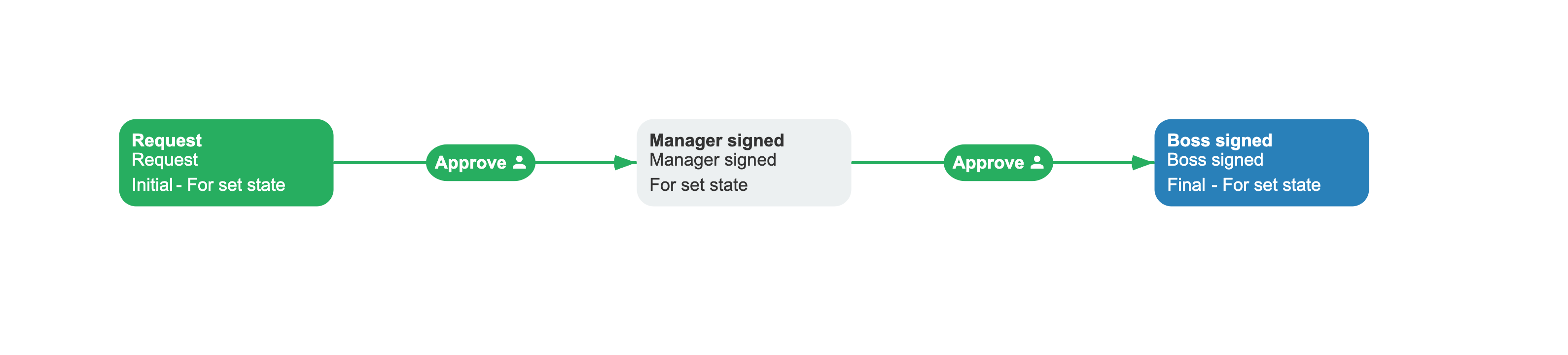
| Process stage | Approval history | Inbox | Outbox |
|---|---|---|---|
Request | Two predicted stages; the first allows Manager and Boss, and the second allows Boss | Manager and Boss can execute the first Approve | Empty |
Manager signed | Completed manager stage and pending boss stage | Boss can execute Approve | Manager has one process summary |
Boss signed | Completed manager and boss stages | Empty when no command remains | Manager and boss each have a process summary |
After a user executes Approve, Approval history records the completed stage, Outbox includes the process in that user's completed work, and Inbox is recalculated for the next stage.
Register ApprovalPlugin
Register ApprovalPlugin after the base runtime configuration and before StartAsync(). Set registration-sensitive members such as AutoApprovalHistory before calling WithPlugin, because OnPluginAdd decides whether to install the automatic build step.
using OptimaJet.Workflow.Core.Runtime;using OptimaJet.Workflow.Plugins;public static class ApprovalPluginRegistration{ public static WorkflowRuntime AddApprovalPlugin(this WorkflowRuntime runtime) { var plugin = new ApprovalPlugin { AutoApprovalHistory = true, DisableApprovalHistory = false, DisableInbox = false, InboxCheckConditions = false, UseLocalizedNamesInApprovalHistory = true }; return runtime.WithPlugin( plugin, ["DocumentApproval"] ); }}The optional scheme list scopes ApprovalPlugin actions and Designer formats because WithPlugin passes the list to both providers. The plugin also uses the list to restrict its runtime handler and automatic history build step. Omit the list or pass an empty list to register those capabilities globally.
Before testing the result, verify the workflow scheme supplies the data ApprovalPlugin needs. When automatic history is enabled, its build step adds FillApprovalHistory to activities with a non-blank State in the schemes covered by the plugin. An inbox row requires an outgoing command transition with actor restrictions that resolve the identity, and at least one resolved transition for that identity must have the Direct classifier unless InboxActorsWithOnlyRejectCommands is enabled.
Known limitation - custom activity scope:
WithPluginadds generated custom activity types without a scheme filter, so they remain available in every scheme even when the registration call supplies a scheme list. Use the registration list, rather than activity visibility in the Designer, to determine which schemes the plugin handles.
Understand plugin capabilities
ApprovalPlugin is included in WorkflowEngine.NETCore-Core under the OptimaJet.Workflow.Plugins namespace. The plugin registers four asynchronous actions, Designer parameter formats, a runtime process handler, and an optional build step. Its base provider also creates Designer custom activity types for every action that is not excluded when WithPlugin runs. With the default AutoApprovalHistory value, these are GetApprovalHistory, GetInbox, and GetOutbox; setting the field to false before registration also adds FillApprovalHistory. The plugin registers no synchronous actions, conditions, rules, or custom condition forms.
| Capability | Role |
|---|---|
FillApprovalHistory action | Writes a pending or completed item that the provider inserts or applies to a pending match |
GetApprovalHistory action | Reads history by process or identity and writes the list to a process parameter |
GetInbox action | Reads inbox entries by process or identity and writes the list to a process parameter |
GetOutbox action | Reads process summaries for one identity and writes the list to a process parameter |
| Custom activity types | Provide action wrappers on the Activities tab of the Designer Elements panel |
| Runtime process handler | Deletes stale pending history, runs pre-execution, and rebuilds inbox rows before the root process becomes idled or finalized |
AutoApprovalHistoryBuilderStep | Adds FillApprovalHistory to state activities when automatic history is enabled |
ApprovalPlugin uses IApprovalProvider through WorkflowRuntime.PersistenceProvider. IPersistenceProvider extends IApprovalProvider, so every supported persistence provider supplies this contract.
Actor rules that represent roles or teams must resolve to workflow identity IDs. ApprovalPlugin persists inbox work for each resolved identity instead of storing one shared role or team task.
Configure ApprovalPlugin
ApprovalPlugin configuration members control history generation, inbox selection, names, and comments. Configure the plugin instance before registration because OnPluginAdd captures the automatic build-step decision; most other members are read when their handler or action runs.
| Member | Kind and type | Default | When read and effect |
|---|---|---|---|
AutoApprovalHistory | Field, bool | true | At registration, excludes the FillApprovalHistory custom activity type and installs the build step when history is enabled; its current value also hides the action from ordinary Designer action lists |
DisableApprovalHistory | Property, bool | false | At registration, prevents build-step installation; on each runtime-handler call, skips pending-row cleanup and history pre-execution; it does not block a FillApprovalHistory action already in a scheme |
DisableInbox | Property, bool | false | On each runtime-handler call, skips inbox deletion and rebuilding; existing inbox records remain |
InboxCheckConditions | Field, bool | false | During each inbox refresh, evaluates transition conditions before resolving actors and commands |
InboxActorsWithOnlyRejectCommands | Field, bool | false | During each inbox refresh, keeps an empty-command row for an identity that has no Direct transition |
AllowedActorsFilter | Property, Func<string, bool> | null | During each inbox refresh, filters Allow restrictions; Restrict restrictions are unaffected |
GetUserNamesByIds | Field, Func<List<string>, List<string>> | null | During history pre-execution, maps distinct predicted identity IDs to values stored in AllowedTo |
NameParameterForComment | Field, string | "Comment" | During completed history execution, names the process parameter copied to Commentary |
UseLocalizedNamesInApprovalHistory | Property, bool | true | When FillApprovalHistory writes a record, resolves localized state and command names with technical-name fallbacks |
Set AutoApprovalHistory and DisableApprovalHistory before WithPlugin. Changing either member later does not remove a build step that was already registered or remove FillApprovalHistory from a scheme that was already built. A later AutoApprovalHistory change affects ordinary action discovery, but it does not regenerate the custom activity types already added to the runtime.
When GetUserNamesByIds is configured, ApprovalPlugin stores the list returned by that delegate. When it is null, ApprovalPlugin calls WorkflowRuntime.GetUserByIdentityAsync for each distinct identity if that runtime delegate is configured. If both delegates are null, the plugin stores the identity IDs unchanged in AllowedTo.
Apply automatic history changes
Use this deployment sequence when automatic history changes for schemes that already have process instances:
- Create new runtime instances with the required settings applied before
WithPlugin, and deploy the same configuration to every runtime node. Changing a field on a runtime that already registered the build step does not unregister that step. - After the new runtimes start, call
SetSchemeIsObsoleteAsync(schemeCode, tenantId)for each affected scheme. The next scheme creation or update rebuilds the generated process scheme with the current build-step pipeline. - Existing process instances remain bound to their old generated scheme until
UpdateSchemeIfObsoleteAsync(processId)migrates them. The current activity must allow automatic scheme updates unless the overload withignoreAutoSchemeUpdate: trueis used.
Rebuilding changes future behavior only. It does not backfill approval stages that were never recorded or delete existing WorkflowApprovalHistory rows. A FillApprovalHistory action saved explicitly in the source scheme also remains after automatic injection is disabled.
What Disabled controls
ApprovalPlugin.Disabled affects action and Designer-format discovery. When it is true during registration, no generated custom activity types are added; setting it later hides existing types from Designer discovery but does not remove them from the runtime. Disabled does not prevent WithPlugin from registering the runtime process handler or automatic build step, so it is not a master switch for approval history and inbox maintenance.
Use ApprovalPlugin actions
ApprovalPlugin actions run inside workflow schemes. The three query actions read the persistence provider and save their result to the process parameter named by ParameterName; they do not return the list to application code.
| Action | Parameters | Stored result |
|---|---|---|
FillApprovalHistory | None | Adds or updates WorkflowApprovalHistory directly |
GetApprovalHistory | Query selector, output parameter, optional paging | List<ApprovalHistoryItem> |
GetInbox | Query selector, output parameter, optional paging | List<InboxItem> |
GetOutbox | Identity, output parameter, optional paging | List<OutboxItem> |
GetApprovalHistory and GetInbox use the same parameter structure.
| Parameter | Type | Required | Default | Description |
|---|---|---|---|---|
GetParameterType | GetParameterType | Yes | - | Selects ProcessId or IdentityId |
GetParameterValue | string | Yes | - | Supplies the process GUID or identity according to the selector |
ParameterPurpose | ParameterPurpose | Yes in Designer | Persistence | Controls how Workflow Engine stores the output parameter |
ParameterName | string | Yes | - | Names the process parameter that receives the result list |
PageIndex | int | No | -1 | Uses a 1-based page index; values below 1 disable paging |
PageSize | int | No | -1 | Enables paging only when both page values are greater than zero |
When an action omits PageIndex or PageSize, the handler checks inherited PluginSettings for a value with the same name before using -1.
GetOutbox accepts one identity instead of a ProcessId or IdentityId selector.
| Parameter | Type | Required | Default | Description |
|---|---|---|---|---|
IdentityId in Designer | string | Yes | - | Selects the identity whose history is grouped into outbox summaries |
ParameterPurpose | ParameterPurpose | Yes in Designer | Persistence | Controls how Workflow Engine stores the output parameter |
ParameterName | string | Yes in Designer | "" in the handler | Names the process parameter that receives the result list |
PageIndex | int | No | -1 | Uses a 1-based page index; values below 1 disable paging |
PageSize | int | No | -1 | Enables paging only when both page values are greater than zero |
Understand runtime integration
ApprovalPlugin combines a build-time action injection with runtime activity handling. Automatic history adds FillApprovalHistory to the pre-execution and execution implementations of eligible activities that have a non-blank state. The runtime handler then removes obsolete pending rows, starts pre-execution from the current activity, and rebuilds inbox entries each time root process execution is about to become idled or finalized.
The pre-execution pass used while approval history is enabled loads persisted parameters, resolves actor restrictions through the rule provider, evaluates transition conditions unless ResultOnPreExecution supplies a fixed result, and runs actions from PreExecutionImplementation. Keeping approval history enabled can therefore call custom rules, conditions, and pre-execution actions before a user executes the next command. Temporary values from the preceding request are not reloaded, so persist data required by those callbacks or handle its absence.
Custom callbacks must be safe to run during simulation and more than once. Check processInstance.IsPreExecution before sending notifications, writing to an external database, or calling an API that changes external state. For a condition with unsafe or expensive evaluation, set ResultOnPreExecution to the result that simulation should use. The simulated activity path is not committed, but external effects produced by custom code are not rolled back.
flowchart TB
    subgraph prediction[Build and predict]
        direction LR
        A[Build process scheme] --> B[Inject FillApprovalHistory]
        B --> C[Create pending history]
    end
    subgraph completion[Execute and refresh]
        direction LR
        D[Execute command, timer, or SetState with execution]
        D --> E[Update or insert completed history]
        E --> F[Refresh pending history and inbox]
    end
    prediction --> completion
SetStateAsync with SetStateParams.PreventExecution = true changes the current activity without running its implementation or invoking this runtime handler. Approval history and inbox rows are therefore not refreshed by that operation and can continue to describe the previous activity until later workflow execution invokes the handler.
The runtime handler skips its refresh cycle when both history and inbox are disabled. It also skips refreshes for a subprocess instance; actor resolution for a root process can still inspect that process and its descendants. FillApprovalHistory itself has no subprocess guard, so a build-injected or explicitly configured action can still write history while a subprocess executes.
Understand persistence requirements
ApprovalPlugin persists its primary records in two provider-managed tables or MongoDB collections. WorkflowInbox contains current per-identity work, and WorkflowApprovalHistory contains pending and completed stages. Outbox queries group completed history by identity and process, so no separate outbox store exists.
The plugin also persists WorkflowPluginApprovalHistoryOrder as an internal process parameter to assign the next Sort value. Query actions write their results to the output parameter requested by the scheme, but the inbox and history themselves are not serialized into process parameters.
Delete a process and approval data
The persistence provider removes ApprovalPlugin records during normal process deletion. Both DeleteProcessAsync(Guid) and DeleteProcessAsync(Guid[]) delete the matching WorkflowInbox and WorkflowApprovalHistory records as part of process deletion. Export approval history before deleting the process when the application must retain an audit record after the process is removed.
The approval history DELETE operations and inbox DELETE operations in the Workflow Engine HTTP API have a narrower scope. They delete selected projection records without deleting the process or running ApprovalPlugin. A later inbox refresh can recreate deleted inbox records, while deleted completed history is not backfilled automatically.
Use provider mutation methods
IApprovalProvider is the persistence contract through which ApprovalPlugin and application code read and modify Inbox and Approval history data and read derived Outbox summaries. It exposes mutation methods because ApprovalPlugin and administrative application code share this contract. ApprovalPlugin owns the normal inbox replacement and pending-history lifecycle; direct calls bypass that lifecycle and should be reserved for controlled repair, cleanup, or import operations.
| Method | ApprovalPlugin use |
|---|---|
| DropWorkflowInboxAsync | Removes the current process inbox before the plugin inserts a refreshed snapshot |
| InsertInboxAsync | Inserts the identities and available commands calculated during inbox refresh |
| FillApprovalHistoryAsync | Inserts a history item or updates a matching pending item |
| DropEmptyApprovalHistoryAsync | Removes pending predictions before ApprovalPlugin runs pre-execution again |
| DropApprovalHistoryByProcessIdAsync | Removes all approval history for one process |
| DropApprovalHistoryByIdentityIdAsync | Removes every history row whose IdentityId matches; ApprovalPlugin normally assigns this value only to completed rows |
Calling an inbox delete without the matching insert leaves the worklist empty until a later refresh. Calling a history delete changes both the approval timeline and any derived outbox summaries. The provider methods do not execute a workflow transition or re-evaluate actor rules on their own.
See also
Inbox and Outbox
Review inbox refresh behavior, outbox aggregation, paging, and query methods.
Approval History
Review pending and completed history entries and query them through IApprovalProvider.
Frequently asked questions
How do I apply an AutoApprovalHistory change to existing processes?
Register a fresh ApprovalPlugin instance with the new setting, mark each affected scheme obsolete with SetSchemeIsObsoleteAsync, and migrate running instances with UpdateSchemeIfObsoleteAsync. Existing history is neither backfilled nor deleted by that migration.
When must I set AutoApprovalHistory?
Set AutoApprovalHistory before registering ApprovalPlugin. OnPluginAdd reads the field to decide whether to add AutoApprovalHistoryBuilderStep to the runtime builder.
Why can ApprovalPlugin call my rules or conditions before the next command?
ApprovalPlugin calls pre-execution before a root process becomes idled or finalized whenever approval history is enabled. Pre-execution resolves actor rules and may evaluate transition conditions; use ProcessInstance.IsPreExecution and ResultOnPreExecution to keep custom code safe during that simulation.
Can I enable ApprovalPlugin for selected schemes?
Yes. Pass a List<string> of scheme codes as the second argument to runtime.WithPlugin. The list scopes ApprovalPlugin actions, Designer formats, its runtime handler, and the automatic history build step.
Does ApprovalPlugin store inbox and history in process parameters?
No. The persistence provider stores inbox and history records. ApprovalPlugin uses one internal process parameter for history ordering, and its query actions can write result lists to parameters selected by the scheme.