
Overview

BpmnPlugin supplies BPMN import and eight BPMN activity types for teams exchanging process models with analysts or authoring native workflows with BPMN shapes. Register the plugin with a configured Workflow Runtime before starting runtime services, and use a license that includes the BPMN capability.
Install and register
BpmnPlugin is distributed in the WorkflowEngine.NETCore-BpmnPlugin NuGet package. The assembly and root namespace are OptimaJet.Workflow.BpmnPlugin; the package targets netstandard2.0.
dotnet add package WorkflowEngine.NETCore-BpmnPluginCall the following integration method after configuring the runtime's builder and persistence provider and before StartAsync. It returns the plugin instance so application code can inspect or change its Disabled property later. The host's existing startup code starts the runtime.
using OptimaJet.Workflow.BpmnPlugin;using OptimaJet.Workflow.Core.Runtime;public static class BpmnSetup{ public static BpmnPlugin Register(WorkflowRuntime runtime) { var plugin = new BpmnPlugin(); runtime.WithPlugin(plugin); return plugin; }}new BpmnPlugin() uses BpmnConverterBuilder.Create().Build(). The constructor also accepts a custom BpmnConverter; see Customize BPMN Import.
Registration requires a license that includes BPMN Plugin. Otherwise, registration throws Your license doesn't include the Bpmn plugin. A trial used to evaluate BPMN must include this capability too. Register each plugin instance once; adding the same instance again throws Plugin already added.
Use BPMN elements
After registration, restart the backend as needed and reload the Designer. Its Elements panel includes a BPMN tab. Drag an element onto the canvas and configure it as part of a native scheme; importing a file is optional.
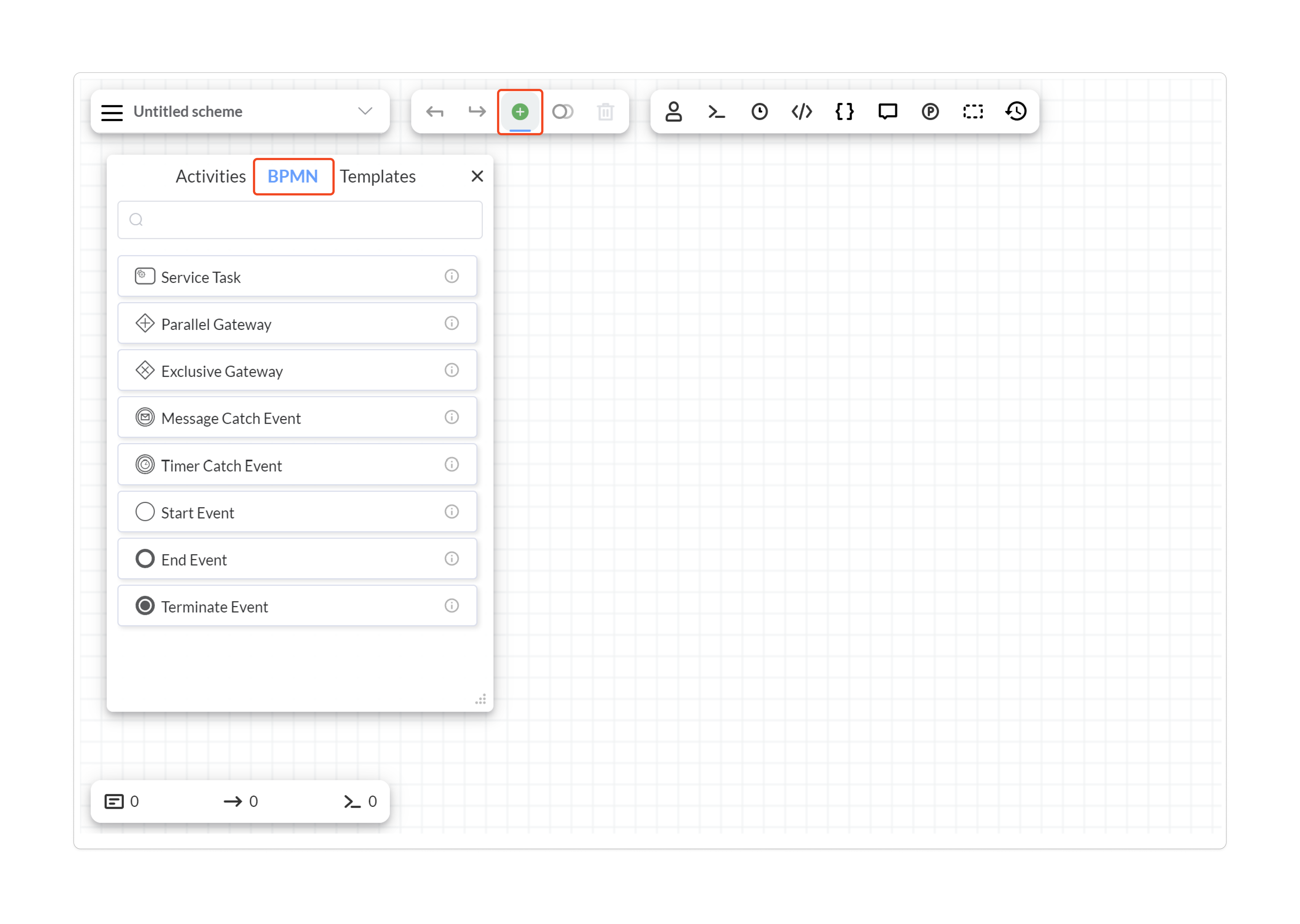
| Designer element | Custom type | Native behavior |
|---|---|---|
| Service Task | BpmnServiceTask | Runs activity implementation actions. |
| Parallel Gateway | BpmnParallelGateway | Builds native fork and join transitions. |
| Exclusive Gateway | BpmnExclusiveGateway | Routes through outgoing conditional transitions. |
| Message Catch Event | BpmnMessageCatchEvent | Waits on a command-triggered transition. |
| Timer Catch Event | BpmnTimerCatchEvent | Uses a timer-triggered transition. |
| Start Event | BpmnStartEvent | Marks the initial activity. |
| End Event | BpmnEndEvent | Marks normal final completion. |
| Terminate Event | BpmnTerminateEvent | Adds termination behavior for parallel branches. |
The Parallel Gateway gives scheme authors a BPMN-shaped entry point to native subprocess creation and merging. Inspect the generated transitions when reviewing the built scheme. Importing other BPMN element types may produce ordinary activities; Supported Elements documents each fallback.
Understand runtime capabilities
BpmnPlugin registers an action provider, three system build steps, and one Designer operation. These capabilities prepare native schemes for execution; the plugin does not subscribe to runtime events or run extra work when the runtime starts.
| Name | Kind | Execution and result |
|---|---|---|
BPMNTerminate | Asynchronous action | Invokes termination cleanup for the root process tree, removing other subprocess branches while excluding the currently executing process from deletion. Final activity settings govern completion of the current execution. |
BPMNMerge | Asynchronous condition | Calls CheckAllSubprocessesCompletedAsync(processInstance) to decide whether a join may continue. |
These methods have no plugin-specific action parameters. They are advertised for NamesSearchType.All, rather than as general user-selectable methods. BPMN Plugin registers no rules and no additional general-purpose actions or conditions beyond these two internal methods.
The builder runs these plugin steps in the following order:
MessageCatchEventBuildStepadds a split gateway when one message catch has multiple outgoing transitions and a valid command-name annotation, keeping one command wait before the split. A missing command name makes this build step fail. Creating the split also requires integer Designer coordinates on the message activity.ParallelGatewayBuildStepvalidates and transforms parallel gateways and subprocess boundaries, introduces additional merge nodes when required, and attachesBPMNMergeto join transitions. Invalid parallel structure can fail scheme saving.TerminateEventBuildStepattachesBPMNTerminateto terminate activities.
The Designer operation bpmnplugin_uploadbpmn converts uploaded BPMN and saves the resulting schemes through the configured builder. BPMN Plugin adds no dedicated database tables, collections, or persistence provider. Definitions and running instances use the normal persistence services. Messages are completed through application-issued commands; the plugin does not add a message broker consumer or a BPMN message-correlation service.
Configure plugin lifetime
BpmnPlugin implements IWorkflowPlugin directly. Its registration applies across the runtime: the optional scheme list passed to WithPlugin is not used by BpmnPlugin.OnPluginAdd to scope activities, the action provider, build steps, or the upload handler.
| Member | Kind and type | Default | When read and effect |
|---|---|---|---|
Constructor bpmnConverter | BpmnConverter argument | null, selects the default converter | Captured at construction by the upload handler. Configure a replacement converter before creating the plugin. |
Disabled | Read/write bool property | false | Hides BPMN palette elements and the Upload BPMN command in the Designer. Also disables BPMN runtime actions and conditions; import and build steps remain registered. |
PluginSettings | Get-only nullable Dictionary<string, string> property | Empty dictionary | The IWorkflowPlugin.PluginSettings contract member is obsolete; this plugin does not read the dictionary. Configure conversion through the constructor instead. |
Name | Get-only string property | BpmnPlugin | Identifies the plugin during registration. |
Set Disabled to true to hide BPMN elements from the Designer palette and the Upload BPMN command from its menu. Reload the Designer to refresh the UI. Existing scheme definitions are kept, and import and build steps remain available. The flag also disables BPMN runtime actions and conditions, so existing schemes that rely on parallel gateway merging or terminate events may fail during execution.
BPMN import settings let you choose how fixed timer dates are interpreted, for example as local time or UTC (DateTimeKind). You can also set whether a process may automatically move to a newer scheme version while it is at an imported activity (DefaultAutoSchemeUpdate). These settings are applied when a BPMN file is imported; changing them does not modify already saved schemes. See Customize BPMN Import for a configuration example.
Frequently asked questions
Which NuGet package installs BpmnPlugin?
Install WorkflowEngine.NETCore-BpmnPlugin. OptimaJet.Workflow.BpmnPlugin is the assembly and namespace name.
Why does BpmnPlugin reject my license?
Registration requires the license's Bpmn capability to be true. A general Workflow Engine license or trial without that capability does not satisfy the check.
Can I register BPMN Plugin for only selected schemes?
BpmnPlugin currently ignores the scheme list supplied during registration. Its registered activities, provider, build steps, and upload operation apply across that runtime.
Does setting Disabled stop BPMN uploads?
No. Disabled hides the Upload BPMN command in the Designer, but direct upload requests can still reach the registered import operation. The system build steps remain registered too.