
Supported Elements

BPMN Plugin converts selected elements into native activities and transitions. Retained shapes do not imply preserved BPMN semantics. User tasks, scripts, signals, complex gateways, and cyclic timers need manual implementation or custom conversion. Message waits become commands; timer waits use supported date, duration, or expression definitions. Nonempty embedded subprocesses become inlinable schemes. Review conversion issues and validate native fork/join behavior.
BPMN Plugin imports selected BPMN tasks, gateways, and events into native Workflow Engine activities and transitions. Use this reference to check which behavior survives conversion, which definitions need application code, and which unsupported elements require changes before the imported scheme can execute as intended.
Interpret support levels
BPMN Plugin preserves supported behavior through native scheme settings. Retaining an element as an ordinary activity preserves its place in the diagram, but does not implement its BPMN specialization.
After import, review the log in the Upload BPMN dialog, along with the Comment fields on imported activities and transitions. A successful import can still contain automatic transitions where the source model expected a message, condition, or timer wait.
To inspect conversion from code, create a converter with BpmnConverterBuilder.Create().Build() and call ConvertBpmnDocument with a TextReader containing BPMN XML. It returns a list of ConvertedProcess results; read each result's Issues collection for its conversion messages. See Inspect conversion before saving for a complete C# example that reads a BPMN file and prints the issues without saving schemes.
For nodes created through the standard node visitor, the BPMN id becomes the activity Name. A nonblank BPMN name becomes the activity State and enables setting that state directly. An unnamed node has no state and is not a state-setting target. DefaultAutoSchemeUpdate controls automatic scheme updates for these activities and defaults to true; inline activities follow their separate creation path.
The supported custom shapes are Service Task, Exclusive Gateway, Parallel Gateway, Message Catch Event, Timer Catch Event, Start Event, End Event, and Terminate Event. These are native activity types, rather than evidence of complete BPMN 2.0 execution support.
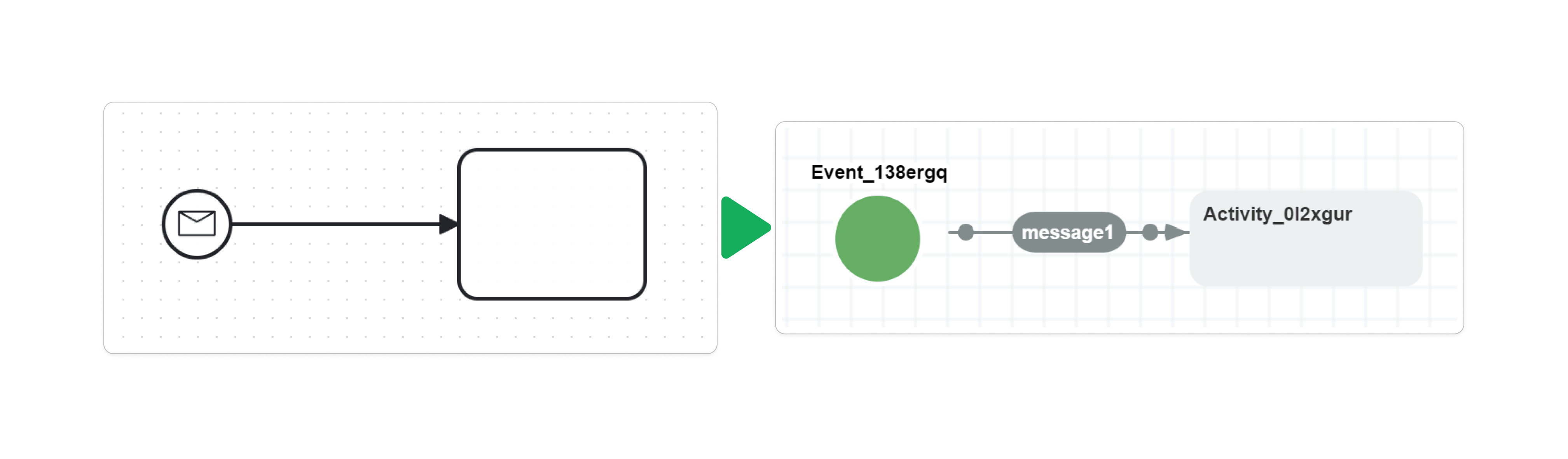
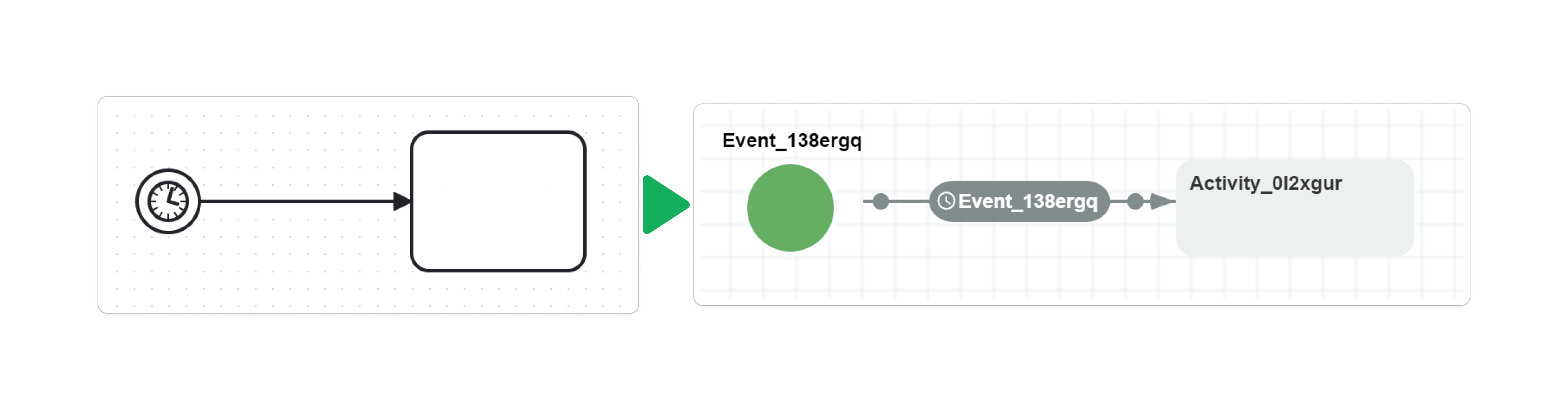
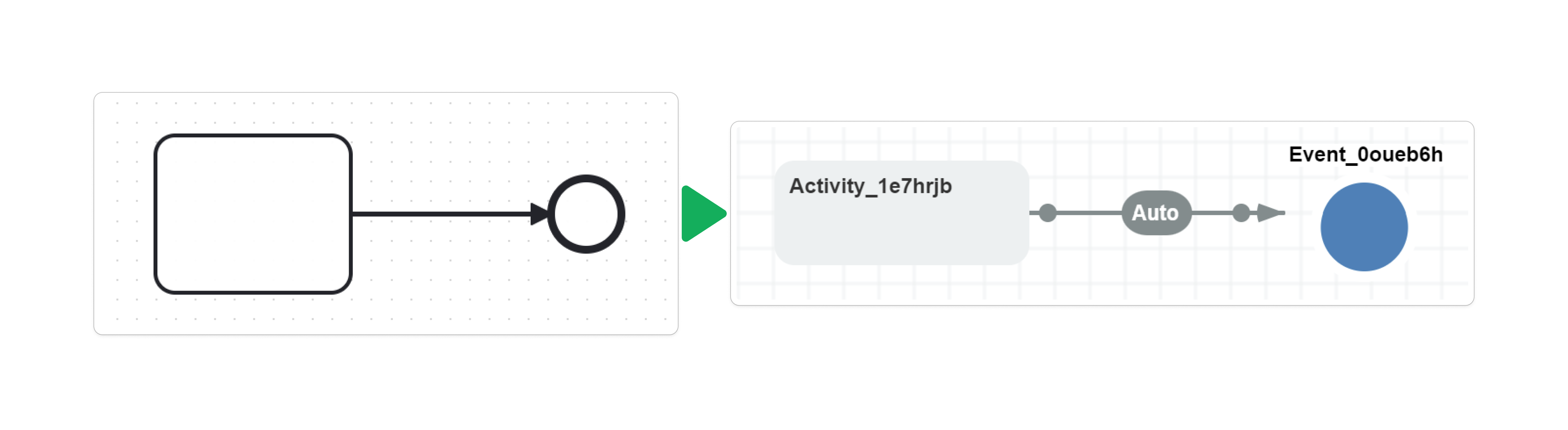
The conversion diagrams show the source BPMN on the left and the resulting native scheme on the right. Select a diagram to enlarge it and inspect the transition labels.
Branch decisions use the BPMN nodes' incoming and outgoing reference lists. Keep those references consistent with the document's sequence flows. The tables describe the default visitors; incoming-flow updates and runtime build steps can refine the initial transition settings before execution.
Convert BPMN tasks
BPMN Plugin converts task nodes into activities. Except for receive tasks absorbed into event-based gateways, each task retains its ID. Tasks with multiple outgoing references initially mark those flows as parallel starts; later incoming-flow updates can change a flow's subprocess boundary settings.
| BPMN task | Conversion behavior |
|---|---|
| Generic Task | Ordinary activity; no task-specific implementation is added. |
| Service Task | Service Task custom activity; implementation names become native actions. |
| Receive Task | Ordinary activity with outgoing command-triggered transitions when its message reference resolves. |
| User Task | Ordinary activity with a warning; no user-task lifecycle or form binding is imported. |
| Business Rule Task | Ordinary activity with a warning; no business-rule implementation is imported. |
| Manual Task | Ordinary activity with a warning; no human-work wait is created automatically. |
| Script Task | Ordinary activity with a warning; the BPMN script is not imported as executable code. |
| Send Task | Ordinary activity with a warning; sending a message requires application implementation. |
Service task actions
For a service task, the importer uses the first matching XML attribute named camunda:topic or camunda:delegateExpression, falling back to the task's implementation attribute. It ignores blank values and the standard values ##WebService and ##unspecified. A remaining value is split by commas, each name is trimmed, and the importer adds the resulting actions in their original order. For example, ReserveStock, NotifyWarehouse creates two action references; the application must supply both implementations. The default service-task extension hook adds no other vendor-specific behavior.
A matched vendor attribute takes precedence even when its value is blank; fallback to implementation occurs only when no matching attribute value is present. Empty comma-separated entries are retained as empty action names, so remove leading, trailing, or repeated commas from implementation lists.
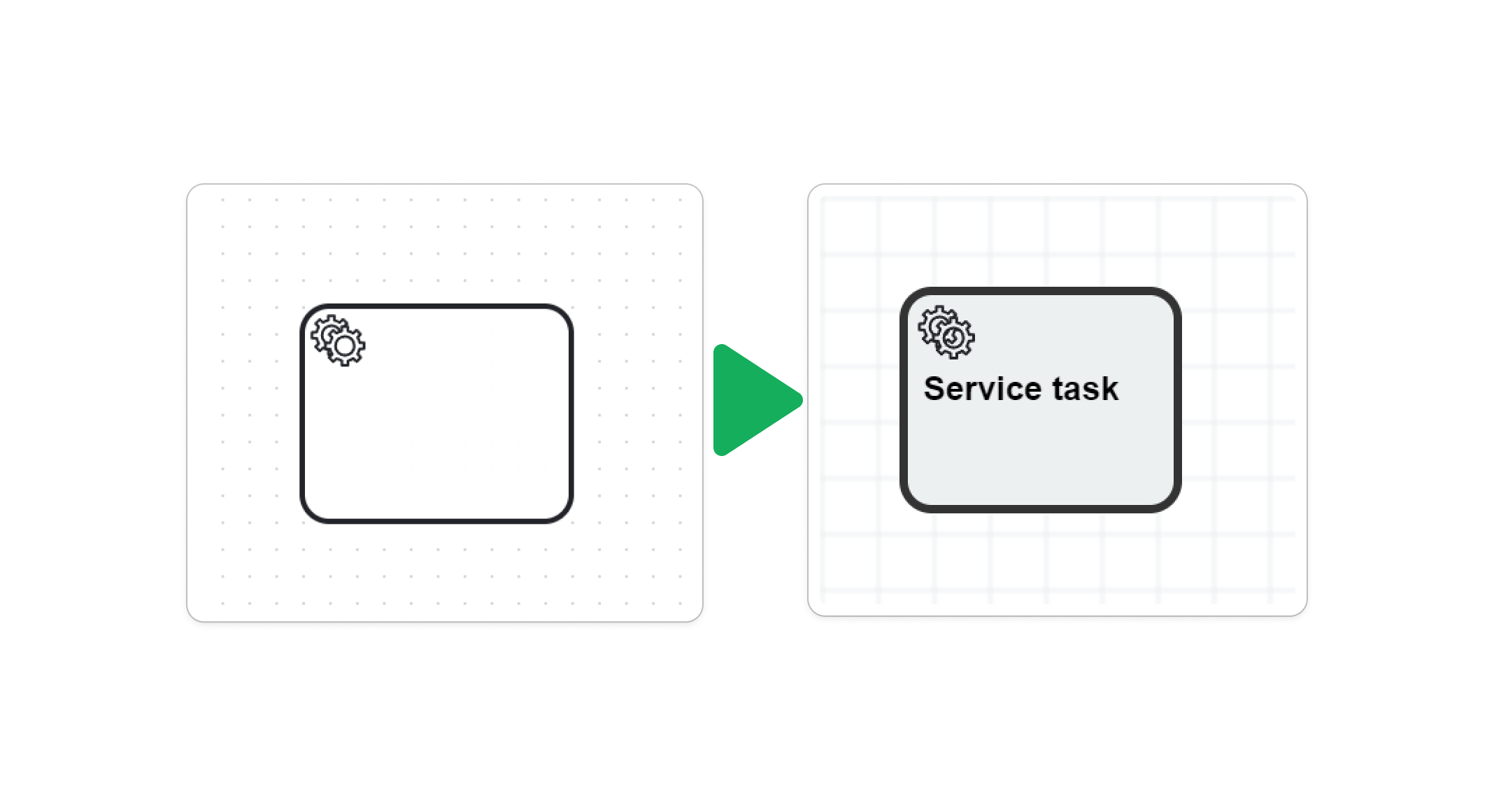
The service-task shape is retained in the Designer. Its implementation references the application actions named by the source task's supported implementation attributes.
Receive task commands
A receive task resolves messageRef against a root BPMN message definition and uses that message's name as the native command name. A missing reference produces a warning and leaves the outgoing transition without the expected command trigger. The importer does not create message broker subscriptions.
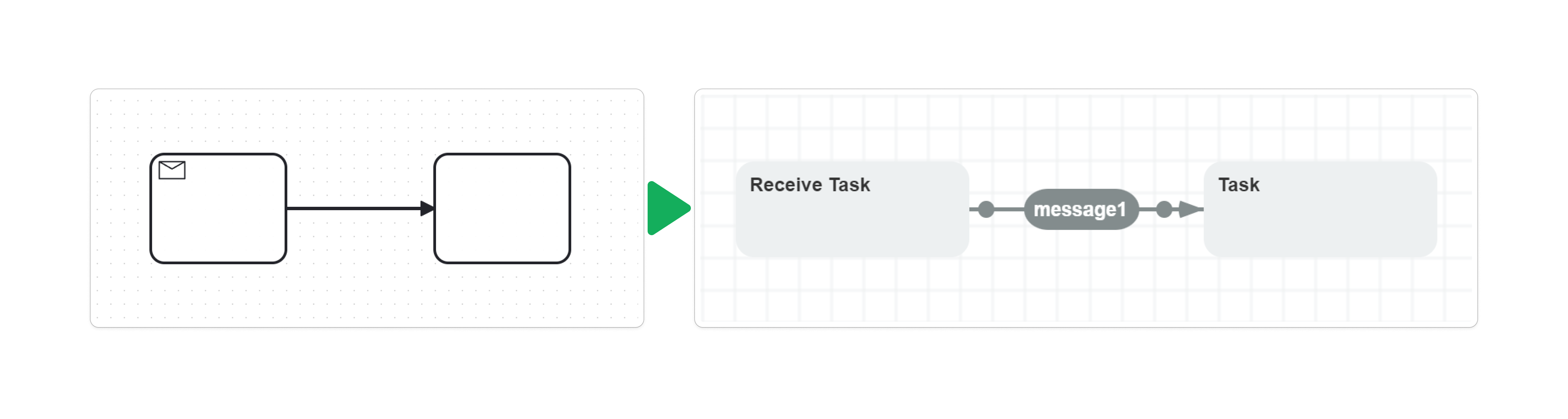
The receive-task example waits on the outgoing message1 command transition rather than on a separate message subscription inside the activity.
Convert BPMN gateways
BPMN Plugin converts gateway sequence flows into native transition routing. The gateway type determines whether those transitions receive conditions, parallel flags, or event triggers.
| BPMN gateway | Conversion behavior |
|---|---|
| Exclusive Gateway | Custom Exclusive Gateway activity when it has multiple outgoing flows; otherwise an ordinary activity. Default flow becomes Otherwise; other flows use their condition definitions. |
| Parallel Gateway | Custom Parallel Gateway activity. Multiple outgoing flows start parallel branches; multiple incoming flows finalize branches. System build steps validate and prepare the join. |
| Event-Based Gateway | Ordinary activity whose outgoing transitions receive triggers from the following intermediate catch events or receive tasks. Those following nodes are absorbed into the transitions. |
| Inclusive Gateway | Ordinary activity with partial outgoing-flow conversion: multiple outgoing flows become parallel starts, the default becomes Otherwise, and other conditions are imported. General inclusive join semantics are not implemented. |
| Complex Gateway | Ordinary activity with transitions and warnings. The BPMN activation condition is not implemented. |
Exclusive gateway conditions
For exclusive and inclusive gateway conditions, the importer requires one expression text entry. It trims whitespace and leading = characters. A value containing only letters, digits, underscores, or spaces becomes a named condition, except for true and false; other values become expressions. The application must supply any named condition implementation and make expressions valid for Workflow Engine's expression syntax. A missing condition on a non-default branching flow, or an invalid text-entry count, produces a warning and a transition without that condition.
The true and false comparison is case-sensitive. Whitespace is trimmed before leading = characters are removed, with no second whitespace trim; TRUE and = true therefore become named conditions rather than Boolean expressions.
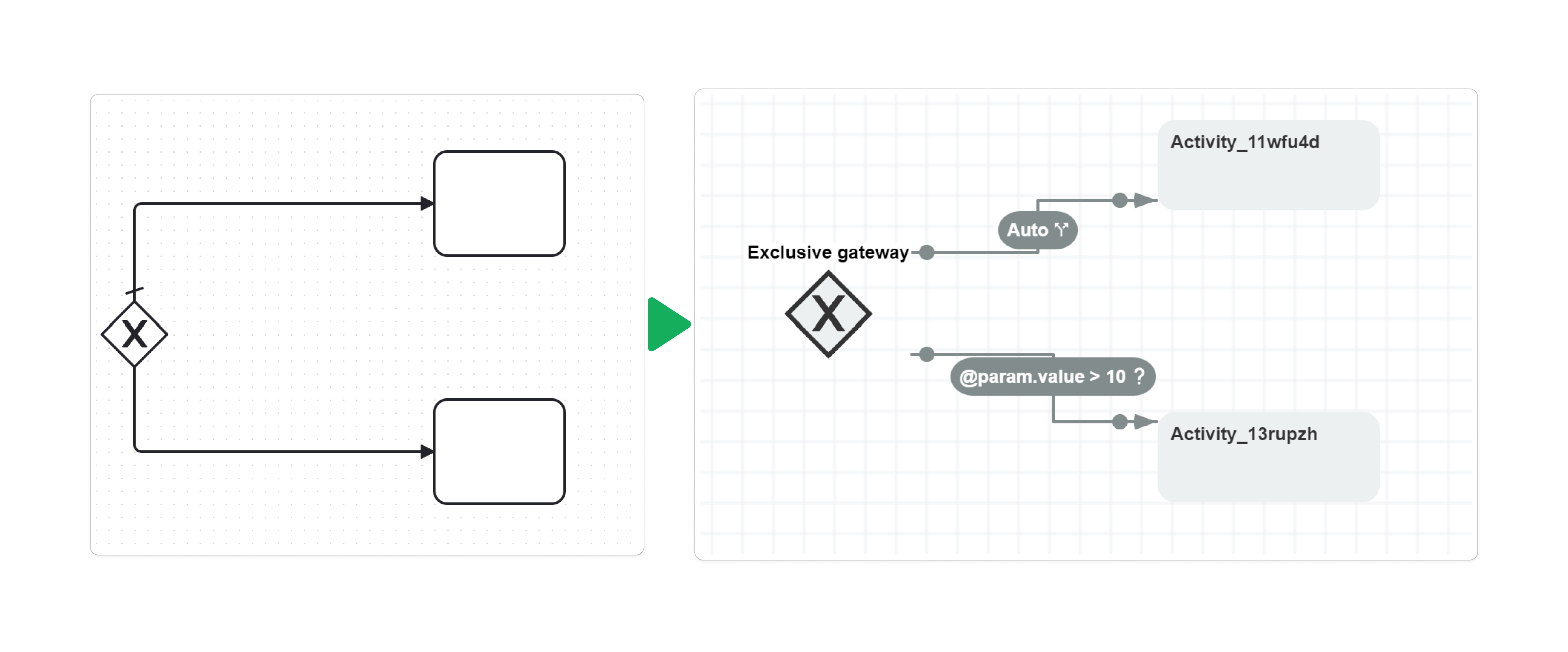
The exclusive-gateway example keeps the decision shape and places the expression and default routing on its outgoing transitions.
Inclusive gateway limits
An inclusive gateway with more than two outgoing flows receives warnings. With exactly two flows, the importer warns unless exactly one is the default and exactly one contains a condition expression. Passing that check does not add general BPMN inclusive synchronization; review the native parallel structure before using this conversion.
Event-based gateway waits
For an event-based gateway, the default converter processes only outgoing flows that lead directly to intermediate catch events or receive tasks. It connects the gateway directly to the activities after those nodes, using the nodes' outgoing sequence-flow IDs as transition names. Flows to other target types are skipped with a conversion warning.
If an intermediate catch event has missing, unsupported, or multiple event definitions, its converted transitions remain automatic instead of waiting for the intended event, and the importer records a warning.
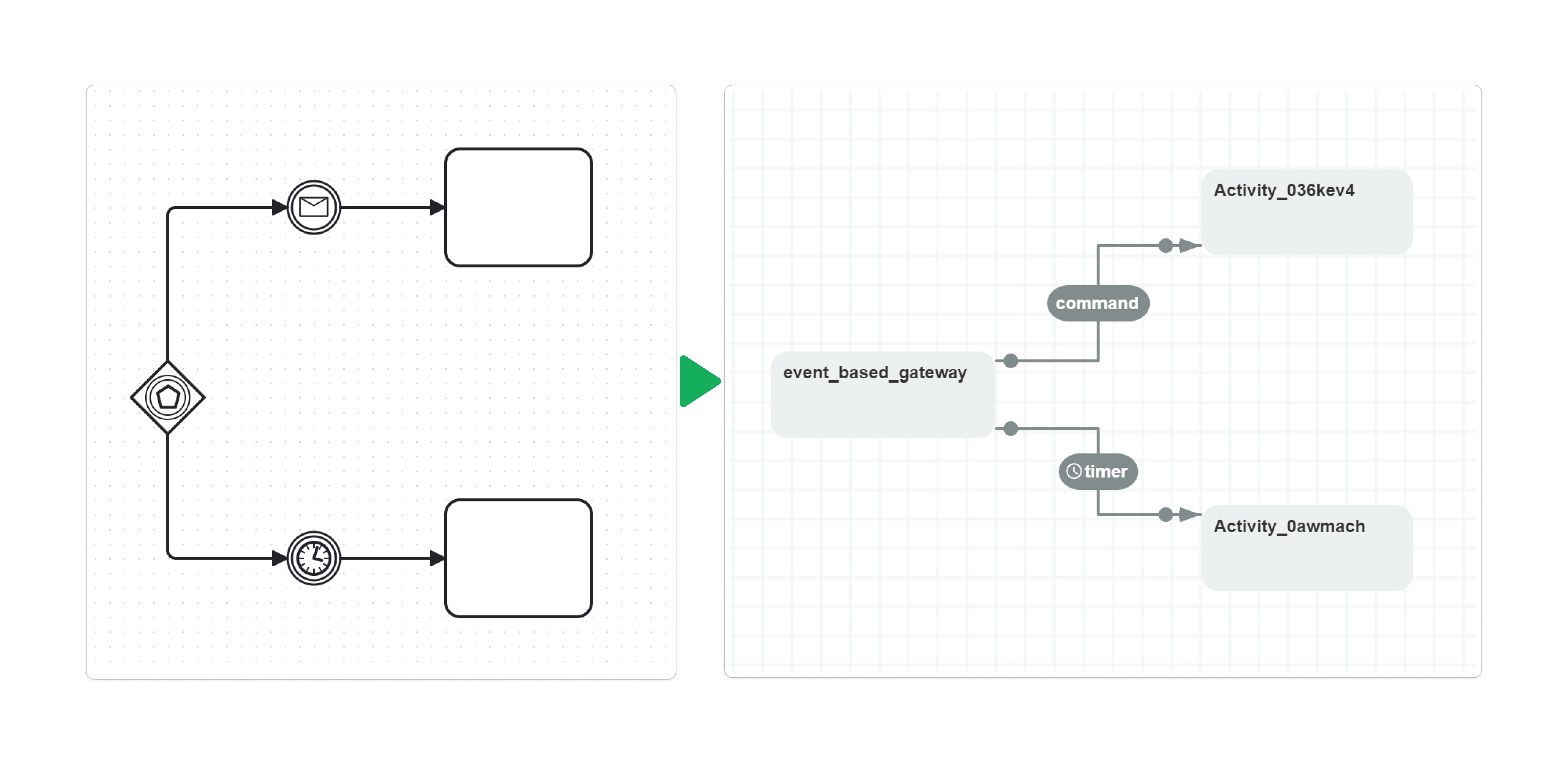
The event-based-gateway example absorbs the message and timer catch nodes into two outgoing transitions from one ordinary activity. The transitions lead directly to the activities after those catch events.
Parallel gateway branches
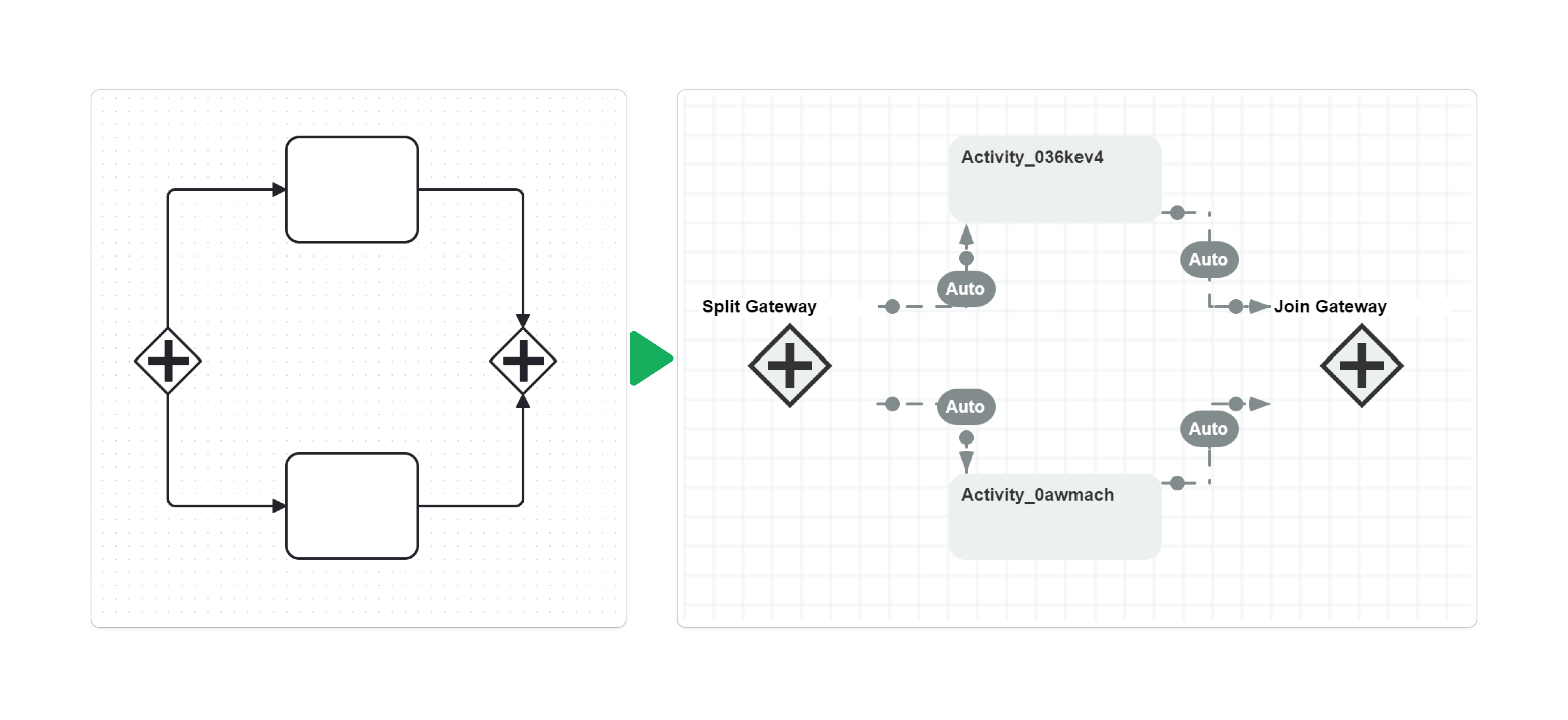
The parallel gateway diagram shows how the importer retains gateway shapes while native transitions create and merge dependent branches. A gateway that both joins and splits can be separated into join and split activities during building.
Convert catch and throw events
BPMN Plugin creates a specialized intermediate catch activity only for a single supported message or timer definition. Its outgoing transitions perform the wait. A catch event immediately following an event-based gateway is absorbed into the gateway's transitions instead of becoming another activity.
| Intermediate event | Conversion behavior |
|---|---|
| Message Catch | Message Catch Event activity with command-triggered outgoing transitions when its message reference resolves to a nonblank message name. |
| Timer Catch | Timer Catch Event activity with timer-triggered outgoing transitions when the timer definition is supported. |
| Signal Catch | Ordinary activity; signal semantics are ignored with a warning. |
| Conditional Catch | Ordinary activity; conditional-event semantics are ignored with a warning. |
| Link Catch | Ordinary activity; link-event semantics are ignored with a warning. |
| Intermediate Throw, including message or signal | Ordinary activity and transitions with warnings; the event is not thrown. |
Multiple event definitions on one catch event are unsupported and ignored with issues. An ordinary fallback activity does not wait merely because the source element was a catch event. Multiple outgoing catch-event flows are initially marked as parallel starts. For a message catch event with multiple outgoing transitions, a build step inserts a split gateway after the command wait when the activity has a valid command-name annotation, so one command execution starts the branches. If the referenced message or its name is invalid, this build step fails instead of creating the split. The build step also reads integer Designer coordinates from that message activity. A conversion without matching BPMN diagram coordinates can therefore return a definition that fails during the later split-building step.
Message catch waits
The intermediate message catch retains its event shape. With a resolved, nonblank message name, the outgoing command transition waits for the application to deliver the corresponding message as a native command.

Timer catch waits
The intermediate timer catch also retains its event shape. Its outgoing transition uses the timer derived from the event definition; the preceding automatic transition enters the waiting activity.

Convert boundary events
BPMN Plugin represents a boundary event as transitions from its attached activity to the event's target activities. The importer does not create a separate boundary-event activity. An unresolved attachment is ignored with an issue.
| Boundary event definition | Trigger on the converted transition |
|---|---|
| Message | Command trigger when the referenced BPMN message resolves. |
| Timer | Timer trigger when the timer definition is supported. |
| Signal | Automatic transition; the signal definition is ignored with an issue. |
| Escalation | Automatic transition; the escalation definition is ignored with an issue. |
| Conditional | Automatic transition; the event condition is ignored with an issue. |
| Error | Automatic transition; the BPMN error handler is not implemented. |
| Compensation | Automatic transition; compensation behavior is not implemented. |
Non-interrupting boundary events (cancelActivity="false") also produce these transitions and a warning. Supported message and timer definitions still produce their corresponding triggers; the non-interrupting BPMN semantics are not preserved. Do not treat the imported boundary transition as a handler that can interrupt an action already executing inside the attached activity. Multiple outgoing flows from the boundary event are initially marked as parallel starts; later incoming-flow updates can revise those settings.
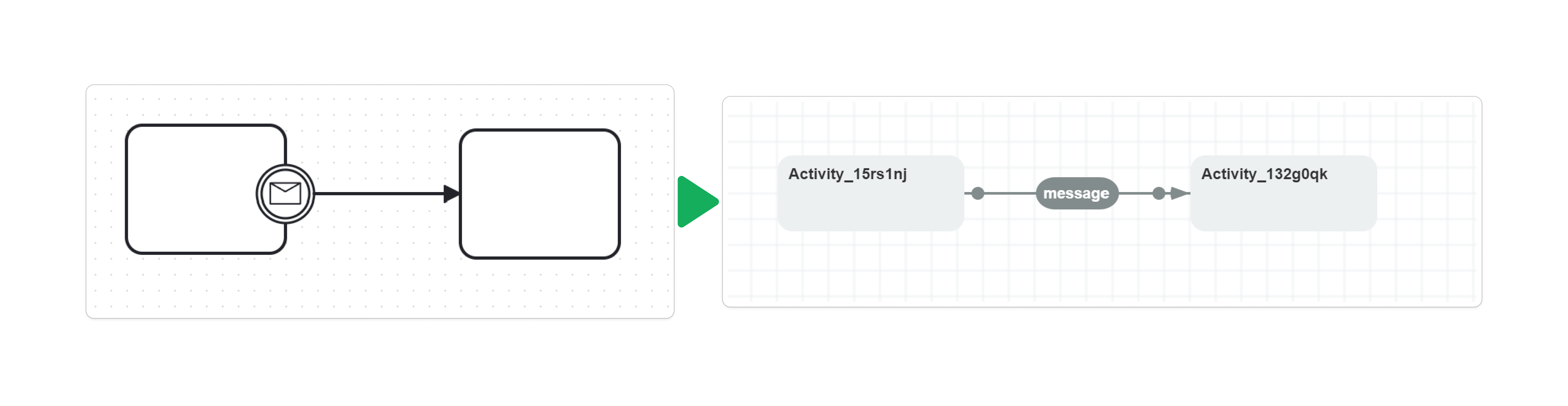
Boundary message transitions
The boundary message example becomes a command-triggered transition from the attached activity. The boundary circle itself is absent from the native scheme.
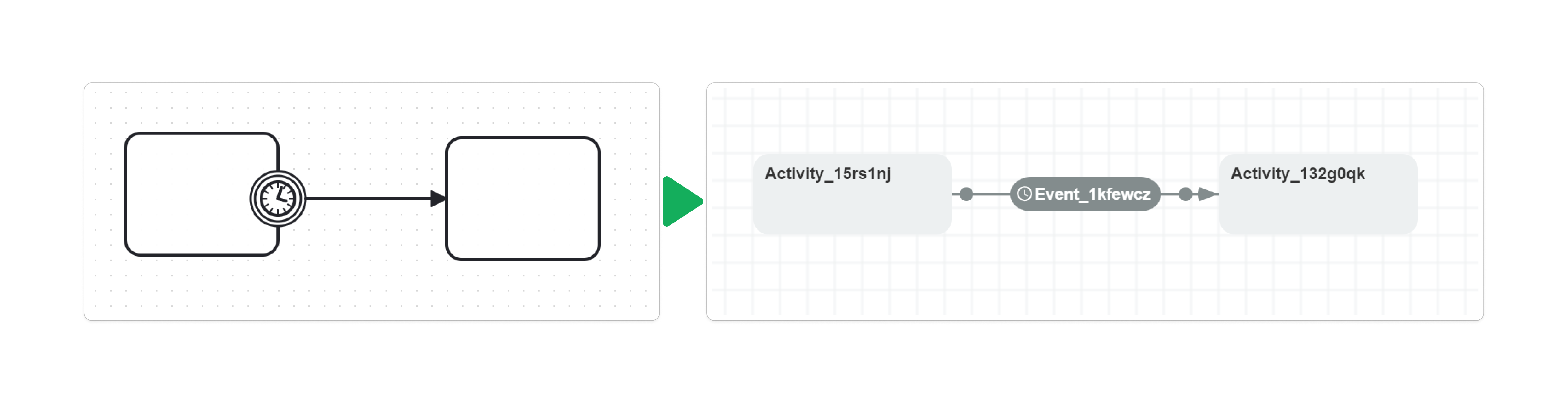
Boundary timer transitions
The boundary timer example becomes a timer-triggered transition from the attached activity. Review the resulting activity's execution and waiting behavior rather than treating the transition as a BPMN action interruption handler.
Convert start and end events
BPMN Plugin represents a start event with one native initial activity. Its outgoing transitions may wait for commands or timers, but the application must first create the process instance. A message or timer start does not create new instances automatically when an external event occurs.
| Start event | Conversion behavior |
|---|---|
| Generic | Start Event custom activity with automatic outgoing transitions. |
| Message | Initial Start Event activity and command-triggered outgoing transitions when the message resolves to a nonblank name; start-definition support is partial. |
| Timer | Initial Start Event activity and timer-triggered outgoing transitions when supported; start-definition support is partial. |
| Signal | Initial activity; signal semantics are ignored and outgoing transitions remain automatic. |
| Conditional | Initial activity; conditional-start semantics are ignored and outgoing transitions remain automatic. |
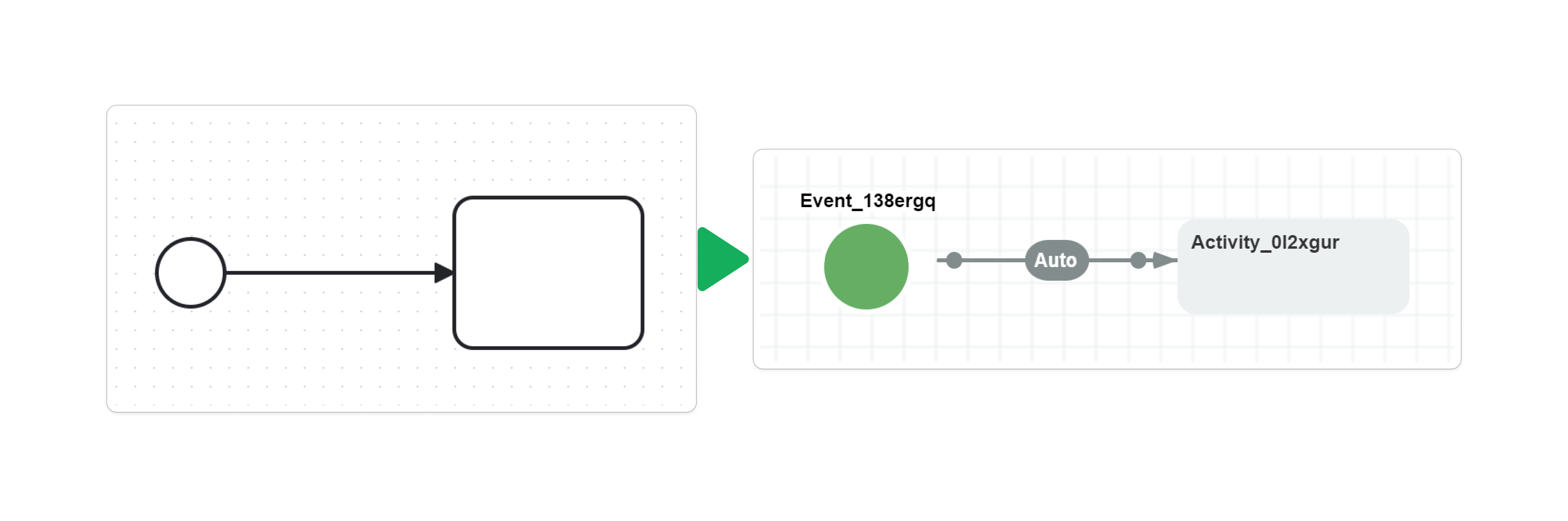
Generic start events
The generic start example becomes one initial Start Event activity with an automatic transition to the next activity.
Message start events
The message start example places a command wait after the initial activity. The host creates the process instance before delivering that command.
Timer start events
The timer start example places a timer wait after the initial activity. The timer applies to the existing instance; it does not schedule creation of additional instances.
Multiple start events
Typed start events share the initial activity and retain separate outgoing transitions. If a generic start exists, the importer uses it as the initial activity; otherwise it creates the initial activity from the first typed start. More than one generic start event is rejected with Multiple start events without event definitions are not supported. Multiple outgoing flows belonging to one start event are initially marked as parallel starts.
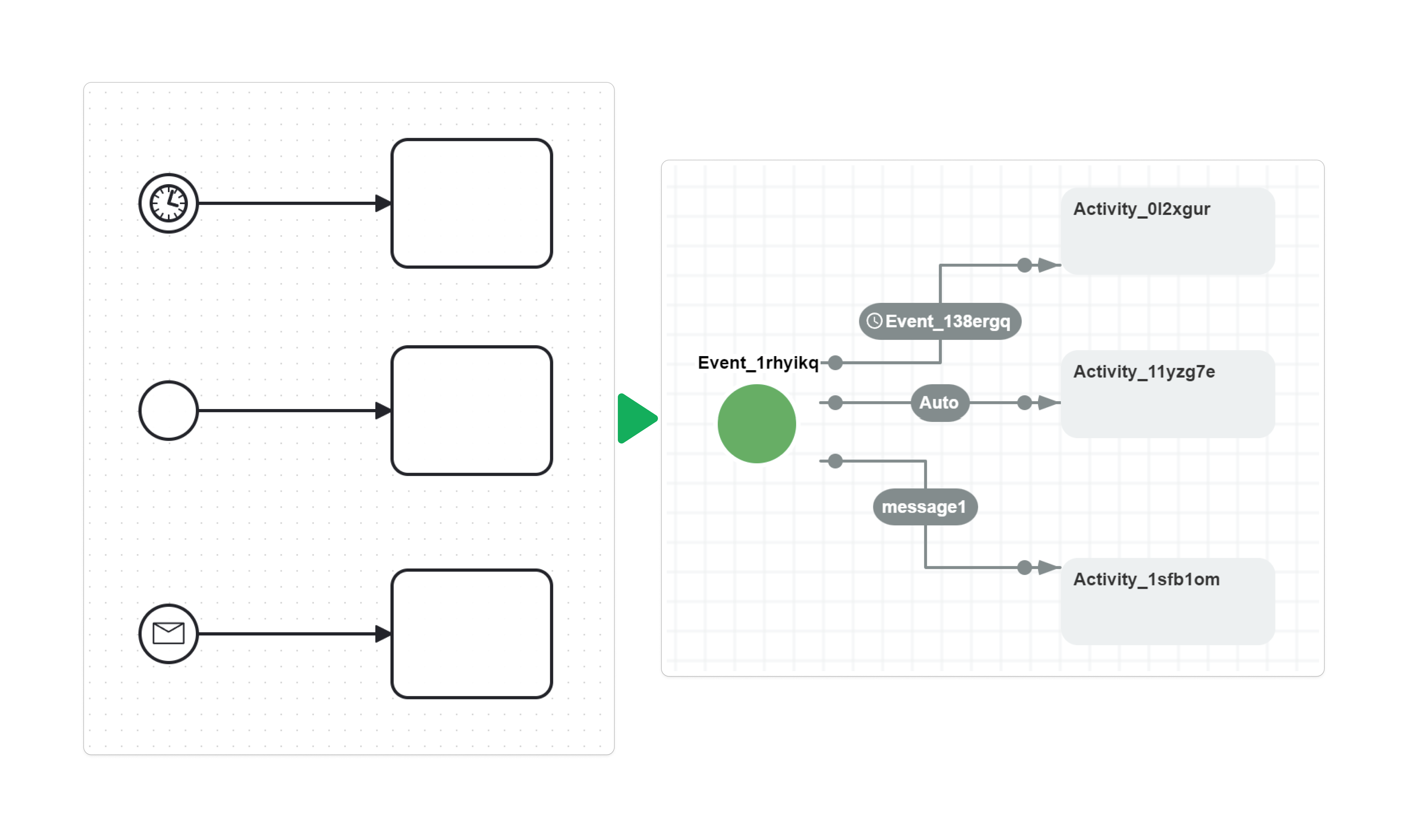
The multiple-start example contains one generic start alongside timer and message starts. It illustrates a shared initial activity with distinct outgoing triggers, not support for several generic start events.
Start-definition warnings depend on node order: a typed start visited before a generic start can defer initial activity creation without that warning. Warning presence does not change the supported trigger mapping.
End event mappings
BPMN Plugin initially marks each imported end event as a final activity. Subprocess refinement can remove or replace these final nodes to unify completion, as described below. Outgoing flows from an end event are ignored with an issue.
| End event | Conversion behavior |
|---|---|
| Generic | End Event custom activity. |
| Terminate | Terminate Event custom activity; a build step adds the asynchronous BPMNTerminate action. |
| Message | Ordinary final activity with an issue; no message is sent. |
| Escalation | Ordinary final activity with an issue; no escalation is thrown. |
| Signal | Ordinary final activity with an issue; no signal is sent. |
| Error | Ordinary final activity with an issue; no BPMN error is thrown. |
| Compensation | Ordinary final activity with an issue; compensation is not performed. |
The normal end example becomes an End Event activity reached through an automatic transition.
Terminate event behavior
Multiple end-event definitions are ignored with an issue and initially leave a final activity. A Terminate Event uses the root process tree to delete other dependent subprocess instances, rather than implementing a BPMN token-local cancellation scope. Review termination carefully when the converted scheme contains nested parallel branches.
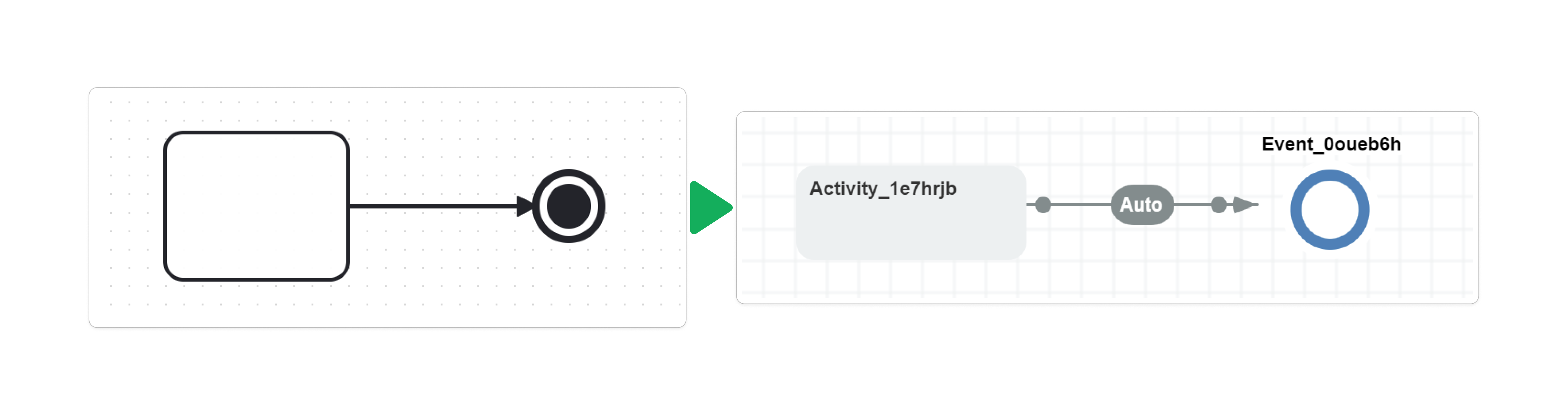
The terminate shape identifies the activity where the build step adds BPMNTerminate. The root-process-tree cleanup described above determines its effect on other parallel branches.
Interpret message and timer definitions
BPMN Plugin resolves a message reference by the BPMN message id and creates the native command from its name. Use named message definitions and supply the host integration that executes the command for the intended process. Imported commands do not acquire application-specific authorization automatically; configure rules where command restrictions are required. In the standard controller flow, retrieve the user's commands with GetAvailableCommandsAsync, which checks restrictions, then select a command, fill its parameters, and execute it with ExecuteCommandAsync for the same user. Alternatively, check restrictions during execution with ExecuteCommandWithRestrictionCheckAsync or ExecuteCommandAsync with checkRestrictions: true.
BPMN Plugin creates native timers named after the catch event ID. The same conversion rules apply to supported timer start, intermediate catch, and boundary events.
| Timer definition | Native result |
|---|---|
timeDate with a date value | Date/time timer parsed using XmlConvert.ToDateTime; DateTimeKind defaults to Local. |
timeDuration with an ISO 8601 duration | Interval timer parsed using XmlConvert.ToTimeSpan, such as PT30M. |
timeDate or timeDuration beginning with = | Timer expression after removing the leading = characters. |
timeCycle | Unsupported; a warning is recorded and the timer trigger is not added. |
| Missing or unknown timer definition | Warning; the expected timer trigger is not added. |
For expression timers, = must be the first character of the first text entry. The importer does not trim leading whitespace before testing that prefix; it removes only the leading = characters from an expression value.
For multiple text entries in a date or duration, the importer uses the first entry and records an issue. Invalid date or duration text can fail conversion. An unsupported timer can leave an automatic transition, so inspect the result before assuming that a timer-shaped activity will pause execution.
Convert subprocesses and collaboration
BPMN Plugin converts a nonempty embedded BPMN Subprocess into an Inline Activity in the parent scheme and a separate inlinable scheme containing its nested flow. The referenced scheme code uses the subprocess name, falling back to its id only when the name is absent (null). Explicitly empty or whitespace-only subprocess names are retained. Nested subprocesses are converted recursively. An empty subprocess becomes an ordinary activity with an issue.
The inlinable scheme is marked for Scheme Inlining. Activities without outgoing transitions become final activities. When several final activities exist, the importer unifies completion through an additional parallel merge and final activity, removing ordinary End Event placeholders where necessary. Save the generated inlinable schemes as well as the parent scheme so the builder can resolve the references.
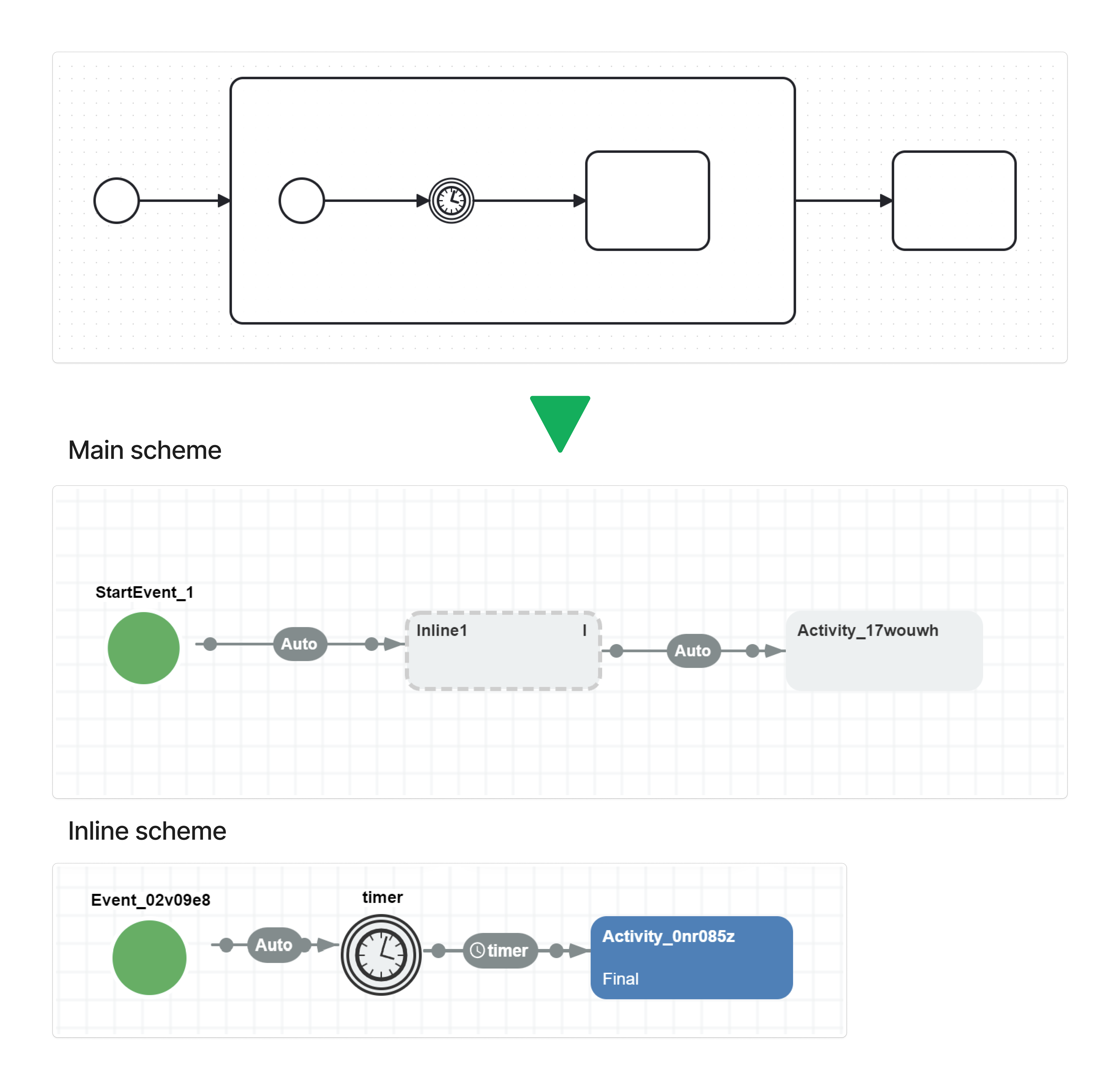
The subprocess diagram shows two stored schemes; building the parent expands the inline scheme into the parent's definition. The Inline Activity does not itself create a dependent runtime subprocess.
| BPMN collaboration element | Conversion behavior |
|---|---|
| Pool with a process | Each root BPMN process becomes a separate scheme; the Designer displays at most the selected main scheme. Open other saved schemes separately. |
| Process name | Scheme code uses the process name, falling back to its id only when the name is absent. Exact duplicate top-level names, including blank ones, select IDs. An explicit main scheme code overrides the first non-inlinable result not marked DontSave. |
| Lane | Ignored; lane membership does not become an activity group or access-control rule. |
| Call Activity | Ordinary activity with an issue; the referenced called process is not invoked automatically. |
| Artifacts, including annotations and groups | Ignored with issues rather than converted into executable activities. |
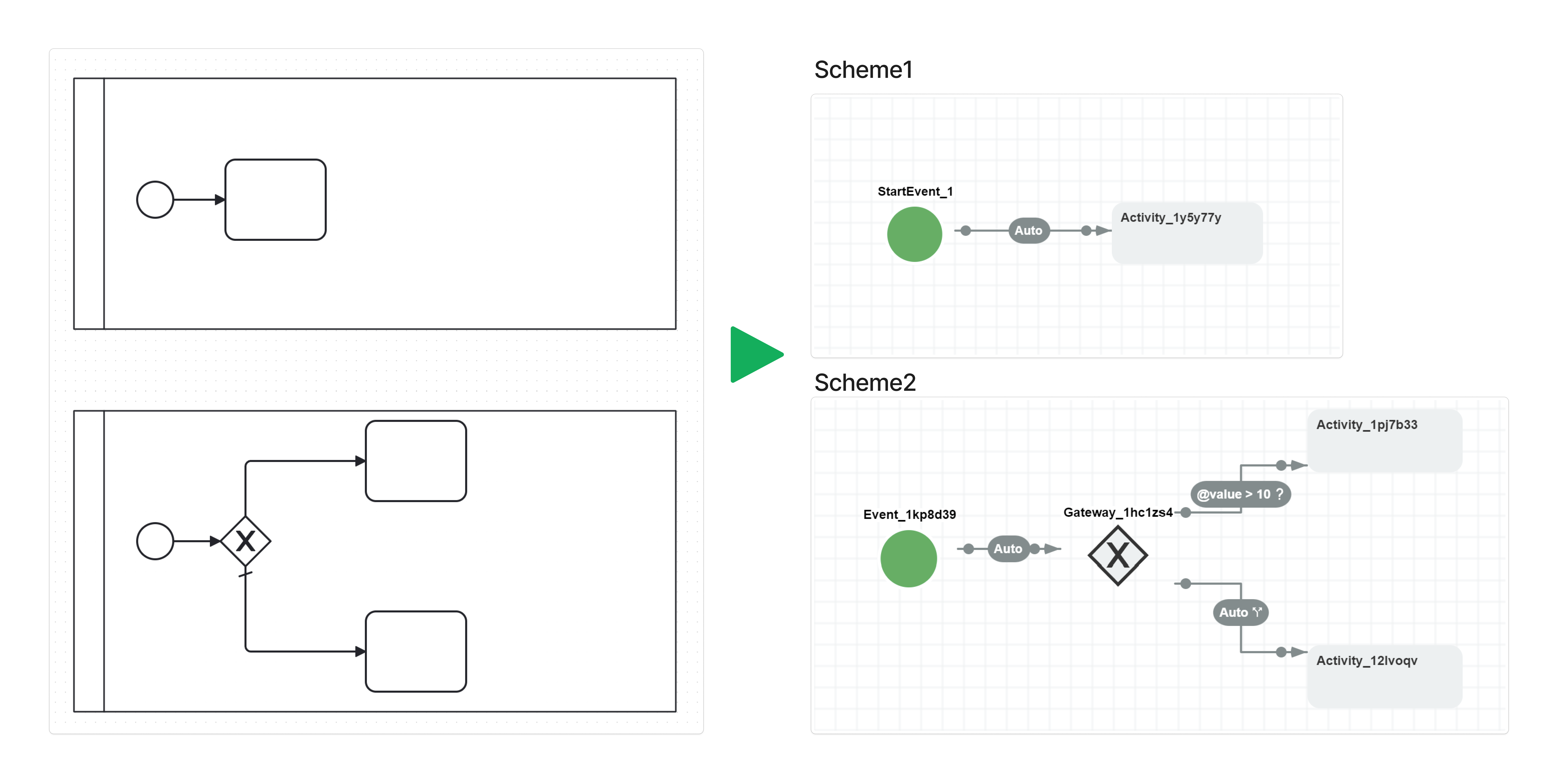
The pool example produces two separately stored schemes. Open each scheme by its own code to inspect its activities and routing in the Designer.
Pool separation does not implement interprocess message transport. Connect the resulting schemes through application code and native commands when the BPMN collaboration expects communication between participants.
Review parallel execution
BPMN Plugin makes implicit BPMN parallelism explicit through native parallel transitions. Multiple outgoing task, subprocess, call-activity, and supported catch-event flows are initially marked as branch starts. Incoming gateway updates and build steps can revise those boundaries, including changing a start into finalization at a join. The Designer depicts starts with dashed lines and finalization with dash-dot lines. Native subprocesses provide the dependent process instances behind those branches.
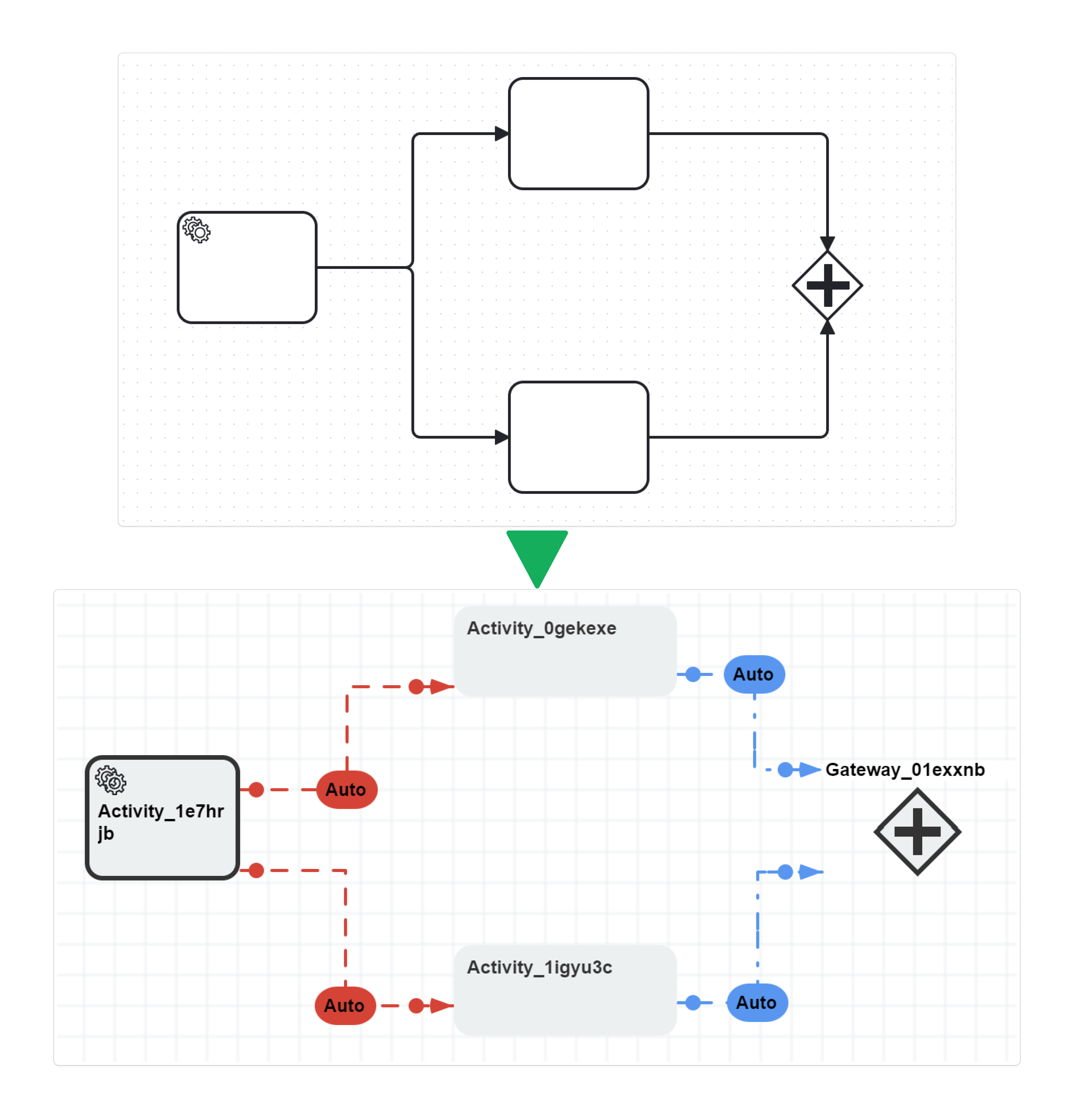
The parallel-gateway build step validates branch structure, adds merge routing when required, and uses BPMNMerge to wait until the current process has no remaining child subprocesses. Invalid fork/join structures can fail scheme building even when XML conversion returned a result. Conversion therefore needs a build-and-execution check against the application's intended branches and completion behavior.
Related import tasks
The import guide explains how BPMN Plugin saves the converted schemes and exposes conversion issues; the customization guide explains how to replace a default element mapping when the source model needs application-specific behavior.
Import BPMN Diagrams
Import, review issues, and save parent and inlinable schemes.
Customize BPMN Import
Replace node and flow visitors for your application's conventions.
Frequently asked questions
Does BPMN Plugin import user tasks with forms and assignments?
No. The default BPMN Plugin converter creates an ordinary activity and records an issue for a User Task. Configure the application's form, actor, and command behavior separately or implement a custom task visitor.
Does Workflow Engine support inclusive BPMN gateways?
BPMN Plugin partially converts inclusive gateway outgoing flows using conditions, a default branch, and native parallel starts. General inclusive gateway synchronization is not implemented; review the generated routing and import issues.
Can I import a BPMN process with multiple start events?
Typed start events can share one initial activity with separate outgoing transitions. Multiple generic start events without event definitions cause conversion to throw an exception.
Are non-interrupting boundary timers preserved during import?
BPMN Plugin imports a supported timer as a timer-triggered transition from the attached activity and records a warning. The non-interrupting BPMN semantics are not preserved.
Why does an imported BPMN timer run immediately?
An unsupported timer definition, such as timeCycle, does not add a timer trigger and can leave an automatic transition. Inspect the conversion issues and use a supported date, duration, or native timer expression.