
Authorize Commands with Directory Groups

Create an ActiveDirectoryGroup actor for the LDAP group, use that actor as an Allow restriction on the command transition, and query available commands with the directory value mapped as the user's name. The rule checks direct membership live and does not expand nested groups.
Use the ActiveDirectoryGroup rule to make a command available only to direct members of a group in Microsoft Entra Domain Services, AD DS, or a compatible LDAP directory. Add a directory-backed actor to the scheme, assign it to an Allow restriction on the command transition, and query available commands with the same user name that the LDAP source returns. The built-in presets use cn; a custom source can map another attribute.
Prerequisites:
- Configure LDAP Sources - register a source that can read the target users and groups.
- Rule - understand how actors connect rules to transition restrictions.
- Command - prepare a command-triggered transition to protect.
Create a directory actor
An actor connects a name used in transition restrictions to the ActiveDirectoryGroup rule and one directory group. In the Designer, open Actors, select Create, and set these fields:
| Field | Value |
|---|---|
| Name | DirectoryAdministrators |
| Rule | ActiveDirectoryGroup |
| Value | Select the directory group and source from autocomplete |
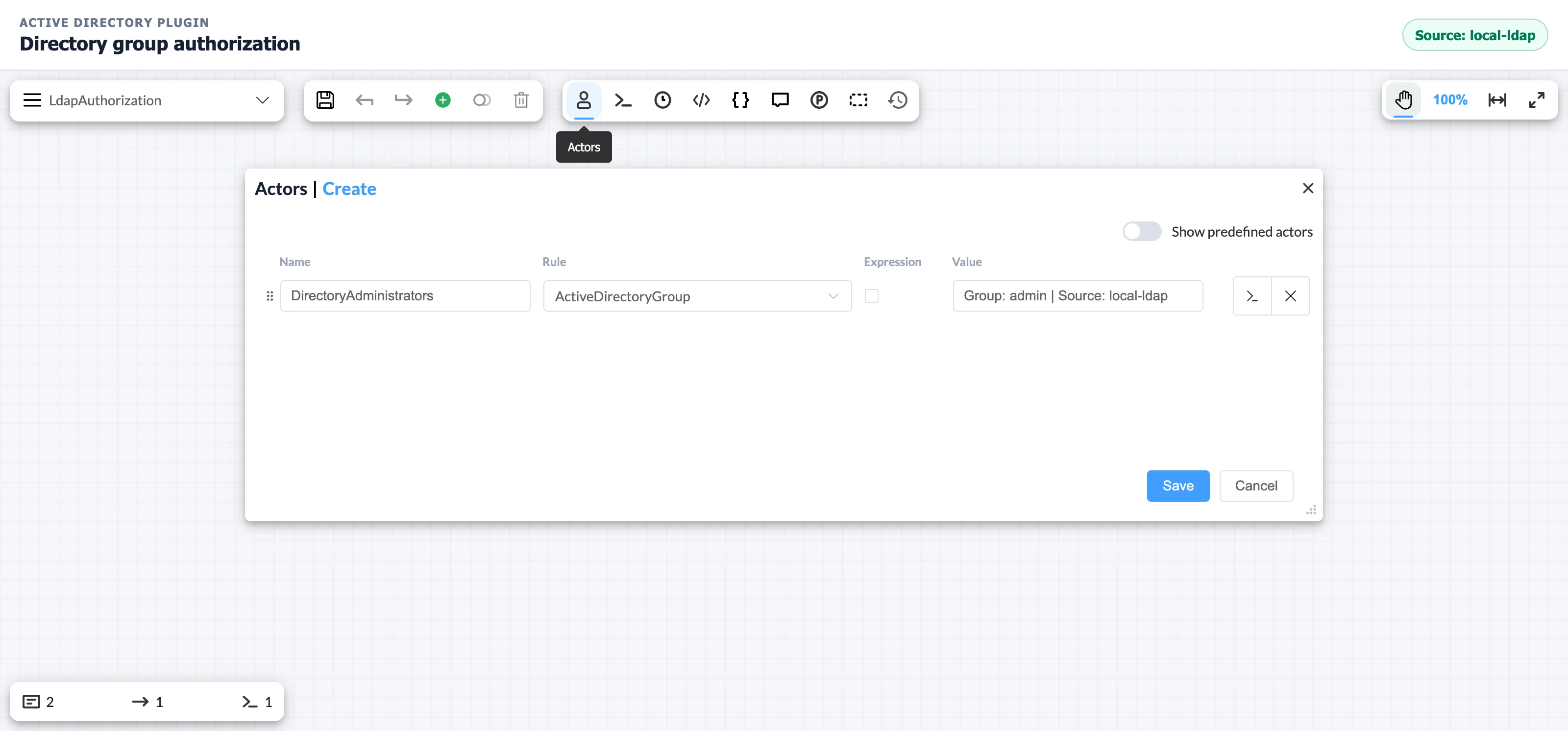
The example selects Group: admin | Source: local-ldap. Use the corresponding group and source in your environment. Choose the item from autocomplete instead of typing the value: the Designer stores the selected group and source together. If the list is empty, return to Verify the source configuration.
Restrict the command transition
A transition restriction connects the directory actor to command availability.
- Open the command-triggered transition in the Designer.
- Under Trigger, select Command and choose the command to protect.
- Under Restrictions, choose
DirectoryAdministratorsas the actor and Allow as the type. - Save the transition.
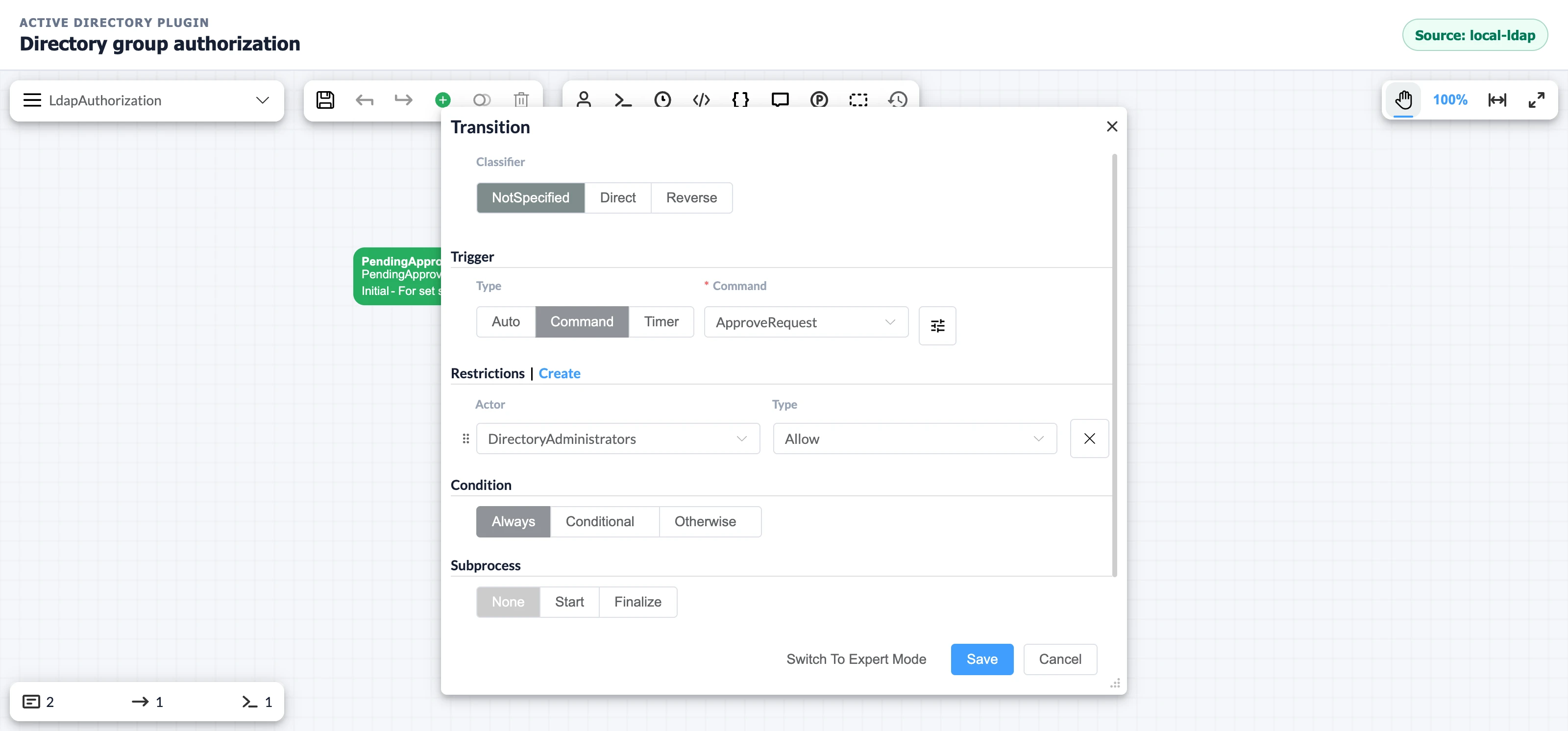
When WorkflowRuntime calculates available commands, the rule loads the selected group from the selected source and checks whether the supplied identity matches a direct group member. The GetAvailableCommandsAsync overload used below checks transition restrictions without evaluating transition conditions. Use GetAvailableCommandsWithConditionCheckAsync to also exclude commands whose transition conditions fail.
Match the workflow identity to LDAP
Pass the directory value configured as the user's name whenever the application asks WorkflowRuntime which commands the user can execute. The built-in presets use cn, so an LDAP entry with cn=Test User must be queried as Test User. If the application authenticates users by UPN, email address, object ID, or an application account ID, translate that identity first or map the corresponding LDAP attribute. Matching is exact and case-sensitive.
using OptimaJet.Workflow.Core.Runtime;public static class DirectoryCommandAuthorization{ public static async Task<bool> CanExecuteAsync( WorkflowRuntime runtime, Guid processId, string userCommonName, string commandName) { var commands = await runtime.GetAvailableCommandsAsync( processId, userCommonName); return commands.Any(command => command.CommandName == commandName); }}The call evaluates the scheme restrictions, including ActiveDirectoryGroup. CanExecuteAsync returns true only when the named command is available to the supplied directory identity. If it returns true, execute the command through the ordinary command execution API after the application performs its own authentication and request authorization.
Verify command authorization
Run the GetAvailableCommandsAsync check with at least these two identities:
| Identity used in the query | Expected result |
|---|---|
| The configured directory name of a direct member | The protected command is available |
| The configured directory name of a user outside the group | The protected command is absent |
Then change the directory membership, wait for the directory service to expose the change, and run the check again. The plugin performs another live read; it has no membership cache to clear.
Direct membership: Use a direct member for this test. The built-in providers do not recursively expand nested groups.
The plugin queries LDAP during rule evaluation. A slow or unavailable directory can delay or fail command discovery.
Troubleshoot missing commands
The ActiveDirectoryGroup rule requires the scheme value, identity mapping, and directory data to agree exactly.
| Symptom | Likely cause | Fix |
|---|---|---|
| The actor group list is empty | The group search base, filter, bind permission, or endpoint is wrong | Verify the source configuration, then reopen the group selector |
| A direct member cannot see the command | The workflow identity does not match the configured LDAP user name | Log the value passed to GetAvailableCommandsAsync and compare it with the mapped LDAP value (cn by default) |
| A nested-group member cannot see the command | The built-in providers do not expand nested groups | Add the user directly or implement a custom workflow rule |
| The actor value was entered manually | The value does not match the stored group and source selection | Select the group from autocomplete |
| Every user can see the command | The actor is missing from the transition restriction | Add an Allow restriction to the command-triggered transition |
Frequently asked questions
What identity value does ActiveDirectoryGroup expect?
Use the directory value configured as the user's name. The built-in presets use cn; a custom source can map another attribute. The comparison is exact and case-sensitive.
Does ActiveDirectoryGroup include nested group members?
No. ActiveDirectoryGroup checks member entries loaded directly from the selected group. It does not resolve users transitively through nested groups.
Does ActiveDirectoryGroup cache membership?
No. ActiveDirectoryGroup queries the directory for each rule evaluation. A later command query can observe a membership change as soon as the LDAP endpoint returns it.
Can the same scheme use groups from several directories?
Yes. Create actors whose values select different source names. Each ActiveDirectoryGroup actor stores both its group and source in the Group: ... | Source: ... value.