
Active Directory Plugin Overview

ActiveDirectoryPlugin connects WorkflowRuntime to Microsoft Entra ID through Microsoft Entra Domain Services, to AD DS, or to a compatible LDAP directory. It reads direct group membership live for the ActiveDirectoryGroup rule and exposes synchronous actions and conditions for user and group operations. The built-in implementations do not authenticate application users, call Microsoft Graph, cache directory data, or expose plugin-specific Web API routes.
ActiveDirectoryPlugin connects WorkflowRuntime to an LDAP directory so a workflow can authorize commands with directory groups and run directory management operations. For a Microsoft Entra ID integration, the plugin queries Microsoft Entra Domain Services over LDAP or LDAPS. It can also query AD DS or another compatible LDAP server.
Follow the integration path
Active Directory Plugin queries the configured directory when WorkflowRuntime resolves a directory actor, action, or condition. It does not import users or groups into Workflow Engine persistence.
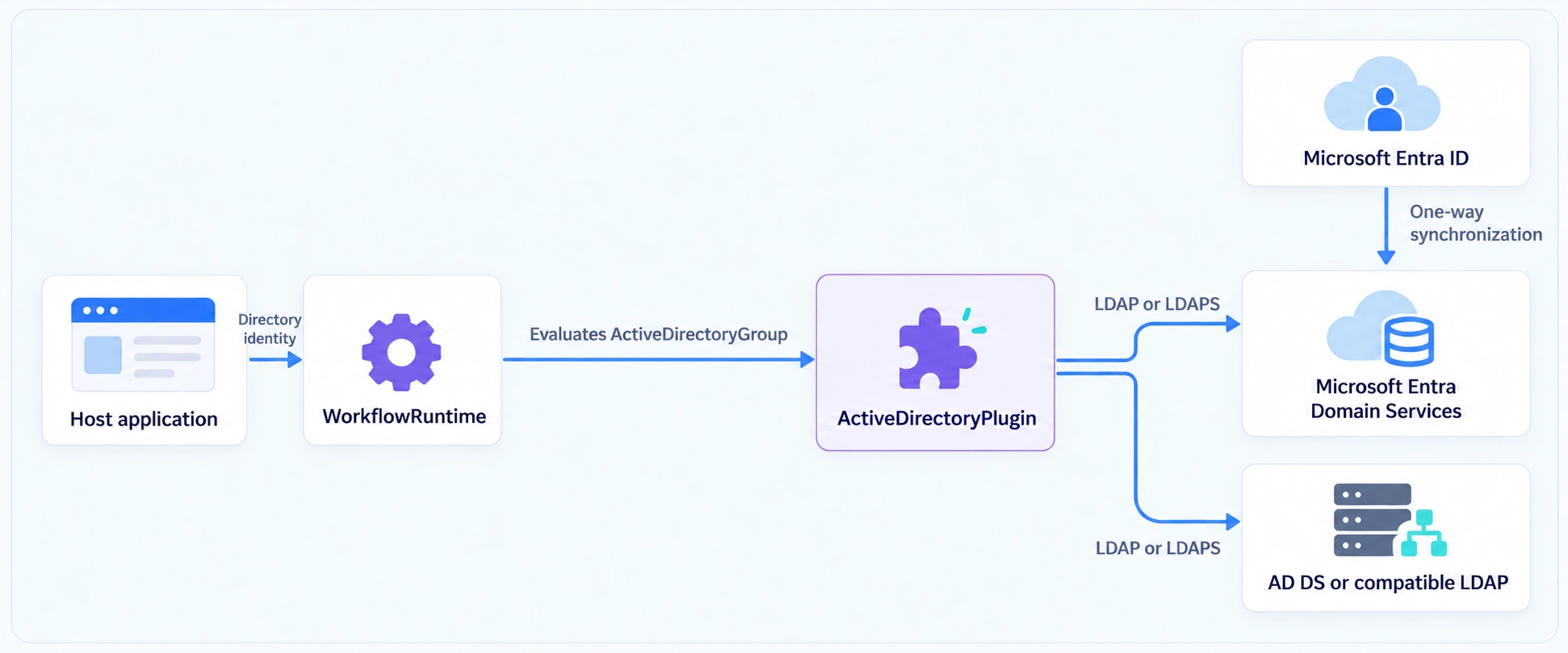
Microsoft Entra Domain Services synchronizes directory objects one way from Microsoft Entra ID and exposes the LDAP or LDAPS endpoint used by Active Directory Plugin. See Microsoft's LDAP architecture.
Understand the capabilities
ActiveDirectoryPlugin exposes these integration points:
- The ActiveDirectoryGroup rule authorizes commands by checking direct membership in the selected directory group.
- Plugin actions create or delete users and groups and change group membership. Conditions query current directory state. The management guide documents each operation.
- Designer parameter-format and autocomplete providers add source and group controls to plugin parameters. Registered actions can also appear as generated custom activity types.
- Application code calls IActiveDirectoryMethods through the ActiveDirectoryMethods field to use the configured provider directly.
Understand the plugin boundaries
Active Directory Plugin fits applications that authenticate users separately and use directory groups for workflow authorization. The host application passes the directory user name as the current Workflow Engine identity, and the plugin uses that value to check direct group membership. The authorization guide explains how to map the workflow identity to a directory user.
The built-in plugin does not provide application login, token validation, password validation, SSO, Microsoft Graph access, nested-group expansion, or manager-reporting hierarchy. Implement those application concerns separately. An IActiveDirectoryMethods implementation can wrap or route the built-in providers, subject to the public-model limitation described in the management guide.
The plugin reads directory data on demand and does not retain connections, cache entries, or a persistent copy. It has no plugin-specific Workflow Engine Web API routes. Application code registers and uses the plugin through .NET, while ordinary Workflow Engine command endpoints can still trigger schemes that contain its rules or actions.
Advanced note - synchronous directory access: The built-in providers expose synchronous LDAP operations without plugin-level retry, timeout, or cancellation settings. Account for directory response time when a rule is evaluated as part of
GetAvailableCommandsAsync.
Compare the LDAP implementations
ActiveDirectoryPlugin uses NovellLdap by default. Both built-in implementations expose the same plugin rule, actions, conditions, and models, but some connection and lookup behavior differs.
| Behavior | NovellLdap | DirectoryServices |
|---|---|---|
| Platform and library | Cross-platform, Novell.Directory.Ldap.NETStandard | Windows, System.DirectoryServices |
No SetAuth call | Binds with unset credentials, which requires an LDAP server that permits that bind | Passes unset credentials to ADSI, which uses the Windows caller's security context |
| Name-based reads | Searches below the configured base for the derived common-name value | Binds to the exact DN constructed directly below the configured base |
| Group attribute initializers | Applies them during group creation | Does not apply them during group creation |
Both implementations construct create and write-operation DNs directly below the configured user or group base. For consistent behavior, place objects managed by the plugin directly in those containers. Both implementations apply user attribute initializers. The default group presets contain no group initializers, so that creation difference appears only with custom configuration. The configuration guide explains the lookup boundary, and the management guide records the initializer difference as an advanced note.
Control plugin scope and availability
Configure directory sources through an ActiveDirectoryPlugin constructor, then register the instance with WithPlugin. Pass scheme codes to WithPlugin to make the plugin rule, actions, conditions, parameter formats, and autocomplete available only to those schemes. PluginSettings does not configure directory sources.
Generated custom activity types are runtime-wide and are not restricted by the scheme list. Setting Disabled to true makes the plugin rule, actions, conditions, and Designer helpers unavailable and prevents directory actions from running. Setting it back to false restores those providers.
Known limitation - custom activity registration: If
Disabledis alreadytruewhenWithPluginruns, generated custom activity types are not created. Re-enabling the plugin restores its providers but does not create the missing activity types. See generated custom activities.
See also
Configure LDAP Sources
ActiveDirectorySource connects ActiveDirectoryPlugin to an LDAP or LDAPS endpoint.
Authorize Commands with Directory Groups
ActiveDirectoryGroup connects direct group membership to command transition restrictions.
Manage Directory Users and Groups
Plugin actions and IActiveDirectoryMethods perform directory operations.
Frequently asked questions
Does Active Directory Plugin call Microsoft Graph?
No. The built-in Active Directory Plugin implementations call LDAP endpoints. Microsoft Entra ID integration uses the LDAP endpoint supplied by Microsoft Entra Domain Services.
Does Active Directory Plugin copy directory users into Workflow Engine?
No. Active Directory Plugin reads directory entries live and keeps no plugin-owned user or group store. A rule evaluation reflects the directory response returned for that call.
Does Active Directory Plugin import directory groups as Workflow Engine roles?
No. Designer autocomplete reads groups live and an actor stores a group-and-source reference in the workflow scheme. The plugin does not create Workflow Engine roles or copy directory memberships into Workflow Engine persistence.
Does Active Directory Plugin resolve nested groups?
No. Active Directory Plugin compares the workflow identity with member entries loaded directly from the selected group. It does not expand users transitively through nested groups.
Can Active Directory Plugin route work through an organization chart?
No. Active Directory Plugin resolves users and direct groups, but it does not interpret manager or reporting relationships. A custom rule provider must implement organization hierarchy rules.