
Configure LDAP Sources

Configure one ActiveDirectorySource for each LDAP endpoint, give every source a unique name, and set both its UsersSource and GroupSource. For Microsoft Entra ID, connect to Microsoft Entra Domain Services over LDAPS and use explicit search base DNs. Register ActiveDirectoryPlugin before WorkflowRuntime.StartAsync.
The worked example uses Microsoft Entra Domain Services. For AD DS or another compatible LDAP server, keep the same source structure and replace the endpoint, schema presets, and search base DNs.
Prerequisites:
- Active Directory Plugin overview - confirm that the LDAP integration boundary fits the application.
- Workflow Runtime - configure the builder, persistence provider, and runtime services.
- A license that includes the Active Directory feature.
- A reachable LDAP endpoint and its directory schema and search base DNs.
- A bind identity with the required read or write permissions when the server does not permit the required access without explicit credentials.
Install the plugin package
The WorkflowEngine.NETCore-ActiveDirectoryPlugin package supplies ActiveDirectoryPlugin, ActiveDirectorySource, and both built-in LDAP implementations.
dotnet add package WorkflowEngine.NETCore-ActiveDirectoryPluginThe package namespace is OptimaJet.Workflow.Plugins.ActiveDirectoryPlugin.
Configure Microsoft Entra Domain Services
ActiveDirectorySource combines connection settings with a user search definition and a group search definition. SetUsersSource(...) and SetGroupsSource(...) configure those search mappings. For Microsoft Entra ID, enable Microsoft Entra Domain Services and secure LDAP first, then use the managed domain's LDAPS DNS name and port 636. Microsoft's LDAPS tutorial covers the certificate, networking, and managed-domain prerequisites.
Replace the example host, DNs, and bind identity with values from the managed domain. Supply the password from the application's secret provider.
using OptimaJet.Workflow.Core.Runtime;using OptimaJet.Workflow.Plugins.ActiveDirectoryPlugin;public static class ActiveDirectoryRegistration{ public static WorkflowRuntime AddEntraDirectory( this WorkflowRuntime runtime, string bindPassword) { const string domainDn = "DC=aaddscontoso,DC=com"; const string directoryDn = "OU=AADDC Users,DC=aaddscontoso,DC=com"; var source = new ActiveDirectorySource( "entra-domain-services", "ldaps.aaddscontoso.com", 636, isSecureConnection: true) .SetAuth( "CN=Workflow Reader,OU=AADDC Users," + domainDn, bindPassword) .SetUsersSource(UsersSource.ADUserDn(directoryDn)) .SetGroupsSource(GroupSource.ADGroupDn(directoryDn)); return runtime.WithPlugin(new ActiveDirectoryPlugin(source)); }}The bind identity must be synchronized to the managed domain and have Kerberos and NTLM password hashes. A user created in Microsoft Entra ID is not synchronized to Domain Services until the user changes their password. Confirm that the bind account is in the synchronization scope, change its password when required, and wait for synchronization before testing LDAP authentication. See Microsoft's credential synchronization behavior.
The example points both search bases to the synchronized OU=AADDC Users container. Use this source for authorization reads. To create or manage locally owned objects, configure another source whose search bases point to a writable custom OU. See Manage Directory Users and Groups.
Set the source connection
ActiveDirectorySource stores connection and bind settings for one endpoint. Every configured source must also receive both a UsersSource and a GroupSource; accessing either property before setting it throws an exception.
| Member or method | Default | Effect |
|---|---|---|
Name | Required | Identifies the source in Designer values and runtime calls |
Host | Required | Sets the LDAP server DNS name or address |
Port | Required | Sets the LDAP port, commonly 636 for LDAPS |
IsSecureConnection | false | Enables the built-in client's secure LDAP mode |
User, Password | null | Supply the credential values passed to the selected directory client |
SetAuth(user, password) | Not called | Stores the bind identity and password passed to the selected directory client |
SetUsersSource(...) | Not set | Defines where and how users are read and created |
SetGroupsSource(...) | Not set | Defines where and how groups are read and created |
Choose the LDAP implementation
LdapImplementation is selected when ActiveDirectoryPlugin is created. NovellLdap is the cross-platform default. Use DirectoryServices only for a Windows-hosted application that specifically requires System.DirectoryServices. All sources in one plugin instance use the same implementation. See Compare the LDAP implementations for differences in bind and lookup behavior.
Protect credentials and network access
SetAuth stores the credential strings on the in-memory source object. The plugin does not encrypt or persist that configuration. Keep the bind password outside source code, load it from the host application's secret provider, and do not log or serialize the source object. Grant the bind identity only the directory permissions required by the selected operations.
Use LDAPS to protect bind credentials and directory traffic. The application host must trust the issuing certificate authority, and the endpoint hostname must match the certificate. Keep the LDAP endpoint on a private network when possible. If Microsoft Entra Domain Services secure LDAP is exposed over the public internet, restrict inbound TCP port 636 to known source IP addresses with network security group or firewall rules.
Configure user and group searches
UsersSource and GroupSource map the directory schema to the plugin models and define the bases used for reads and writes.
Use explicit search base DNs
Prefer the explicit DN factory methods so the configured search location is visible in code.
| Factory | Search base | Schema defaults |
|---|---|---|
UsersSource.ADUserDn(usersDn) | Uses usersDn exactly | cn, memberOf, object classes user and person |
GroupSource.ADGroupDn(groupsDn) | Uses groupsDn exactly | Filter (objectClass=group), cn, member |
UsersSource.LDAPUserDn(usersDn) | Uses usersDn exactly | cn, memberOf, object classes inetOrgPerson and person |
GroupSource.LDAPGroupDn(groupsDn) | Uses groupsDn exactly | Filter (objectClass=groupOfNames), cn, member |
The base-DN convenience methods add fixed containers. UsersSource.ADBaseDn(baseDn) searches CN=Users, while GroupSource.ADBaseDn(baseDn) searches CN=Builtin. UsersSource.LDAPBaseDn(baseDn) adds ou=users, and GroupSource.LDAPBaseDn(baseDn) adds ou=roles. Use the explicit methods when the directory stores objects elsewhere, including OU=AADDC Users in Microsoft Entra Domain Services.
The generic LDAP user preset also initializes sn from the requested user name during creation. The AD user preset defines no default attribute initializer.
Map a custom schema
For a custom schema, construct UsersSource or GroupSource directly and configure these members:
| Configuration | Purpose |
|---|---|
SearchBaseDn | Sets the root for supported subtree searches and the parent DN used for created objects and constructed write-operation DNs |
CommonNameAttribute | Supplies the attribute mapped to the plugin object's Name |
ObjectClasses | Supplies object classes written when a user or group is created |
UsersSource.MemberOfAttribute | Names the user attribute that contains group DNs |
UsersSource.LoadGroupMethod | Chooses how the provider populates ActiveDirectoryUser.Groups |
GroupSource.SearchFilter | Filters group enumeration, including Designer autocomplete |
GroupSource.MemberAttribute | Names the group attribute that contains member DNs |
Attributes | Loads extra attributes and adds optional fields to Designer create operations |
AttributeInitializers | Calculates user attributes during creation; NovellLdap also applies group initializers, while DirectoryServices does not |
When the plugin loads a user, it can build the user's group list in two ways:
- The AD preset reads the groups listed in the user's
memberOfattribute. - The generic LDAP preset searches the configured groups and checks their direct members for that user.
This choice affects only the group list returned with a user. It does not change command authorization: the ActiveDirectoryGroup rule always checks the direct members of the selected group.
Understand lookup and write locations
Both providers create users and groups directly below their configured SearchBaseDn and construct DNs there for write operations. DirectoryServices also resolves name-based user and group operations by binding to that exact constructed DN. NovellLdap searches below the configured base for name-based reads, but its writes still target the constructed DN. Keep objects that the plugin manages directly below the corresponding base when behavior must be consistent across providers.
Add more than one source
ActiveDirectoryPlugin accepts a List<ActiveDirectorySource>. Each source name must be unique because runtime and Designer lookups use that name as the key.
using System.Collections.Generic;using OptimaJet.Workflow.Core.Runtime;using OptimaJet.Workflow.Plugins.ActiveDirectoryPlugin;public static class MultipleDirectoryRegistration{ public static WorkflowRuntime AddDirectories( this WorkflowRuntime runtime, ActiveDirectorySource entraSource, ActiveDirectorySource partnerLdapSource) { var sources = new List<ActiveDirectorySource> { entraSource, partnerLdapSource }; return runtime.WithPlugin( new ActiveDirectoryPlugin( sources, LdapImplementation.NovellLdap)); }}Verify the source configuration
Open the Designer group selector and choose the configured source. Confirm that a known group appears in autocomplete. This verifies the endpoint, bind credentials, and group search settings.
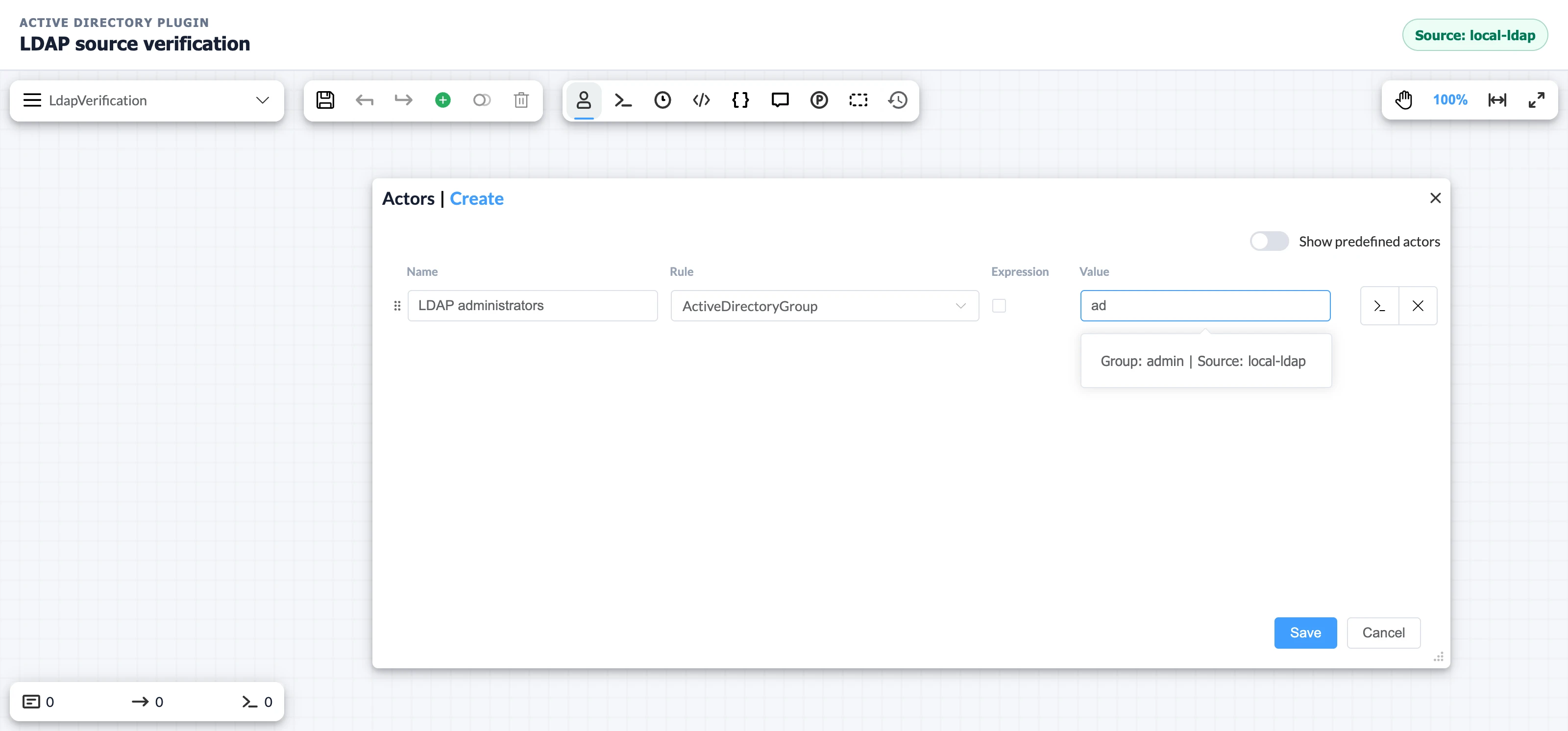
Group discovery does not verify user lookup, membership matching, or write access. Follow Authorize Commands with Directory Groups to verify authorization, or Manage Directory Users and Groups to test a writable source.
Troubleshoot source configuration
ActiveDirectorySource failures usually come from endpoint security, a search base that does not contain the expected objects, or schema defaults that do not match the directory.
| Symptom | Likely cause | Fix |
|---|---|---|
| TLS connection fails | The certificate is untrusted, expired, or does not match the LDAPS hostname | Install the required CA chain and use the certificate's DNS name |
| Bind fails | The bind identity format, password, or network access is wrong | Test the same identity against the endpoint and confirm firewall rules |
| No groups appear, or a named user is not found | The search base, common-name mapping, or group filter does not match the directory | Use explicit DNs and inspect the directory schema before changing preset fields |
| Users load without groups | The directory does not populate memberOf as expected | Set LoadGroupMethod to UseGroupSearch and verify the group member attribute |
| Registration reports a duplicate key | Two sources have the same Name | Give every ActiveDirectorySource a unique name |
Frequently asked questions
Which LDAP implementation should I use on Linux?
Use LdapImplementation.NovellLdap. It is the Active Directory Plugin default and works across supported .NET platforms. See Choose the LDAP implementation for the Windows alternative.
Should I use ADBaseDn for Microsoft Entra Domain Services?
Usually no. Use ADUserDn and ADGroupDn with the actual managed-domain OUs, as described in Use explicit search base DNs.
Can Active Directory Plugin use an anonymous LDAP bind?
With NovellLdap, omitting SetAuth passes unset credentials to the LDAP bind, so the server must permit that bind and access to every required attribute. DirectoryServices does not request an anonymous ADSI bind; with unset credentials, it uses the Windows caller's security context. IsAnonymous is changed only by SetAuth and does not change either provider's bind options. Call SetAuth when the application needs explicit and consistent credentials.
Can different sources use different LDAP implementations?
Not within one Active Directory Plugin instance. Its source-list constructor selects one LdapImplementation for the whole list. If one runtime must combine different directory backends, provide an IActiveDirectoryMethods implementation that delegates each source to the appropriate built-in provider. See the public-model limitation in the management guide.